
Mar 21, 2026
A complete guide to USGA post scores. Learn how to manage GHIN uploads, troubleshoot errors, and streamline your entire tournament score posting process.

For any tournament organizer, getting scores posted to the USGA is the final piece of the puzzle. It's not just about typing in numbers; it's about closing out the event correctly and protecting the integrity of the handicap system. With the World Handicap System (WHS) now updating daily, getting this right has never been more important.
Why Posting Scores Accurately Is No Longer Optional

Accurate score posting is the foundation of a handicap system everyone can trust. The days of dropping a scorecard in a box and waiting weeks for an update are long gone. Today's system is live, with a player's Handicap Index® changing overnight. This puts the responsibility squarely on club officials and tournament staff to get scores in quickly and correctly.
For players, this means their handicap is a true reflection of their current game, giving them confidence that every competition is fair. Whether it's the club championship or a Saturday morning game, they know they're playing on a level field.
For your staff, getting this right is a sign of a well-run tournament. It cleans up the post-round chaos, cuts down on mistakes, and just makes for a better player experience. When golfers see their scores posted fast, it tells them your facility knows what it's doing.
The Impact of the World Handicap System
The World Handicap System (WHS) brought millions of golfers under one set of rules, and its biggest feature is the daily handicap revision. The score a player shoots today directly impacts the handicap they play with tomorrow.
This whole system hinges on a constant flow of good data. If scores are missing or entered wrong, the entire system starts to break down.
Skewed Handicaps: Missing scores mean a player's Handicap Index won't reflect their actual ability.
Unfair Competition: Bad handicaps ruin the fun of any net event. It’s that simple.
Lost Player Trust: If players think the system is sloppy or inaccurate, they'll stop believing in it.
The goal is simple: a player’s Handicap Index should be a reliable measure of how they play. As a tournament organizer, you're a guardian of that principle. Your diligence in posting scores is what gives the entire system its value.
A solid grasp of handicapping is also non-negotiable for running great events. If you need a refresher, our guide on how to calculate golf handicaps is a great place to start. Ultimately, mastering how to USGA post scores isn't just an administrative task—it’s a commitment to the fairness of the game.
Your Pre-Posting Checklist for USGA Scores

Before you even think about posting that first score, a little prep work can save you a massive headache later. Think of it as your pre-tournament checklist for data. The very first step is making sure you have the right credentials to get into the USGA's score posting portal, often known as the "Admin Portal."
Don't assume you already have access. These permissions are managed by your state or regional golf association, so you'll need to request them. This gives you the authority as a club administrator or tournament director to post scores on behalf of your players.
Understanding Acceptable Scores
Let’s get one thing straight: not every round of golf can be posted for a handicap. The USGA has clear guidelines to protect the integrity of the system, and it’s your job to know the difference between a casual knock-around and a score that actually counts.
You'll mainly deal with two types: regular recreational rounds and official competition scores, which you'll see marked as "T-scores." Both are postable, but T-scores carry more weight in some handicap calculations and are required to be posted by the committee.
So, what makes a score legit? Here's the rundown:
Minimum Holes: The round must be at least 9 holes.
Rules of Golf: The round needs to be played mostly by the Rules of Golf.
Course Rating: The course must have a valid USGA Course Rating and Slope Rating.
This system has come a long way. The Slope System, which the USGA rolled out nationwide starting in 1987, completely changed handicapping. It introduced the Bogey Rating and Slope Rating to better measure course difficulty, allowing a player's Handicap Index to translate to a Course Handicap on any rated set of tees. You can read more about this game-changing innovation on the USGA's website.
Gathering Player and Course Information
Once you have your credentials and know which scores to post, it all comes down to the data. Honestly, incorrect or missing player info is the #1 reason uploads fail when you USGA post scores. Getting this organized beforehand is the secret to a smooth process.
Before every single event, create a master roster. Double-check that every player's first name, last name, and GHIN number are perfect. A single typo can bring the entire process to a screeching halt.
You also need the specific course details for the round. This isn't just the course name—it's the exact set of tees played, which determines the Course Rating and Slope Rating to use. If you want to dive deeper into how those ratings work, our guide on the USGA Course Handicap calculator is a great resource. Nailing these details ensures every player's score is processed accurately against the true difficulty of the course they played.
How to Handle Bulk Tournament Score Uploads
Let's be honest, nobody wants to be the person stuck manually entering scores one-by-one after a tournament wraps up. It’s a tedious job that’s just begging for typos and mistakes. If you’re running an event with more than a few foursomes, learning how to use the bulk upload feature for USGA post scores isn't just a nice-to-have skill—it's essential. It lets you post every score from the day in one clean, simple action.
The secret to a stress-free bulk upload is starting with a good data file from your tournament management software. A platform like Live Tourney lets you export a spreadsheet that’s already 90% of the way there. Your goal is to get a report with each player’s name, their GHIN number, and their score before you even think about uploading.
Preparing Your CSV File for Upload
The USGA score posting portal only speaks one language: CSV (Comma-Separated Values). It’s a basic spreadsheet format you can open and edit with programs you already use, like Microsoft Excel or Google Sheets. Getting the columns and data inside this file right is, without a doubt, the most important part of the process.
Your file has to have specific column headers, and they need to be spelled and formatted exactly how the GHIN system expects them. I’ve seen entire uploads fail because of a small typo like "GHIN_Number" instead of "GHINNumber."
Here are the absolute must-haves:
GHINNumber: The player's unique identifier. It has to be there and it has to be correct.
Score: The player's adjusted gross score for the round.
DatePlayed: The date the round took place, formatted as MM/DD/YYYY.
If any of these are missing or wrong, the file is dead on arrival.
A classic mistake is exporting scores directly from your tournament software and uploading them blind. Always, always open the CSV and give it a quick scan. You're looking for the obvious stuff—missing GHIN numbers, scores of 55 or 125 that look suspicious, or anything that signals a data entry error from earlier in the day.
Structuring the Data for a Flawless Upload
Beyond just having the right columns, the data inside them needs to follow some strict rules. This is where most uploads go wrong. Precision is everything.
So what happens if a player in your event doesn't have a GHIN number? Simple: you can't include them in the upload file. The system will flat-out reject any row that's missing a valid GHIN. Just filter those players out of your spreadsheet before you try to upload.
You also have to make sure every score is an Adjusted Gross Score. This means applying the Net Double Bogey adjustment before you put the score in the file. Your tournament software might handle this automatically, but it’s on you to double-check that it did.
Here’s a breakdown of the fields you'll need in your CSV. Pay close attention to the required format for each column to save yourself a headache later.
USGA Bulk Score Upload CSV File Format
This table outlines the required and optional columns for a successful CSV bulk score upload to the GHIN system. Getting these details right is key.
Column Name | Required? | Data Format | Description & Example |
|---|---|---|---|
| Yes | Number | The player's 7-digit GHIN number without dashes. Example: 1234567 |
| Yes | Number | The 18-hole Adjusted Gross Score. Example: 85 |
| Yes | Date | The date of the round. Example: 10/15/2024 |
| Yes | Text | The type of score. Use "T" for Tournament. Example: T |
| Yes | Decimal | The USGA Course Rating of the tees played. Example: 72.1 |
| Yes | Number | The USGA Slope Rating of the tees played. Example: 128 |
By carefully setting up your CSV file with these guidelines, you turn a potentially frustrating task into a smooth part of your post-tournament routine. Taking ten minutes to validate your data upfront will absolutely save you hours of troubleshooting on the back end.
Troubleshooting Common Score Posting Problems
Sooner or later, it happens to everyone. You’ve run a great event, the scores are collected, and you go to upload the file to post scores to the USGA. Then, bam. An error message. It’s frustrating, but don’t panic. Most of these issues are common, easy to spot, and even easier to fix once you know what to look for.
Think of those error notifications as a helpful guide, not a roadblock. They’re telling you exactly what the system needs to see. Getting familiar with them is the key to a much smoother post-tournament wrap-up.
Dealing With Common Upload Errors
The good news is that most upload problems come from just a handful of simple data entry mistakes. Getting these right isn't just about clearing an error message; it's about making sure every player's handicap information is accurate.
Nine times out of ten, your issue will be one of these usual suspects:
"Invalid GHIN Number": This is the one you'll see most often. It almost always means a simple typo, a player's membership has lapsed, or their GHIN is with a different association than you expected. The fix is to just pull up your roster, double-check the number against the player's info, and if you're still stuck, verify it directly with the player or your state golf association.
"Score Out of Range": This flag is the system’s way of tapping you on the shoulder and asking, "Are you sure?" It pops up for scores that are exceptionally high or low. While your player might have had the round of their life (or a day they'd rather forget), it's usually just a data entry slip-up, like typing 87 as 78. A quick check of the scorecard is all you need.
"Duplicate Score Entry": This one is pretty straightforward. The system has found a score that looks identical—same player, same date, same score—to one that’s already been posted. This often happens when a player posts their own score, and the committee tries to post it, too. Just confirm with the player and delete the duplicate entry.
The single best thing your team can do is slow down and verify the data before hitting that upload button. A quick five-minute spot-check of the CSV file can honestly save you an hour of headaches later. Treat it like a final proofread before you send it off.
Fixing Date and Format Issues
Beyond player data, simple file formatting is the next biggest hurdle. The GHIN system is particular about how it wants to see data, and if the structure isn't perfect, the upload will fail.
A classic example is the "Incorrect Date Format" error. The system usually requires a MM/DD/YYYY format. If your tournament software exports dates differently (like DD-MM-YYYY), you'll have to open your CSV file and reformat that entire date column before trying again.
This flow chart gives you a bird's-eye view of the whole process. It's really just three main stages: getting your data out, getting it into the right shape, and sending it up to the USGA.
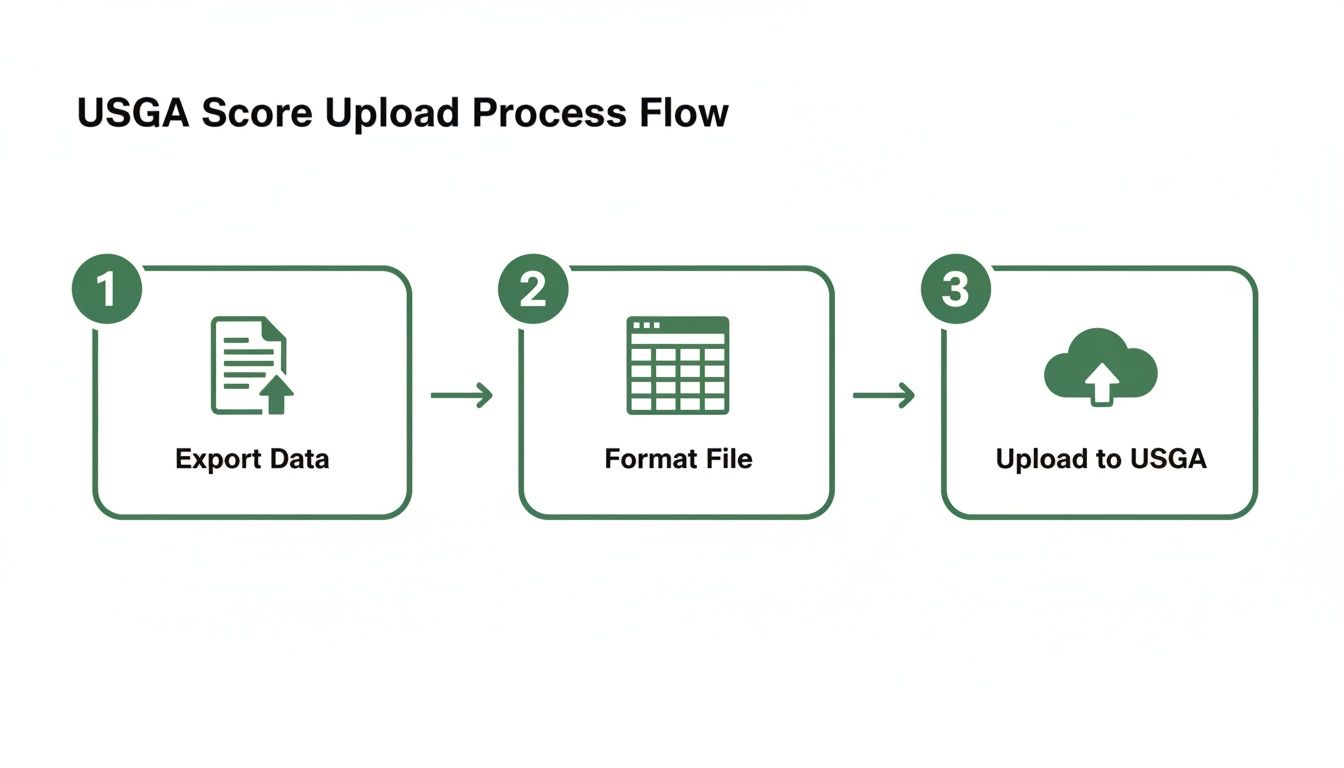
As you can see, that middle "Format" step is where most of the troubleshooting happens. It’s the critical bridge that connects your raw tournament data to a successful score posting.
Using Live Tourney to Make Score Posting Effortless

Let's be honest, moving scores from your event platform to the USGA system can be a real headache. It shouldn't be a clunky, multi-step chore you dread. With the right golf tournament manager software, you can make this process almost disappear into your post-event workflow.
The key is building a system where the data is clean and ready from the start. This process kicks off long before the first tee shot. The best way to manage this is by collecting GHIN numbers directly from players during online registration. If that’s not an option, Live Tourney lets you quickly upload them to your player roster with a simple spreadsheet, getting that crucial info locked in before anyone even steps on the course.
Creating the Perfect Export File
The real time-saver comes after the final putt drops. Instead of building a CSV file from scratch—and all the manual data cleanup that comes with it—you can lean on Live Tourney’s report builder. It lets you generate an export that perfectly matches the USGA's required format.
Here are a few quick tips for getting your export just right:
Customize the Columns: Jump into the report builder and select only the columns you need for the bulk upload: GHIN Number, Score, Score Type (always T for tournament), Date, Course Rating, and Slope Rating. Arrange them in that exact order.
Filter Out the Noise: Before you export, filter your player list to exclude anyone missing a GHIN number. This simple step prevents them from kicking back errors during the upload.
Double-Check the Score Type: Make sure the report correctly flags every score as a tournament ("T") score. This is critical for proper handicap processing.
This ability to create a custom, ready-to-go file means you can go from final results to a successful USGA post scores upload in just a few minutes. And that efficiency matters more than ever. In 2025, over 3.68 million golfers kept an active Handicap Index, posting a record 82 million scores. With 94.4% of those being recreational rounds, it's clear players care about their handicaps and expect their scores to be posted fast. You can dig into more of these impressive handicap statistics on the USGA website.
A Final Check for 100% Accuracy
Even with a perfect export, a quick final verification is always a good idea. Think of it as your last line of defense against any stray errors. It provides total confidence that every score landed where it was supposed to.
Once the batch file is uploaded to the GHIN system, do a quick cross-reference. Pull up your final Live Tourney leaderboard on one screen and the GHIN Admin Portal's "recently posted scores" report on another. Spot-check a handful of players to ensure their scores match perfectly.
This simple audit takes less than five minutes but gives you complete peace of mind that the job is done right.
By collecting data early, using powerful reporting tools, and performing that quick final check, you can turn a tedious admin task into a smooth, professional part of your tournament operations. To see how the right tools can help, check out our guide on finding the best golf tournament manager software for your course.
Answering Common Questions About Posting Scores
No matter how smooth your process is, you're going to get questions when it's time to post scores. It just comes with the territory. Knowing the ins and outs of the USGA system helps your staff give quick, confident answers that keep players happy.
Let's walk through some of the most common questions that pop up for tournament directors and head pros.
A lot of the confusion starts with the basics. If players are new to handicaps, they might not see why posting is so important. Pointing them to a good primer on What Is A Golf Handicap can be a great first step. Once they get the core idea, the rules around posting make a lot more sense.
Player Posting Versus Committee Posting
One question that comes up all the time is whether players can just post their own tournament scores. The simple answer is yes, they can. But the committee really should be the one to do it.
When a player posts their own score, it just shows up as a regular "Home" or "Away" round. When the committee posts it, the score gets marked as a "T-score" for Tournament. That little "T" is a big deal. It signals that the score was shot under the pressure of competition, which the World Handicap System (WHS) factors into a player's Handicap Index to keep it as accurate as possible.
The official USGA recommendation is clear: the committee should post all competition scores. This guarantees every score is correctly labeled as a "T-score" and prevents duplicates or missed entries. It’s all about protecting the integrity of the event and the handicap system.
Correcting an Incorrectly Posted Score
Mistakes are bound to happen. Maybe a player fat-fingers an 89 as a 98, or a staff member uploads the wrong score after a tournament. So, how do you fix it?
The solution depends on when the error is caught. If a player posts their score and immediately sees the mistake, the GHIN mobile app lets them delete and re-enter it right away. But that window closes fast.
For just about any other situation—like a score posted by the committee or an error someone notices the next day—the fix must be made by a club administrator through the Admin Portal. Your club’s handicap committee has the final say and can edit or delete any score to ensure a player's record is accurate.
How Quickly Do Scores Affect a Handicap Index?
Players are always curious about how fast a new score will impact their Handicap Index. With the World Handicap System, the answer is simple: it happens daily.
Any score posted on a given day gets factored into that night's handicap revision. That means the player will have a brand-new, updated Handicap Index waiting for them the next morning. This rapid turnaround is why it's so important to post scores on the same day the round was played. It keeps the Playing Conditions Calculation (PCC) accurate and ensures every player's handicap truly reflects their current ability.
Ready to make tournament score posting truly effortless? Live Tourney replaces clunky software with an intuitive, web-based platform that saves you time and elevates the player experience. Set up events in minutes, run seamless live scoring, and generate perfect USGA-ready export files every time. Discover a better way to run your tournaments at https://livetourney.com.





