
Oct 19, 2026
roster management, golf tournaments, tournament pairings, league management, golf software
Learn how roster management keeps golf tournaments and leagues running smoothly, from uploads and pairings to waitlists, edits, and best practices for staff.

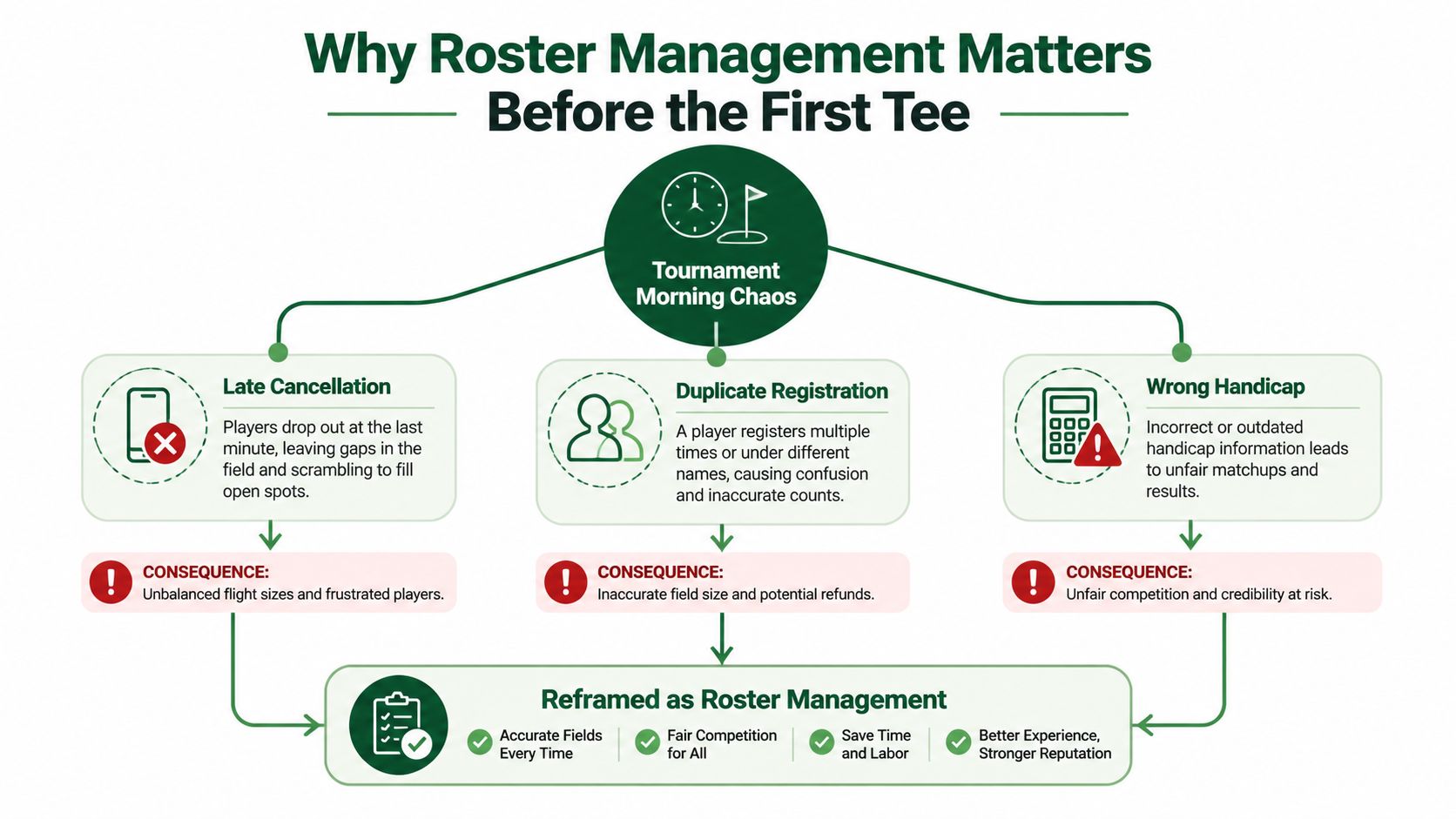
The event is close enough that players are already asking where to check in. Then a cancellation comes by text, a duplicate registration turns up on the list, and a handicap looks wrong just as staff are printing scorecards. The tee sheet, cart signs, pairings, side games, and payouts all depend on getting those details right.
Roster management is the work of keeping participant information accurate as it changes, then making sure every event document uses the same approved record. That means building a clear process for updates and exceptions, not just importing names and hoping the list stays current.
Why Roster Management Matters Before the First Tee
At the course, a late change rarely stays in one place. A player withdraws, and someone has to update the roster, check the waitlist, adjust the group, and make sure the replacement appears on the right scorecard. If staff update only the tee sheet, the cart signs or side-game list may still show the original player.
A duplicate registration creates a different kind of trouble. The player can end up in two groups, receive two sets of event communications, or appear twice in a payout report. A wrong handicap can distort a net result even when every other field is correct. These problems look separate, but they often share one cause: staff don't have a reliable source of truth or a visible record of who changed what.
Sports offer a useful reminder that a roster is shaped by more than a headcount. MLB used a 25-player active roster for most of the regular season for more than a century, with temporary changes, exceptions, and an expansion to 26 after the 2020 season. Those shifts reflect operating conditions, labor agreements, scheduling, availability, and financial constraints, all reasons not to treat a participant list as static. The history of MLB roster limits shows how rules and exceptions can change over time.
For a golf event, the practical lesson is simple: one trusted roster should feed the tee sheet, cart signs, pairings, scorecards, side games, and payouts. When a record changes, staff need to know which outputs are affected and whether each has been updated. That makes roster management a living, auditable process that continues through the event, not a clerical task completed at registration.
Practical rule: If two event documents disagree about who is playing, stop and reconcile them against the approved roster before publishing either one.
What Roster Management Actually Is
A roster is more than a list of names. Roster management is the structured practice of collecting participant details, checking them, and tracking changes throughout an event or league. It needs to answer two different questions: who is registered now, and who participated, under what conditions?
That distinction matters because a final list can hide the event's real history. Players withdraw, substitutes step in, eligibility changes, and pairings shift. MLB player usage, for example, can differ substantially from the nominal active roster because of transactions, injuries, call-ups, and movement between major- and minor-league teams. A review of MLB roster moves and player usage illustrates why a current list and an auditable history serve different purposes.
For a golf event, treat every participant as a structured record. Include the fields needed to run your format and communicate with players, such as:
Identity and contact: Name, email or phone, and a consistent record identifier.
Eligibility and competition details: Division, current Handicap Index, team, and event format.
Logistics: Round, tee time, cart, and any relevant pairing request.
Administration: Registration and payment status, plus the record of approved changes.
Free-text entries make it harder to catch a duplicate or match a player to the right team. “Alex Smith,” “A. Smith,” and a misspelled name may refer to the same person, but a system can't safely assume that. Normalize names and contact details at intake, check required fields, flag duplicates, and confirm eligibility before generating pairings.
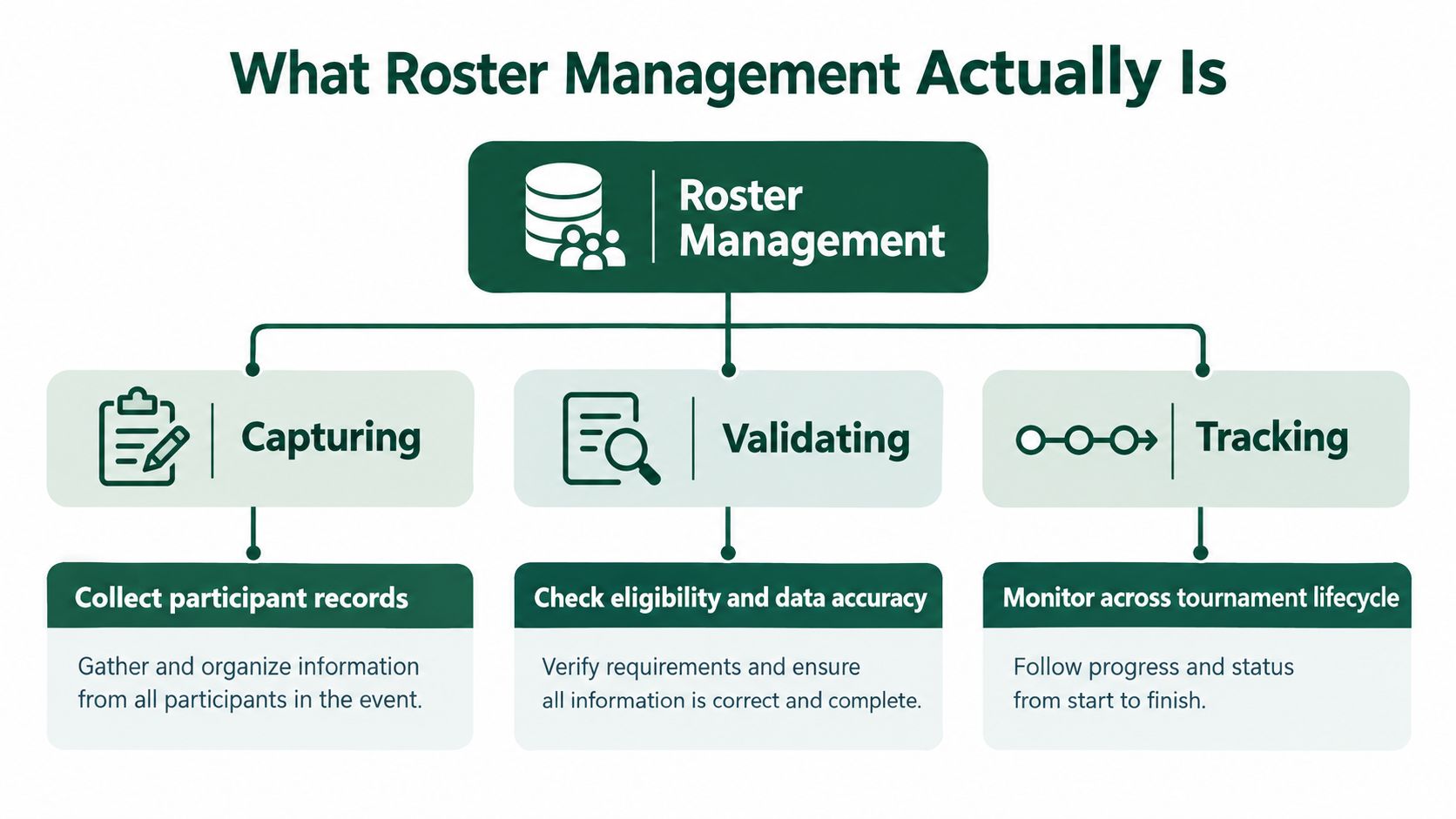
A useful roster system should let staff retrieve and update records, create reports, preserve prior versions, and track relevant constraints and requests. The key is to validate before tee time, when there's room to resolve a missing handicap or duplicate, rather than discovering it while staff are handing out scorecards.
Core Features Every Roster Workflow Needs
A workable roster process needs four capabilities: import records, edit them safely, build pairings from the event rules, and manage a waitlist when the field is full. A feature is only useful if staff can also see what changed and confirm the related documents were refreshed.

Uploads save staff from retyping a registration list or rebuilding a recurring event roster. Before importing a file, check that columns match the event's fields and that names and contact details are consistent. A successful upload is not proof that the records are complete; validate the imported data before using it.
Edits handle the inevitable changes: a corrected handicap, a team swap, or a substitution. An edit should update the participant's record without erasing the previous value or hiding who made the change. Otherwise, staff may have no way to explain why a published scorecard differs from the original roster.
Pairings translate the roster into groups or matches. The pairing process needs to account for the event format, eligibility, field capacity, tee-time rules, and any pairing constraints. Without those checks, staff can create a group that looks complete but doesn't comply with the competition setup.
Waitlists give the director a clear way to fill an opening. When a place becomes available, staff should be able to identify the next eligible player, confirm acceptance, and update the roster and related pairings without creating a second record.
A practical way to assess any roster workflow is to test an exception, not just a clean import. Ask what happens when a player cancels after pairings are published, when a substitute has an incomplete record, or when the wrong player is assigned to a team. Check whether the system preserves an audit trail and whether staff can tell which tee sheets, scorecards, or communications need to be regenerated. For a sample structure to adapt, see these golf roster form examples.
How Format and Handicap Rules Shape the Roster
A stroke-play qualifier and a club match-play bracket ask the roster to solve different problems. Treat format as a set of constraints the record has to satisfy: who is eligible, whether scores are gross or net, whether results are decided by total strokes or by holes won, and which fields staff must be able to defend during the final 72 hours. The USGA's Rule 3 guidance describes how the Rules separate match play from stroke play, individual from partner play, and gross from net scoring.
That distinction turns data entry into exception handling. Stroke play needs enough detail to verify a total and catch a card error after the last group leaves. Match play needs hole-level status, because a conceded hole, a dormie finish, or a match closed on 16 should remain explainable instead of collapsing into "won 2 and 1." In net events, record handicap status and the allowance used; in scratch events, mark that no handicap strokes apply so a later posting question does not look like a missing field.
For team allowances, keep the arithmetic clean at player level. The USGA says to apply the allowance to each player's unrounded Course Handicap, combine the adjusted values, then round the team number. In an 85% example, the partner difference depends on the individual handicaps, so store each Course Handicap plus the competition's chosen allowance in its terms; for the math step by step, see this guide on handicap scoring in golf. The USGA's guidance on handicap allowances covers formats such as Foursomes, Chapman/Pinehurst, and Scrambles.
Add two fields new directors often skip: the source of each handicap revision and a no-app path. A late substitute can arrive with a card, a phone number, and no smartphone; the roster should still show eligibility, team assignment, and who approved the change. The USGA's FAQ on posting match-play scores explains why the final result alone may not support handicap posting.
From Roster to Tee Sheet Without Manual Rebuilds
A good tee sheet is an output of the roster and its rules, not a separate document someone maintains by hand. Schedule quality involves more than filling every starting time quickly. The director also needs to respect course capacity, player eligibility, fixed tee times, and the competition format, while keeping groups practical and fair.
Think of the schedule as a set of hard constraints and soft constraints. Hard constraints must be met: a player can't appear in two places at once, the field can't exceed course capacity, and a fixed tee time must stay fixed. Soft constraints help improve the experience: keeping group sizes balanced, limiting repeated pairings, allowing rest between rounds, and distributing players fairly across tee-time blocks.
Sports-scheduling research recognizes constraint programming, integer programming, metaheuristics, and hybrid approaches as ways to handle competing requirements. For an event director, the important point isn't the algorithm's name. It's whether the system applies the rules consistently, flags conflicts, and lets staff review the result before publication. Research on sports scheduling methods provides background on those approaches.
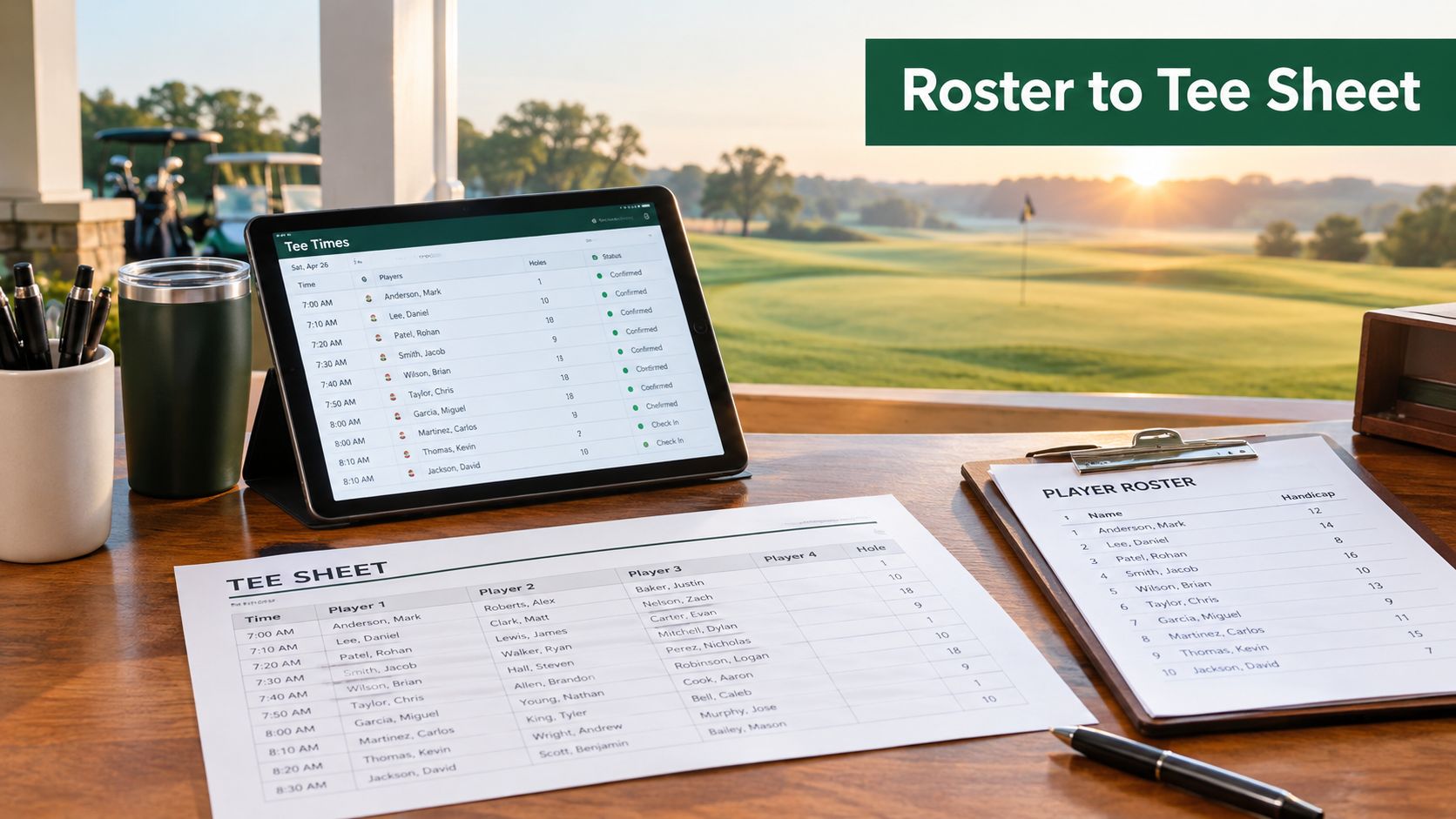
If a player withdraws, a sound workflow recalculates the affected group or groups, then flags any knock-on changes for staff to review. It shouldn't automatically rebuild the entire tee sheet or leave the substitute out of the scorecard run. Track practical quality measures such as how many players were assigned without manual intervention, how many constraint violations remain, and how often staff had to reassign players.
The roster also needs to connect to on-course operations. When staff are coordinating carts and player locations, a resource on GPS tracking for course carts can help them think through that separate logistical layer. For the pairing side of the workflow, compare your process with these golf pairing software considerations.
Designing Rosters That Work for Every Player
A mobile-first workflow can make scoring and event updates convenient, but it doesn't automatically include every participant. Some players have limited connectivity, an older device, low digital confidence, a disability, a language barrier, or no interest in installing an app. If the only path to confirm a pairing or submit a score requires a smartphone app, the process can exclude people without the organizer realizing it.
Digital participation is growing, but growth isn't the same as access. England recorded more than 5.75 million scores submitted to the World Handicap System in the first half of 2025, a 29% year-over-year increase; April submissions rose 98% from April 2024, according to the Golf Club Managers' Association's coverage of participation trends. The National Golf Foundation also reports that more than 75% of core golfers have at least one golf-specific app. Those facts show broad digital use, not that every player can or wants to use an app.
Make the fallback part of the plan. Offer an app-free scoring link, keep pages light enough for a weak connection, and let staff enter scores when a player needs help. Provide clear paper options where appropriate, make digital pages usable with a screen reader, and offer communications in the languages your participants need. If the event uses a public leaderboard, explain what information will be visible and give players a way to raise privacy concerns.
These accommodations shouldn't create duplicate records. The staff member entering a paper score should update the same participant record used for digital scoring, then verify the entry against the scorecard. A clear fallback keeps the event accessible while preserving one roster and one scoring history.
A Final 72-Hours Roster Playbook
Use the final stretch to reduce uncertainty, not to chase updates across messages and documents. The exact lock time depends on your event, but tell players and staff when changes become subject to director approval. Keep one person responsible for the official record, even when a small team shares the work.
Three days out
Import the latest registration list into the approved roster. Normalize names, check for duplicate records, confirm required fields, and identify missing handicaps, eligibility details, or payment information. Review the waitlist and contact eligible players before moving anyone into an open spot. Record each accepted substitution and make sure the original participant is marked as withdrawn rather than deleted.
Two days out
Run the pairing process against the event format and course constraints. Review the output for group size, eligibility, fixed times, and known pairing requests. Set and communicate the field-lock time. After that point, route changes to the director so staff don't make conflicting edits in separate files.
One day out and event morning
Reconcile late cancellations and substitutions against the roster, then recalculate affected groups. Generate the tee sheet, cart signs, bag tags, scorecards, side-game sheets, and payout materials from the same current record. Send updates to affected players and check that staff working the shop, carts, and scoring desk have the same version.
After play
Reconcile the final roster against actual participation and scores. Record no-shows, substitutions, incomplete rounds, and any scoring exceptions before preparing results or handling payouts. An audit trail helps the next staff member understand what happened without relying on memory.
Staffing improvements don't make exception handling disappear. The 2025 NGCOA Canada Pulse Report found that 78% of surveyed facilities were fully staffed in 2024, up from 33% in 2023, while 22% still weren't fully staffed. Even with more hands available, a clear process matters: one person may still be managing the roster, calls, documents, and check-in when a change comes through.
Key Takeaways and Common Roster Questions
Roster management works when it treats each participant as a structured record, preserves changes, and gives every event document the same reliable source. Set the format and rules before building pairings, validate records before publication, and plan a non-digital path so players aren't shut out. Keep an audit trail, especially when changes affect handicaps, teams, tee times, or scores.
Field | Purpose | Used For |
|---|---|---|
Name and contact | Identify and reach the participant | Registration, updates, check-in |
Eligibility and division | Confirm entry requirements | Field validation, group assignments |
Handicap Index and effective date | Apply the event's handicap rules | Teams, net scoring, score verification |
Team or opponent | Record competition assignments | Pairings, match play, team results |
Round and tee time | Place the player in the schedule | Tee sheet, communications |
Cart and payment status | Support event logistics and administration | Cart signs, check-in, reconciliation |
Change history | Show what changed and who approved it | Audits, exception resolution |
What if a player won't download software? Don't make an app the only route. Offer an app-free link or staff-assisted scoring, then record the information in the same participant record.
What if the roster changes after pairings are published? Update the official roster first, then recalculate affected groups and regenerate the documents that depend on them. Notify the players whose assignments changed.
Does every event need a waitlist? Not necessarily. Use one when demand can exceed capacity and you can define how an opening will be offered. For a small, stable field, a clear cancellation process may be enough.
When should the field be locked? Choose a time that gives staff a practical window to produce and check event materials, then communicate it. After lock, send changes through a named director or designated staff member so updates stay controlled.
Live Tourney provides roster uploads, pairing and event-management tools, and real-time scoring through a web-based experience that doesn't require players to download an app. If you're reviewing your final-72-hours workflow, visit Live Tourney to see whether its roster and event tools fit the way your course runs tournaments.





