
Oct 18, 2026
automated email generator, golf tournament emails, tournament automation, email best practices, event communication
Set up an automated email generator for golf tournaments. Learn registration, reminders, pairings, and results workflows with practical best practices.

You've got first tee in forty minutes, the charity chair is asking about mulligan packages, and a player just forwarded you last night's pairings email. His tee time says 8:00, your tee sheet says 8:50, and his partner's name is spelled wrong. That's the moment most directors start looking for an automated email generator, not because they want cleverer copy, but because they're tired of fixing the same preventable errors under pressure.
Why Tournament Emails Break When You Rush Them
The wrong tee time rarely starts as a writing problem. Someone copied yesterday's message, changed the date in the subject line, forgot the starting hole in the body, and hit send while players were checking in. One player shows up late, another group tees off short, and your starter spends the morning rebuilding order from a printout.
I've seen the quieter version too. A reminder goes out after the round because it was scheduled manually. A results email names the right winner but the wrong division. A payment reminder hits a sponsor who already paid. None of those mistakes look dramatic in your drafts folder, but each one costs trust, and trust is what brings that outing back next year.
Blasting Is Not Orchestrating
A batch blast treats every recipient as if they're in the same place. Tournament communication doesn't work that way. One player needs a payment link, another needs a cart assignment, a third only needs to know check-in moved indoors. Orchestration means the message is triggered by an event, built from structured fields, and sent only to people whose status matches.
That's why email sits at the center of automation rather than at the edge of it. By early 2024, 58% of surveyed professionals selected email as the channel most commonly associated with marketing automation, ahead of content and social media management, according to Statista's email marketing topic overview. The number matters less than what it signals. Organizations didn't automate email first because it's fashionable. They did it because confirmations, reminders, and follow-ups recur constantly and break easily when handled by hand.
An automated email generator earns its keep by making the right message boringly repeatable, not by writing a brilliant one once.
Generative drafting does help with the blank page. In a controlled experiment with approximately 450 mid-level professionals, participants using generative AI finished writing tasks 40% faster and independent evaluators rated the work 18% higher in quality, as summarized in the OECD report on generative AI and productivity. That's useful for a post-event thank you or a sponsor recap. It doesn't prove the tee time is correct, the link is safe, or the player in B flight didn't get A flight instructions.
For tournament work, speed is the secondary benefit. The primary benefit is fewer mistakes at scale. If your generator can't prove where every date, time, name, and fee came from, you've just automated the rush.
The Five Message Types Every Tournament Sends
Most events don't need dozens of creative campaigns. They need five operational messages sent in the right order, with the right fields, to the right segment. Get these right and your inbox gets noticeably quieter on event day.

Registration confirmations fire when a player or team registers. They should confirm event name, date, format, division, and next steps, and they should never promise a tee time that hasn't been assigned yet. If you're still building your front end, your golf tournament invitation templates should feed the same event fields the confirmation later reuses, so the invitation and confirmation can't disagree.
Payment receipts and reminders depend on payment status, not on your memory. A receipt confirms amount paid and what's included. A reminder goes only to unpaid registrants, with a clear payment link and deadline. Send a reminder to someone who paid yesterday and you've created a phone call, not a conversion.
The Day-Of Messages That Carry the Risk
Tee-time reminders and pairings announcements are where precision matters most. Player name, tee time, starting hole, group members, format, and handicap all need to come from the current tee sheet, not from a spreadsheet someone exported last night. Post-round results and payout notes close the loop. They carry scores, standings, tiebreakers, and next steps for prizes, which means an error there lingers longer than an error in a reminder.
Core Tournament Message Types
Message type | Trigger event | Key merge fields | Risk if wrong |
|---|---|---|---|
Registration confirmation | Player or team registers | Event name, date, format, division | Player expects wrong format or date |
Payment receipt or reminder | Payment recorded or still outstanding | Payment status, balance, payment link | Paid player gets chased, unpaid player gets missed |
Tee-time reminder | Tee sheet published or changed | Tee time, starting hole, venue | Late arrival, starter chaos |
Pairings announcement | Groups finalized | Group members, handicap, division | Wrong partner, wrong flight |
Results and payout note | Scoring finalized | Scores, standings, payout detail | Disputed winner, reputational damage |
Personalization inside these messages isn't decorative. Inserting a recipient's name, status, and next action is a functional part of the send, and reported benchmarks indicate personalized subject lines can improve open rates by approximately 20% to 26%, while behavioral segmentation can improve click and conversion rates by 50% or more, according to Sona's compilation of email marketing statistics. If you want a broader view of how agencies structure segmentation and lifecycle programs beyond golf, Alpha Omega Digital's agency guide is a useful reference for the underlying discipline.
My recommendation is blunt. Pick one system as the source of truth for registration, payment, pairings, and scoring fields. If the generator has to reconcile three exports before it can write a sentence, it will eventually guess, and guessing is where tournament emails go wrong.
Building the Generation Pipeline Behind the Scenes
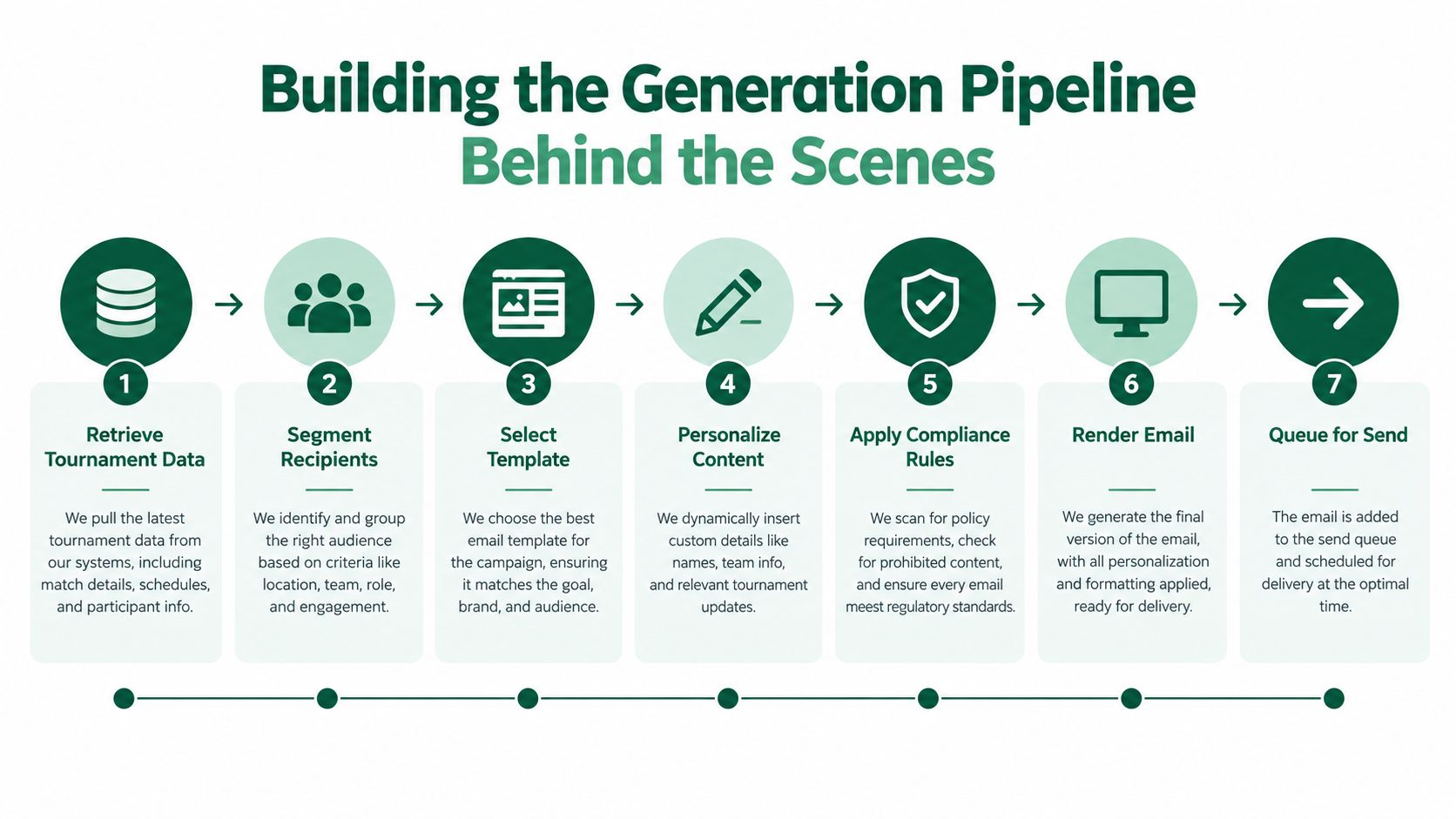
A production-grade automated email generator isn't a prompt box. It's a controlled pipeline where language generation is only one stage, and not the most important one. If a vendor can't walk you through these seven stages, you're buying a drafting toy and calling it operations software.
Stages One to Three Get the Facts Straight
Retrieve structured facts: Pull event name, dates, tee time, player or team, handicap, format, payment status, and venue directly from the tournament database.
Validate and normalize: Check required fields before drafting, and normalize dates, time zones, currency, and URLs so 8:00 doesn't render three different ways in one message.
Classify the intent: Label the message as a registration confirmation, payment reminder, tee-sheet update, score notification, or post-event follow-up, because each intent carries different required fields and a different call to action.
This is also where your intake quality shows up. If your player registration form lets players enter nicknames, duplicate emails, or free-text handicaps with no validation, the pipeline inherits that mess. Clean structured input is cheaper than clever downstream repair.
Stages Four to Seven Keep the Draft Honest
Generate from a constrained template: Lock tone, audience, and call-to-action rules per message type, and let the model vary phrasing only inside those rails.
Run deterministic checks: Flag unsupported claims, missing merge fields, contradictory times, unsafe links, and any sign that one player's information leaked into another player's message.
Require human approval for high-impact sends: Cancellations, refunds, payouts, and schedule changes wait for a named approver, no exceptions.
Log everything: Record input data, model version, template version, approval status, and final output so you can answer any dispute with evidence instead of memory.
Live Tourney's dynamic email feature, which personalizes conditional content blocks from registration status, payment status, division, and tee-time assignment, is one example of this data-first approach. The principle is vendor-neutral though. Whatever you use, the template should reference fields, not contain facts typed in by hand.
Practical rule: If a required field is missing, the system should stop and create a review task. It should never invent a plausible value to keep the send moving.
Benchmarks support investing in triggered messages over batch newsletters, but read them carefully. One cited benchmark reports 45.38% opens and 5.02% click-through for triggered messages versus 40.08% opens and 3.84% click-through for newsletters, figures collected in Cirrus Insight's B2B email marketing statistics roundup. That gap reflects timing and relevance, not proof that AI-written copy caused the lift. Separately, Omnisend figures reported elsewhere show automated emails averaging a 30.21% open rate, 4.66% click rate, and 1.49% conversion rate, with $3.41 in revenue per automated send compared with $0.155 for regular campaigns, as cited in Wix's email marketing statistics summary. Use numbers like these to justify event-driven design. Don't use them to promise your board a guaranteed return from generated subject lines, especially since privacy protections can inflate open counts.
Accessibility and CAN-SPAM Compliance as Built-In Outputs
Most generator demos show you a polished email on a large monitor. Your actual reader is a 70-year-old member squinting at a phone in the parking lot, trying to confirm a starting hole. If the message fails for him, it doesn't matter how elegant the copy was.
Accessibility Is an Output Specification
The scale of the problem is hard to overstate. An Email Markup Consortium analysis of 443,585 emails found that 99.89% contained serious or critical accessibility issues, with only 21 emails passing all automated checks, a finding discussed in Knak's overview of AI and email accessibility. The same analysis notes AI can detect roughly 20–30% of accessibility issues, which means automation assists but doesn't finish the job. Contextual alt text, logical heading order, meaningful link labels, and judgment about decorative images still need a human eye.
Configure your generator's accessibility mode to produce these by default:
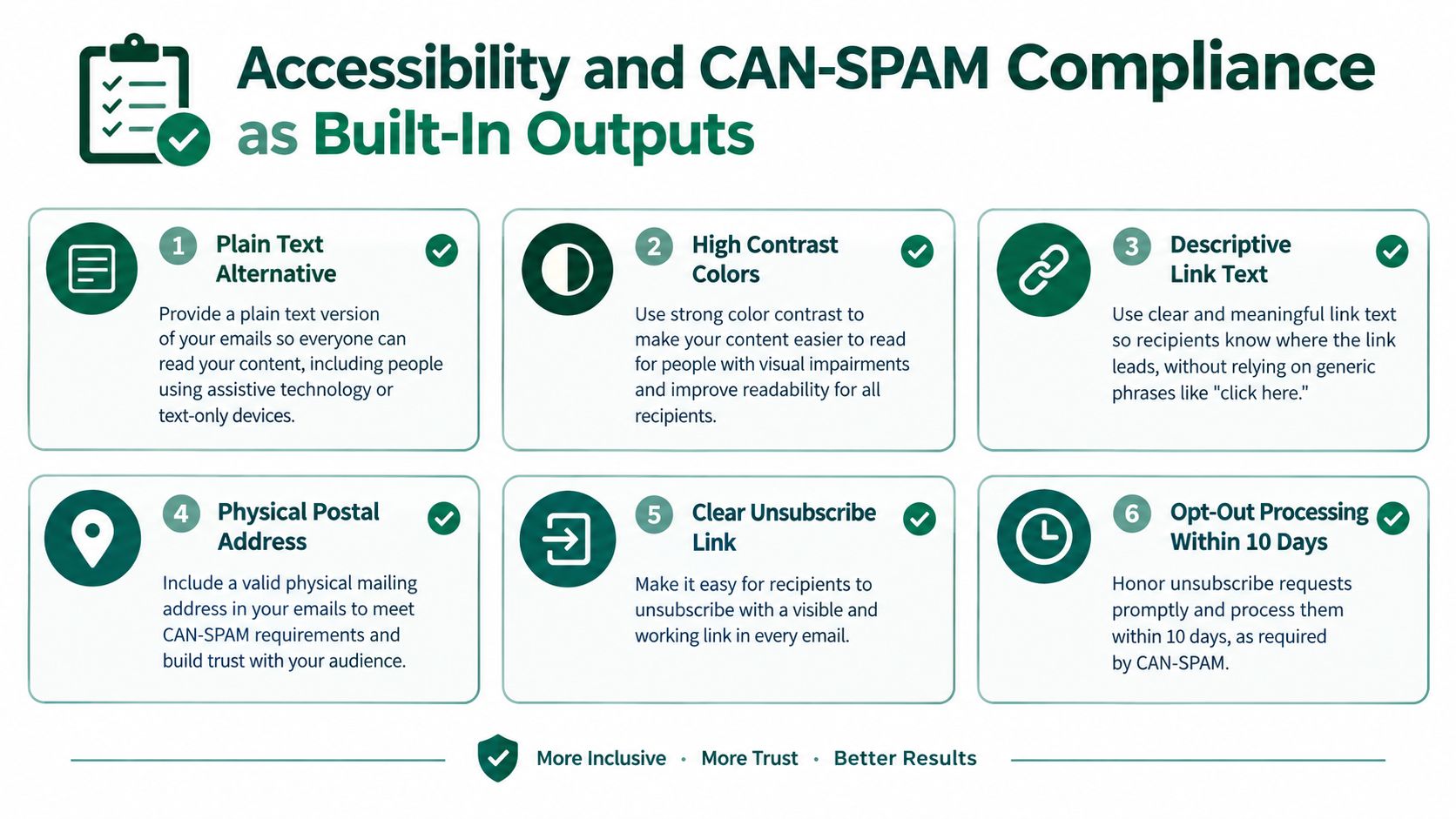
Semantic structure: Real headings in logical order, so screen readers can move through the content instead of reading one long block.
Descriptive link text: "View your tee time" instead of "click here," so the destination is clear out of context.
Sufficient contrast and readable sizing: Body text that survives bright sunlight and aging eyes on a phone screen.
Plain text alternative: A clean fallback that carries the essential facts when HTML fails to render.
The system should also report which checks it ran and flag what it couldn't resolve. A generator that adds alt text without notice and calls itself accessible is giving you false confidence.
CAN-SPAM Rules Apply Even When the Email Feels Transactional
Under the U.S. CAN-SPAM Act, commercial messages must preserve accurate sender and routing information, avoid deceptive subject lines, clearly identify the message as an advertisement where required, and provide a clear opt-out mechanism, requirements laid out in the FTC's CAN-SPAM compliance guide for business. The sender must honor unsubscribe requests, and the opt-out system must stay capable of processing requests for at least 30 days after the message is sent. The moment your results email promotes next year's outing or cross-sells a league, you're in commercial territory whether you intended it or not.
Build these checks into the pipeline, not into a pre-send scramble:
Sender identity verified: From name and address match the actual sending organization.
Subject line matches content: No urgency the body doesn't support.
Physical postal address present: Rendered automatically from account settings.
Working unsubscribe rendered and tested: Included on every commercial template, not pasted in manually.
Suppression list applied before send: Opt-outs and complainers removed at queue time, not after.
Compliance and deliverability aren't separate conversations. Clean lists, honest subjects, and consistent sending identity are also how you improve your inbox placement over a full season instead of watching engagement decay by August.
Why Human Review Still Beats One-Click Sending
The most dangerous sentence in this category is "just let it send." Generation is fast now. Judgment hasn't gotten any faster, and tournament operations are full of messages where judgment is the entire job.

The supervision gap shows up clearly in adoption data. One 2026 industry report found 70% of marketing teams had AI in their production workflow, yet only 29% described adoption as advanced, and 88% reported AI-generated content still required moderate to substantial human editing before publication, according to Knak's 2026 email marketing trends report. Read that as a warning, not a failure. Teams are adopting the drafting speed and keeping the editorial gate, because they've learned what one-click sending costs.
Draft Automation Is Not Send Automation
For a golf operation, the line is easy to draw. A registration confirmation built entirely from validated fields can send automatically. A cancellation, a refund, a payout correction, a weather delay, or a handicap change cannot. Those messages touch money, schedule, or scoring, and each one creates consequences a template can't weigh. Did the sponsor already announce the original start time? Does the rain delay affect the afternoon wave only? A generator doesn't know, and it shouldn't pretend to.
Anything touching money, schedule, or scoring gets a human gate. Everything else is a candidate for full automation.
Good review tooling makes the gate fast instead of burdensome. Your approver should see the draft alongside its source fields, with changed variables highlighted, so verification takes seconds. If the tee time changed from the previous version, that should be visible at a glance, not buried in re-reading the whole message. The reviewer approves facts first and phrasing second.
There's also a data discipline issue reviewers enforce naturally. Organizers shouldn't paste unnecessary player information into prompts just because the box is there. Data minimization means the generator receives only the fields a message needs, and a human checkpoint is where someone notices a notes field carrying information that never belonged in an email. Controlled acceleration beats one-click sending every time, because the approval click is the cheapest insurance you will ever buy on event day.
Engineering Against the Five Common Failure Modes
Assume the generator will try to fail in predictable ways, then engineer each failure out. The five that matter for tournaments are hallucinated details, stale data, privacy leakage, prompt injection, and over-automation of sensitive messages.
Controls That Match Each Failure
Hallucinated tournament details: Require every factual statement to trace to a database field or approved policy, and route missing values to a review state instead of letting the model fill the gap.
Stale pairings data: Re-pull fields at render time and separate rendering from sending, so a tee-sheet change after drafting doesn't ship old groups.
Privacy leakage: Apply least-privilege retrieval, field-level access control, and tenant isolation so one player's handicap or payment status can't surface in another player's email.
Prompt injection through player notes: Treat imported free text as untrusted data, redact unnecessary personal information, and allow-list every URL the output can contain.
Over-automation: Keep the human gate from the previous section for operationally sensitive sends, because NIST's generative AI risk profile identifies confabulation, privacy and information-security risks, automation bias, and component-integration risks as material concerns, a summary covered in Superwise's guide to generative AI security risks.
Before any new template goes live, run the rendered output through an HTML email testing tool to catch broken markup, missing alt attributes, and rendering problems your drafting preview won't show. Then measure what catches failures in production. Track factual-error rate, human-edit rate, bounce rate, complaint rate, click-through, conversion to registration or payment, and opt-out rate by message type, not as one blended average. A cited ecosystem benchmark in that same Superwise coverage reports 2.33% bounce and below 0.01% spam complaints across a large B2B dataset, but treat those as context, not as your targets.
Roll out gradually. Use randomized holdouts with minimum sample sizes to compare template-only, AI-assisted, and human-reviewed variants, and set automatic rollback thresholds in advance. When complaints, bounces, or factual corrections cross the line you defined while calm, the system reverts without a meeting.
A Practical Rollout Checklist for This Season
Start narrow and expand only when the first message type survives a real event. Here's the sequence I'd run this month:
Pick one message type: Registration confirmation is the safest starting point.
Define its trigger and required fields: write them down before touching templates.
Configure accessibility and CAN-SPAM checks: make them pipeline defaults, not manual steps.
Route drafts through a named approver: keep the gate until error rates earn its removal.
Run a small holdout: compare against your current process on factual errors and complaints.
Measure by message type: expand to the next type only after the first one holds.
If you're evaluating platforms against this checklist, this overview of golf tournament management software is a reasonable place to compare how different systems handle the underlying event data. A generator built on these constraints isn't slower than the alternatives. It's the only version still standing on tournament morning.
If you're ready to stop rebuilding pairings emails by hand, Live Tourney gives you dynamic, event-driven emails tied directly to your registrations, tee sheets, payments, and live scoring, so every message pulls from the same source of truth. Set up your next outing, automate the five core message types with human approval where it counts, and spend tournament morning running the event instead of apologizing for the inbox.





