
Oct 16, 2026
dynamic email content, tournament email personalization, golf tournament emails, email engagement, tournament communication
Learn how dynamic email content helps golf tournament organizers send personalized registration, pairing, and leaderboard emails that boost engagement

You're probably staring at the same problem most tournament staff hit once the field starts filling. One player still needs to pay. Another is already paid and wants a tee time. A sponsor contact needs logistics, not player instructions. Your assistant sends one broad email anyway, then the replies start piling up.
That's where dynamic email content stops being a marketing buzzword and starts acting like an operations tool. In tournament work, the win isn't clever copy. The win is sending one email template that shows the right block to the right person, based on the data you already have in your event records.
Why Tournament Organizers Need Smarter Emails
A static tournament email usually breaks down the moment your event gets even slightly complex. In a full field, some golfers are confirmed, some are waitlisted, some still owe a balance, and a few only care about whether the skins game is open. When everyone gets the same message, half the field has to hunt for the part that matters, and the other half replies because the email didn't answer their question.
That's expensive in the wrong way. Staff lose time. Players lose confidence. The event starts feeling disorganized, even when the back office is under control.
One template, different outcomes
The practical fix is simple. Keep one core email, then swap modules based on each recipient's record. A registered player can see confirmation details. A player with an unpaid balance can see the payment prompt. A tournament volunteer can get arrival instructions instead of division rules. The message feels specific without forcing your staff to write separate campaigns for every scenario.
This is why dynamic content matters more in golf than many operators realize. Tournament communication is full of structured, high-importance details. Tee time, division, event role, registration status, and scoring responsibility all change what a recipient needs to do next. When those details appear cleanly in the email, the event feels tighter.
Practical rule: If the email changes what the recipient needs to do, it should be dynamic. If it only changes decoration, skip it.
There's also a real performance case for relevance. In randomized field experiments with millions of recipients, adding even a small personalized element, the recipient's name in the subject line, increased opens 20%, from 9.05% to 10.80%, increased sales leads 31%, from 0.39% to 0.51%, and reduced unsubscribes 17%, from 1.2% to 1.0% in the studied campaigns, according to the Stanford Graduate School of Business research on email personalization. For tournament operators, the lesson isn't “use first name everywhere.” It's that relevance changes response.
If you're already refining checklists, pairings, and registration flow, smarter email belongs in the same planning stack as your golf tournament planning guide. It's one of the easiest places to remove friction players feel immediately.
What Dynamic Email Content Actually Does
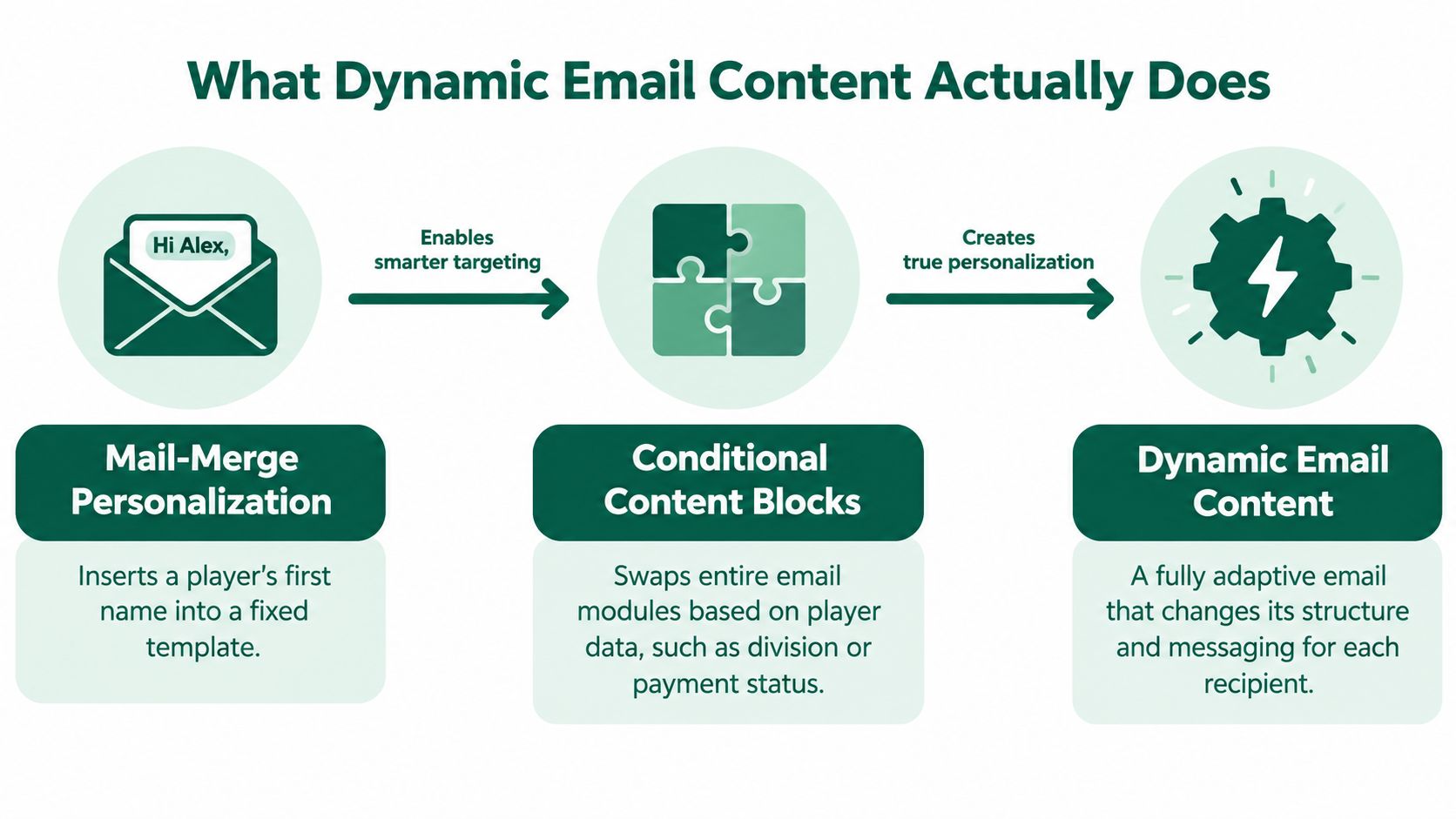
At the basic level, dynamic email content starts where old mail merge started. You insert a first name, event name, or course name into a fixed template. That's useful, but it's still mostly the same email for everybody.
The bigger jump happens when the email changes its modules, not just its greeting.
From merge tags to conditional blocks
Microsoft's documentation describes dynamic content as data being resolved at send time for each individual recipient, using values from contact records and more advanced logic like conditions and loops in a single template, as shown in Microsoft's guide to dynamic email content. In plain English, that means you don't build ten separate emails. You build one template that can render differently depending on who receives it.
For a tournament confirmation email, that might look like this:
If paid: show “You're confirmed” and the event schedule
If unpaid: show balance language and a payment button
If division exists: show division-specific rules
If tee time exists: show tee time block
If tee time is still pending: show a fallback note instead
Microsoft also notes that conditional sections are evaluated in order, and the first true condition wins, with default content used if you've configured it, according to Microsoft's documentation on conditional content. That ordering matters more than teams often expect. If your “all registered players” rule sits above your “registered but unpaid” rule, the unpaid player may never see the payment reminder.
Dynamic content is not the same as segmentation
Segmentation decides who gets the campaign. Dynamic content decides what each person sees inside it. Those two work best together.
A reported analysis of segmented campaigns found 14.31% higher open rates and 100.95% higher click-through rates than non-segmented campaigns, and MarTech also summarized findings that emails personalized with dynamic content achieved 17% higher average click rates and 40% higher average order-conversion rates than non-personalized messages in the cited research roundup, all collected in MarTech's personalization statistics summary. Klaviyo separately reported that segmented campaigns nearly doubled opens and clicks versus blasts and generated roughly three times more revenue per recipient in its analysis of 2.5 billion emails, as outlined in Klaviyo's report on personalization versus blasts.
That's the operational model I trust. Segment first when the audience differs. Then use dynamic content so one send can still adapt by role, status, or task. If your team is also trying to tighten multimedia workflows around campaigns, a strong solution for marketing video content can help keep creative assets aligned with those audience-specific email modules.
Personalization Levels in Tournament Emails
Approach | Tone | Implementation Effort | Tournament Example |
|---|---|---|---|
Basic merge tags | Familiar | Low | “Hi John, you're registered for the Member-Guest” |
Field-based insertion | Transactional and clear | Low to medium | Show division, event date, or course name if present |
Conditional content blocks | Role-specific | Medium | Paid players see confirmation, unpaid players see balance due block |
Fully dynamic email content | Operationally adaptive | Medium to high | One template shows different instructions for players, staff, and scoring admins |
Data Fields That Power Personalization
Dynamic templates only work if the underlying event record is clean. Most failed setups don't fail because the email platform is weak. They fail because the organizer is trying to personalize with fields that are empty, stale, or inconsistent.
If I'm auditing a tournament database for email readiness, I'm not looking for more data first. I'm looking for usable data.
The fields that actually matter
Start with the fields that change what the recipient needs to know or do.
Event role: player, sponsor, staff, scorer, league admin. This decides the entire frame of the email.
Registration status: registered, waitlisted, withdrawn, incomplete. Without this, confirmation emails become misleading.
Payment status: paid, unpaid, partially paid. This is one of the clearest candidates for a conditional block.
Division or flight: this drives rules, pairings context, and prize structure language.
Tee time or starting hole: if it exists, show it prominently. If it doesn't, use a calm fallback.
Scoring role: some recipients need score-entry instructions, others don't.
Outstanding task: sign waiver, complete roster details, pay balance, confirm pairing.
Your form design determines whether these fields exist consistently. If your registration setup is thin, fix that before you get ambitious with email logic. A stronger player registration form usually does more for communication quality than rewriting copy.
Safe defaults beat broken personalization
Every dynamic field needs a fallback. If there's no tee time yet, don't show an empty row. Say tee times will be sent in a separate update. If division hasn't been assigned, omit the block. If payment data is missing, don't guess. Show a neutral contact path.
Empty placeholders make an event feel less organized than generic copy does.
Adobe's documentation reflects the same operational idea. Recipient attributes such as first name, interests, location, and purchase history can populate subject lines or body content, and conditional content can replace blocks and images when profile conditions are met, with those expressions interpreted at send time in Adobe Campaign's dynamic content documentation. The practical lesson is straightforward. Formatting consistency matters as much as field presence.
Behavioral signals need caution
There's also a more advanced path. A peer-reviewed 2024 study used short email text and historical interaction data to infer recipient interests, and reported about 85% classification accuracy versus 60% for conventional segmentation, while nearly doubling average open rates in that study's domain, according to the Kyushu University Evergreen paper on topic-based email segmentation. That supports smarter module selection based on behavior, not just profile fields.
I'd still keep tournament logic grounded in event relationship first. If someone clicked pairings updates recently, maybe move that CTA higher. Fine. But don't build your whole email strategy on opaque inference when explicit event data already tells you most of what matters.
If you're extending this thinking into on-course engagement and loyalty touchpoints, tools that help track customer visits can be useful, but I'd keep that data separate from event-critical emails unless the recipient would reasonably expect it to shape the message.
Email Examples That Move the Needle
The best dynamic emails in tournament operations aren't fancy. They remove one specific question before the player has to ask it. That's the standard.

Registration confirmation
This email should reassure and direct. The key fields are player name, division, registration status, and payment status. If the player is fully paid, lead with confirmation. If they're registered but not paid, lead with the balance reminder and payment link.
The dynamic field doing the heavy lifting here is status. It changes the primary CTA from “view event details” to “complete payment.” Subject lines can also help when they stay relevant to the transaction rather than trying to sound promotional. If you need inspiration for structure and tone, solid golf tournament invitation templates can double as a starting point for confirmation and reminder language.
Pre-tournament reminder and pairing notice
Static email usually causes avoidable confusion. Players don't want a general note that says “we're excited to see you.” They want to know when they start, where they start, what format they're in, and how scoring works.
The right dynamic fields are tee time, starting hole, flight, division, and scoring link. When these show up together, the message becomes immediately usable on a phone in the parking lot.
Send the answer the player will search for first. In most events, that's tee time or pairing context.
Leaderboard and live scoring update
For active rounds, the strongest block is usually a direct path back into action. That could be a live leaderboard link, a score-entry link for designated scorers, or a role-specific prompt if someone still hasn't activated scoring access.
This is less about ornament and more about precision. “Open live leaderboard” beats a vague “click here” every time because it tells the player exactly what happens next.
Which Dynamic Fields Drive Which Metrics
Dynamic Field | Best Email Type | Primary Metric Improved |
|---|---|---|
Registration status | Confirmation | Click-through to next action |
Payment status | Reminder | Completed payments |
Tee time | Pre-tournament reminder | Useful opens and fewer support replies |
Division or flight | Pairing notice | Click-through to relevant event details |
Scoring role | Round-day message | Score-entry activation |
Live leaderboard link | Results and in-round update | Leaderboard clicks |
There's broad historical support for this relevance-first approach. The research summarized by MarTech found dynamic content associated with stronger click and conversion performance in aggregate campaigns, but in tournament work the more useful takeaway is simpler: the field that changes the next action should sit nearest the top.
For tools, keep the system practical. A platform like Live Tourney can automate recurring tournament emails tied to registrations, tee times, and scoring updates, which is useful when those event fields already exist in the workflow. The value isn't that it sends more email. The value is that it can send fewer, clearer emails.
Best Practices for Tournament Email Templates
A tournament email only works if the template holds up under real event data. A player checking tee time, payment status, or scoring access should see the right message without extra noise. Keep the logic tight, keep the design sturdy, and test every branch before send.
What to do first
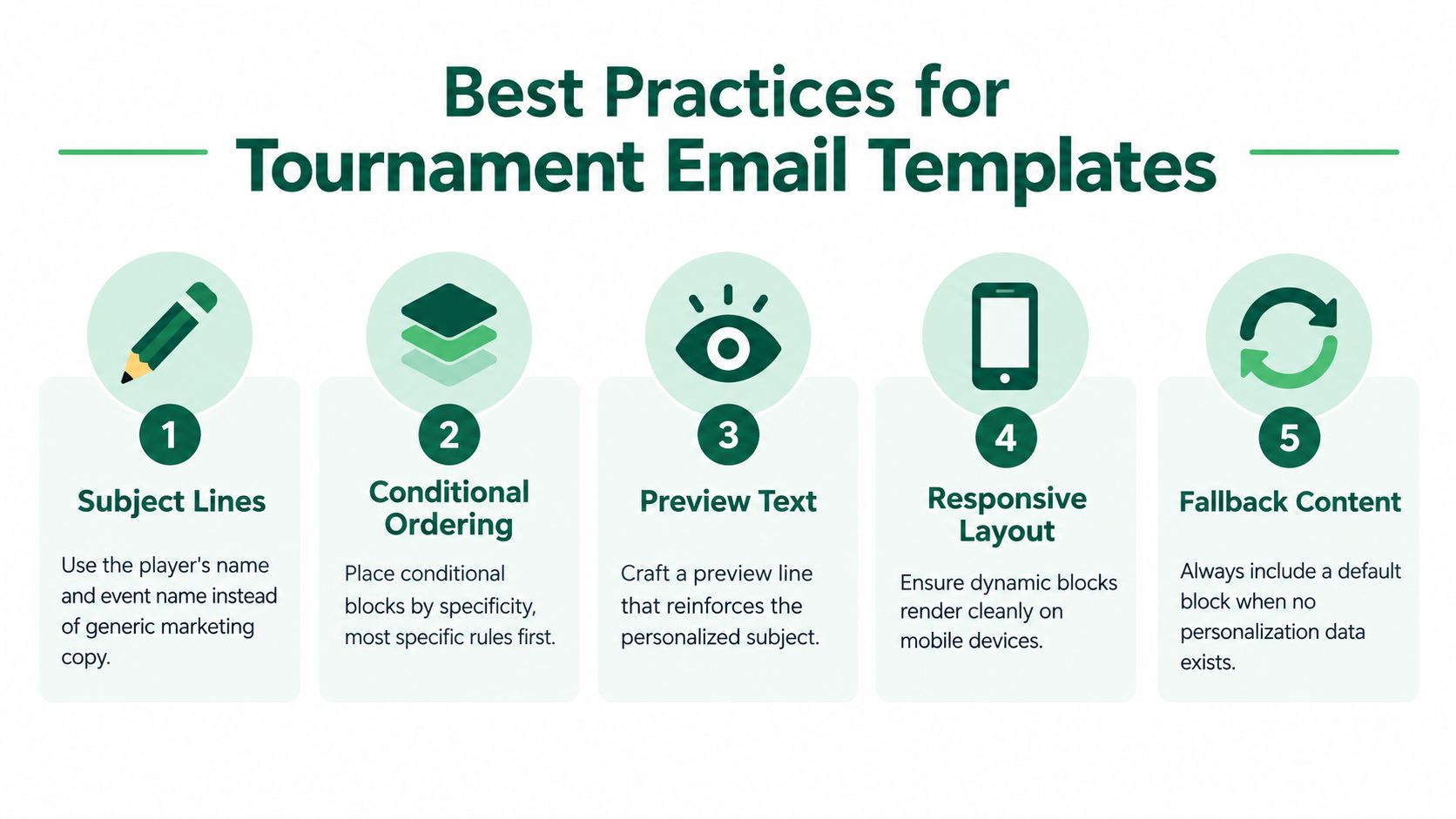
Use the most specific subject line your data supports. A player name plus event name is usually enough. A subject line like “John, Member-Guest tee time 8:40” gives the recipient the two facts they scan for faster than a generic “Tournament update.”
Then order your conditional blocks from most specific to most general. If “unpaid member-guest player with assigned tee time” matters more than “all registered players,” put the narrow rule first. That keeps the right information at the top of the message and reduces the chance that a broad fallback hides the detail that matters.
Accessibility and rendering are not optional
Accessible email construction should meet WCAG-based contrast thresholds of 4.5:1 for normal text and 3:1 for large text, and should include meaningful link text, alt text for informative images, language metadata, and layouts that do not rely on color alone, according to the Enchant Agency guide to accessible email design. Dynamic blocks make that work harder, because every branch can introduce a new broken link, missing label, or unreadable layout.
The broader industry picture is ugly. An accessibility audit of 443,585 emails found 99.89% had serious or critical issues, and only 21 emails passed all automated checks in the analysis published by the Email Markup Consortium accessibility report. For tournament mail, that can mean a player misses a tee time link, payment amount, or leaderboard CTA because the message was not readable.
My working checklist
Write descriptive CTAs: Use labels like Open live leaderboard or Complete registration payment.
Build text-first modules: If images fail, the email should still make sense.
Preview every variation: Test paid, unpaid, waitlisted, assigned tee time, and missing-data scenarios, not just the default version.
Check mobile rendering: Tournament emails get opened in the car, on the range, and at the first tee.
Include default content: If no condition matches, the recipient should still get a usable message.
Field note: The best dynamic template is the one that still works when one field is blank and the player opens it on a dim phone screen outdoors.
Where Personalization Crosses the Line
A tournament email should feel relevant, not watchful. Tournament name, registration status, division, tee time, payment balance, and scoring role connect directly to the recipient's relationship with the event, so these fields usually make the message clearer.
Useful context versus creepy inference
A 2025 qualitative study of 20 e-commerce customers and three email marketers found that highly specific personalization could make recipients feel exposed or vulnerable. Unclear explanations of data collection also reduced trust, according to the Compendium of Paper Asia study on personalization and consumer privacy. The operational lesson applies to tournament workflows: specificity helps only when the recipient understands why the message contains it.
Keep event-critical copy tied to the event. For a member-guest, use the member-guest registration, division, tee time, and scoring information. Avoid unrelated browsing behavior or outside purchase signals unless recipients would clearly expect that data to influence the email.
The trust rules that hold up
A practical policy has four parts:
Use purpose-limited fields: registration state, event role, tee time, and balance due can drive relevant content.
Make profile visibility understandable: staff should know which fields control each email block.
Set retention habits: stale event data produces stale personalization, such as an old tee time or incorrect payment status.
Define fallback behavior: when a field is incomplete, show clear operational text rather than manufactured precision.
Deliverability belongs in the same trust conversation. The Email Markup Consortium's discussion of deliverability cited Validity's report, which found Gmail inbox placement averaged 89.8% in 2024 and fell to 84.2% by Q4. The discussion also covered Gmail and Yahoo requirements involving DMARC, one-click unsubscribe, and spam complaints below 0.3%. If a dynamic message arrives late, goes to spam, or cannot be read, accurate personalization has little practical value.
The system should make the recipient's next action easier, not expose internal data practices or display details that feel unrelated. Use dynamic content to answer the immediate event question, then keep the rule simple enough for staff to inspect, test, and correct.
Your Dynamic Email Playbook
If you want this working in one season, don't start with ten templates. Start with one event, one email type, and one clean set of conditions.
Three moves that matter
First, audit the fields you already capture. Confirm that event role, registration status, payment status, division, tee time, and scoring role are populated consistently enough to drive content.
Second, build one conditional template for each high-impact message. Confirmation, pre-event reminder, pairing notice, and live scoring update cover most of the operational ground.
Third, test every variant. Test the obvious ones, then test the annoying ones. Missing tee time. Waitlisted player. Paid sponsor contact. Player with no division assigned yet.
If your tournament stack already relies on outside systems, it helps to review practical connector options like 10Seat integrations so data doesn't get stranded in separate tools where email logic can't use it.
Paste this into your planning doc
Audit fields this week: role, status, payment, division, tee time, scoring access.
Build one smart template: start with registration confirmation or pre-tournament reminder.
Test before every send: matched rules, fallback copy, mobile rendering, accessible CTA labels.
That's enough to move from broad blasts to emails that help run the event.
If you want to put this into practice, Live Tourney gives organizers a web-based way to run tournaments, automate event communications, and support dynamic emails tied to registrations, tee times, scoring, and live leaderboards. If you're ready to send fewer generic blasts and cleaner event-specific updates, visit Live Tourney and see how it fits your tournament workflow.





