
Apr 14, 2026
A step-by-step guide to planning and running modern local golf tournaments. Learn how to use app-free live scoring to save time and delight your players.

Most local golf tournaments don’t fail because the format was wrong or the prizes were weak. They get ugly because the operations break down.
Registration lives in one spreadsheet. Pairings sit in another. A volunteer updates scoreboards by hand. Players text photos of scorecards. Someone from the shop stays late sorting skins, ties, and flight results while everyone else is already in the parking lot.
That setup was tolerable when players expected a casual event and staff had time to patch holes with paper, phone calls, and patience. It’s a poor fit now. Players want quick signup, clean communication, and leaderboards that move while they’re still on the course. Staff want a process they can trust when there’s a late scratch, a weather delay, or a last-minute pairing change.
Demand for better tools is clearly there. Over the last 12 months through April 2026, searches for “easy live scoring for local golf tournaments” rose 25%, which points to a real need for simpler, app-free scoring workflows for small amateur events at public courses and municipal facilities, as noted by AmateurGolf.com’s discussion of gaps in local tournament coverage.
Professionalizing the player experience also helps when you need sponsors to say yes. If you’re tightening up the event presentation this year, GroupOS has a practical resource on How to Gain Corporate Sponsorship that fits well with local outings, charity days, and recurring club events.
The Modern Playbook for Local Golf Tournaments
A modern tournament doesn’t mean turning a Saturday outing into a tech project. It means removing the friction that players hate and the manual work that burns out staff.
Where old systems break
The old way creates the same set of problems every time:
Registration gets messy: Names arrive by email, phone, paper forms, and pro shop conversations.
Pairings become fragile: One withdrawal forces manual edits across tee sheets, carts, and scorecards.
Scoring slows everything down: Staff collect cards, decipher handwriting, and re-enter scores after the round.
Results feel delayed: Players finish and wait around while someone calculates payouts in the shop.
None of that makes the tournament more fun. It just adds labor.
Practical rule: If your event depends on one person “keeping track of everything,” the system is already too fragile.
What modern players actually notice
Players rarely compliment the back-office work directly. They notice the outcome.
They notice that registration took a minute instead of a week of emails. They notice that tee times arrived cleanly. They notice that scoring worked on their phone without a download. They notice that results were ready before they finished their drink.
That’s the shift. The modern standard for local golf tournaments is less about adding features and more about removing friction.
What operators should aim for
A tournament feels professional when these basics happen without drama:
One registration path
One player roster
One source of truth for pairings
One scoring workflow
One clean closeout process
When those pieces connect, the day runs calmly. Staff answer fewer questions. Players trust the results. Sponsors and members see an event that looks organized instead of improvised.
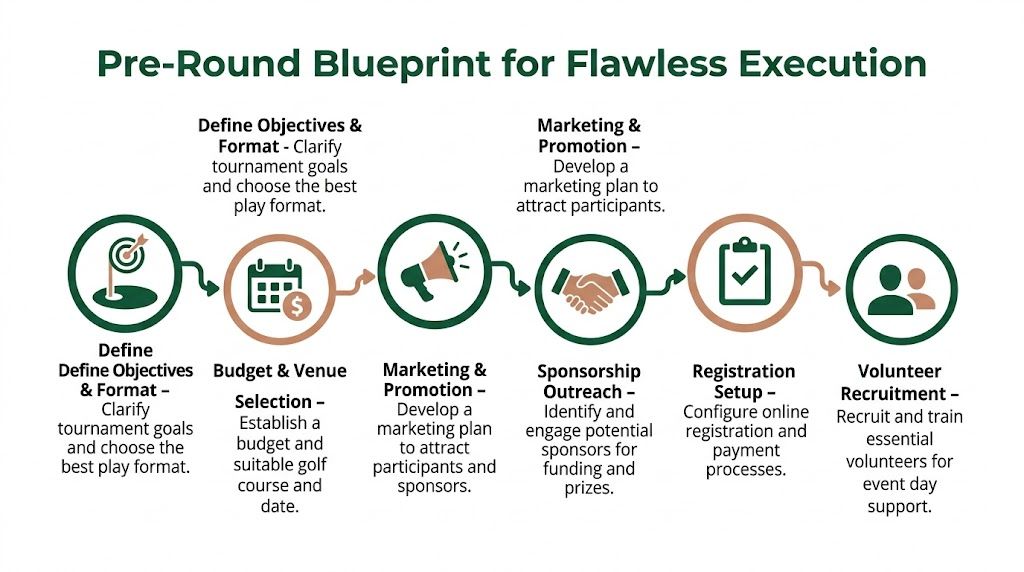
Pre-Round Blueprint for Flawless Execution
A good tournament day starts with decisions made early and clearly. Most problems on event day are planning mistakes that show up late.
The first two decisions matter more than people think. Pick the right format for your audience, then build promotion around the experience you’re offering.
Choose a format players will enjoy
A format should match the field, not just the organizer’s preference. If the field includes mixed abilities, a straight gross event can lose half the room before the first tee shot. If the outing is social, a technical competition can flatten the mood.
Here’s a practical starting point.
Format | Description | Best For |
|---|---|---|
Scramble | Team format where players hit, choose the best shot, and play from there | Charity events, corporate outings, mixed-skill groups |
Best Ball | Each player plays their own ball, best score on the hole counts for the team | Member events, more competitive team days |
Stableford | Players earn points based on hole-by-hole performance rather than raw total strokes | Fields that want pace and less blow-up-hole frustration |
Stroke Play | Standard total-score competition | Club championships, serious individual competition |
Match Play | Head-to-head competition by hole | Season-long brackets, rivalry events, member competitions |
Round Robin | Scheduled matches across a group or pod structure | Leagues, team series, recurring local golf tournaments |
If you’re building pairings or pods for recurring matchups, this round robin scheduling guide is useful for structuring the event before you open registration.
Match the event to the market
Promotion gets easier when the format and audience line up.
Big tournaments prove the point. The 2025 AT&T Pebble Beach Pro-Am drew 60,000 to 80,000 attendees, and on-course participation in golf reached 29.1 million in 2025, with 3.3 million beginners starting annually since 2020, according to golf attendance data compiled here. Local events operate on a different scale, but the lesson is the same. Golf brings people out when the event feels accessible and engaging.
For local golf tournaments, that usually means one of three positioning angles:
Competition-first: Club championship, member-member, season points race
Community-first: Charity outing, alumni event, municipal course open day
Beginner-friendly: 9-hole social event, mixed format night, new-player league kickoff
Promotion that actually fills the field
Most courses under-promote events by relying on a flyer and one social post. That approach misses players who would sign up if the invitation felt complete and easy to act on.
Build the promotional package around clarity:
Event page: Include date, format, handicap policy, entry details, schedule, prizes, and what players receive
Email push: Send one launch email, one reminder, and one final-call message
Social support: Post simple updates with registration deadlines and format highlights
Pro shop script: Give staff a short explanation so they can answer questions the same way
Sponsor visibility: Mention sponsor inclusions early if they improve value for players
The easier it is to understand your tournament in one glance, the easier it is to fill.
Avoid the common planning misses
The same pre-round issues keep showing up:
Too many divisions too early: Keep the structure simple until you know the field size.
No weather plan: Decide in advance how delays, rainouts, and shortened rounds will be handled.
Unclear handicap rules: Publish them before registration opens.
Weak communication rhythm: Players shouldn’t have to call the shop to ask what happens next.
Clean planning does two things. It reduces staff scrambling, and it gives players confidence that the event will run properly.
Streamline Your Setup with Smart Registration and Pairings
A tournament can look organized on paper and still fall apart in setup.
The trouble usually starts with scattered registration data. One player emails a partner request. Another pays in the shop. A sponsor sends a last-minute foursome in a spreadsheet. Staff then spend hours cleaning names, checking handicaps, updating tee times, and making sure the same player is not listed three different ways.
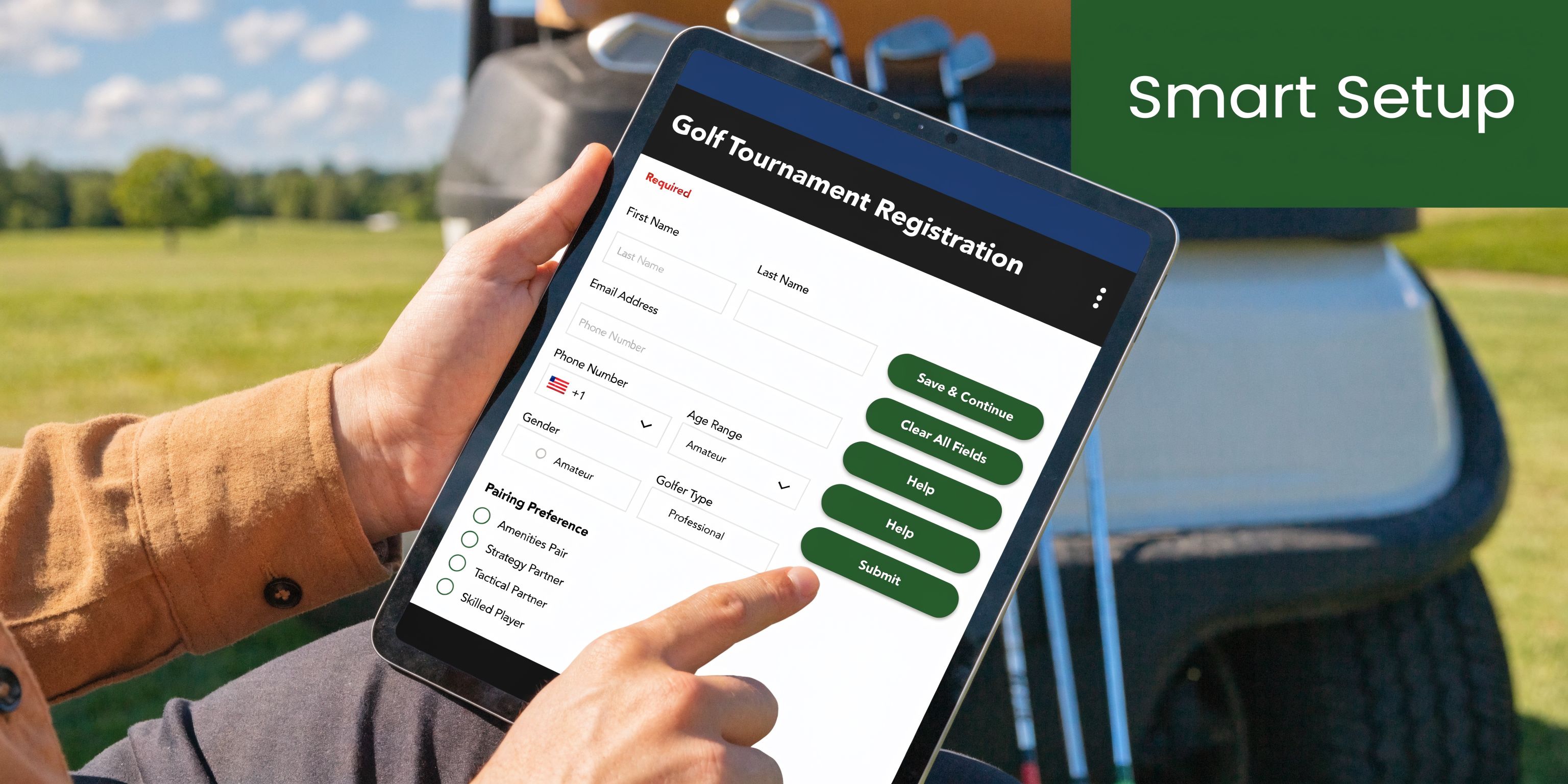
Registration should capture usable data the first time
A good registration flow does more than reserve a spot. It collects the details staff need to run the event without follow-up calls and manual cleanup.
That means gathering:
Player details: Full name, email, phone, and GHIN or handicap info if needed
Event details: Division, tee preference, membership status, and eligibility notes
Team details: Partner requests, team name, sponsor group, or pairing restrictions
Operations details: Cart needs, dietary notes, guest status, and special requests
Payment details: Paid, unpaid, sponsor-covered, comped, or pending
If that information comes in through paper forms, inbox threads, and pro shop notes, errors are almost guaranteed. A single online registration path cuts re-entry and gives staff one clean roster to work from.
Pairings need a repeatable system
Pairings are where many local events lose credibility. If groups are built from memory and a spreadsheet, players notice the inconsistencies fast. Strong teams get stacked in one wave. Flights feel uneven. A late withdrawal forces staff to rebuild everything by hand.
The fix is not fancy math. It is clear pairing rules.
Use criteria that match the event:
Scrambles: Balance teams by handicap or player ability unless the event allows self-selected groups
Stroke play: Set flights from a locked handicap date and keep the cutoffs consistent
Member events: Account for pace-of-play issues and recurring pairing conflicts
Corporate outings: Protect sponsor relationships first, then sort for pace and course flow
League events need another layer. If you run recurring match play, use a fair rotation instead of remaking matches every week. This guide on how to create a round robin schedule is a practical model for setting that up.
Players will accept almost any format if the pairing logic is clear and applied evenly.
Modern software removes the rework
The old method treats registration, pairings, tee sheets, cart signs, and scoring as separate jobs. That is why one late roster change turns into five updates.
Live Tourney keeps those pieces connected in one web-based workflow. Staff can import or build a roster, assign teams and pairings, generate tee sheets, and update event materials from the same source. That matters because local tournaments do not struggle with planning ideas. They struggle with version control.
I have seen staff spend an hour fixing a single foursome change because the pairing sheet, cart list, and printed player materials all lived in different files. A connected system cuts that problem down to one edit.
Plan for changes before they happen
Every field changes. Someone drops out. A sponsor adds guests. A handicap gets corrected after registration closes. The question is whether your setup can absorb the change without creating new mistakes.
A workable process should let staff:
Update one roster
Rebuild pairings without starting over
Refresh tee sheets and player-facing materials quickly
Keep the shop, starter, and event staff on the same version
That is the key upgrade in a modern tournament setup. Staff hours go down, and players stop feeling the back-office chaos.
Habits worth dropping
A few setup habits create more work than they save:
Collecting entries from multiple channels
Building pairings in a standalone spreadsheet
Reviewing handicaps only after registration closes
Printing tee sheets before the roster is stable
Treating sponsor additions like exceptions instead of expected changes
Clean setup is not about adding more admin. It is about removing avoidable work so the event feels organized to players and manageable for staff.
Mastering Tournament Day with App-Free Live Scoring
Tournament day should feel busy, not frantic.
The best-run local golf tournaments have a certain rhythm. Check-in moves. Players know where to go. Cart signs match the tee sheet. Staff aren’t buried in questions because the event materials are already clear. By the time the first group goes off, the operation feels settled.

Start the day with a clean check-in line
Most check-in problems come from missing information or disconnected materials. If the roster, pairings, and player notes were handled properly before the event, the desk work becomes simple.
Use a short operating sequence:
Verify arrivals quickly: Name, team, and any open balance if needed
Hand out the right materials: Scorecards, cart assignments, rules sheet, contests
Confirm scoring method: Tell players exactly how scores will be entered
Answer one question once: If players are confused about format, put the answer on paper and on the starter script
The less interpretation your staff has to do live, the smoother the front end runs.
Why app-free scoring changes the day
App-required scoring loses people before the round starts. Someone forgot their password. Someone refuses the download. Someone has no storage left on their phone. Someone says they’ll “just write it down” and enter it later.
That’s why browser-based scoring works better in practice. Players tap a link and score. No install. No extra training. No delay.
Platforms using that approach have shown 40% higher participation in live scoring, with more than 1 million holes scored, and setup that is 3x faster than legacy software, according to this overview of app-free golf tournament scoring workflows.
If players can open the leaderboard the same way they open a text message, adoption goes up.
What players like about live leaderboards
Players don’t need every stat on earth. They want a clear view of where they stand.
A live leaderboard creates energy in a way paper scoring can’t. Teams know whether a birdie matters. Flights can see movement. Organizers stop fielding constant “who’s leading?” questions.
That matters even more in formats where momentum is part of the fun:
Ryder Cup style events
Skins games
Multi-flight outings
Round robin match days
Member-guest and member-member formats
What staff gain from player-entered scoring
The player-facing excitement is obvious. The staff benefit is even bigger.
When scores go directly into the system during the round, staff don’t spend the final hour collecting cards and entering totals hole by hole. They spend that time monitoring exceptions, resolving rules issues, and preparing awards.
That’s a much better use of trained staff than typing numbers into a screen while the banquet room waits.
A practical tournament-day scoring routine
Assign a scoring contact for each group or team.
Distribute the link at check-in and again on the starter sheet.
Tell groups when to enter scores, such as after each hole or every few holes.
Monitor the board centrally so staff can spot missing groups or odd entries.
Use the paper card as backup, not the primary scoring method.
What doesn’t work on event day
A few habits still cause unnecessary problems:
Complicated instructions: If scoring needs a long explanation, players won’t use it correctly.
Too many scoring channels: Don’t let some groups text scores, others use paper, and others use a portal.
Late leaderboard setup: If the board isn’t ready before the first tee time, you’ve already lost momentum.
No backup plan: Keep a paper option available in case a group has device trouble.
Tournament day is easier when the scoring method is simple enough that players don’t have to think about it. That’s a key advantage of app-free systems. They fit the day instead of disrupting it.
Beyond the Final Putt Payouts and Post-Event Reporting
The most painful part of many local golf tournaments starts after golf is over.
Players walk in, ask who won, ask what they made in skins, ask whether flights are final, and ask when results will be posted. If scores are still trapped on paper, staff are now doing math under pressure in front of the room.

Close out the competition before energy drops
Fast closeout matters because the room has a short attention span after the round.
A solid post-event workflow should handle these tasks in order:
Lock the final scores
Resolve any obvious discrepancies
Finalize flights or divisions
Calculate payouts and side games
Publish results
Send follow-up communication
If your scoring and roster data are already in one place, this becomes administrative review. If not, it becomes reconstruction.
Payout logic needs to be consistent
Nothing creates distrust faster than a payout process that feels improvised.
Set the rules before the event starts. That includes ties, skins carryovers if used, net and gross treatment, and whether contest prizes are cumulative or exclusive. Once the round is over, staff should be applying rules, not inventing them.
Use a repeatable structure:
Main competition: Gross, net, or team result
Flights: Separate results if the field size supports it
Side games: Skins, closest to the pin, longest drive, or other on-course contests
Special awards: Sponsor prizes, raffle items, and volunteer recognition if relevant
Players can accept almost any payout structure if it was clear in advance and applied the same way to everyone.
Reporting should help next time, not just this time
Most tournaments throw away useful information after the awards finish. That’s a mistake.
Post-event reporting should answer practical questions:
Which format moved fastest?
Which divisions filled easily?
Which sponsor package got the most visibility?
Which communication sent the most player questions?
Which holes caused the most confusion for scoring or contests?
That review is how recurring events improve. It’s also how you stop repeating operational mistakes.
Don’t end with silence
The event isn’t done when the trophies are handed out. Follow-up is part of the player experience.
A simple closeout message should include:
Final standings
Thank-you note
Sponsor recognition
Photo link if available
Save-the-date for the next event
That message keeps the tournament alive for another day or two. It also gives players something easy to share.
The operational win
The primary value of a modern post-round system is simple. Staff stop spending the evening calculating and recopying results.
Instead, they review, confirm, publish, and move on. That’s how a tournament finishes with confidence instead of fatigue.
The New Standard for Local Golf Tournaments
A local event used to get by with a spreadsheet, printed scorecards, and one staff member piecing everything together at the table after the round. That no longer holds up. Players notice delays, scoring confusion, and payout questions right away. Staff feel it even earlier.
Players now expect a tournament to run cleanly from signup to scoring to awards. They do not want to download a clunky app, stand around waiting for results, or guess whether pairings and payouts were handled the same way for everyone. Course teams do not want another event built on paper sheets, handwritten notes, and last-minute fixes.
That shift reflects the scale of everyday golf. In the United States, golfers posted a record 82 million scores in 2025, and 94.4% of those rounds were recreational under the World Handicap System. 9-hole rounds reached 14,998,824, which was a 5% increase from 2024 and more than 46% higher than 2020, according to the USGA’s report on 2025 score posting and participation. Local tournaments sit inside that volume. More casual players are entering organized events, and they bring the same expectations they have for every other part of the golf experience. Clear communication. Fast answers. Results they can trust.
What the new standard looks like
The new standard is simple to spot.
Registration collects the right information the first time. Pairings carry through without rework. Scoring is easy to access from a phone browser, so players can participate without installing anything. Standings are ready while the event still has momentum, not an hour later after someone finishes manual entry in the shop.
None of that is flashy. It is disciplined operations.
Why this matters for operators
For head pros, tournament staff, and course operators, modernizing local golf tournaments is a time decision as much as a player-experience decision. Every manual workaround creates another chance for error under pressure. Every extra question at check-in slows the line. Every score entered after the round extends the day for staff who were already on site before sunrise.
Clean systems change that.
Staff spend less time chasing admin work
Players ask fewer repeat questions
Scoring and payouts hold up better under scrutiny
It becomes easier to get players back for the next event
Repeat participation usually comes from one thing. The day felt organized.
Keep the technology simple
I have seen operators reject good tools because they assumed new software would create a training problem. Sometimes that concern is valid. If the system takes too many clicks, needs an app install, or forces staff to maintain duplicate records, it adds work instead of removing it.
The right platform does the opposite. It cuts out handoffs. It keeps registration, pairings, scoring, and reporting connected. It gives players a smoother day and gives staff fewer moving pieces to manage when the course gets busy.
Modern tournament operations should reduce staff workload while making the player experience more dependable.
Raise the floor first
Do not start by redesigning every event format or adding extras players did not ask for. Start with the points that create the most friction on a normal tournament day.
Online registration instead of scattered intake
Connected pairings instead of manual sheets
Browser-based live scoring instead of post-round data entry
Structured closeout instead of end-of-day math
That alone raises the quality of the event. It saves hours for staff, cuts avoidable mistakes, and gives players a day that feels organized from start to finish.
The new standard is defined by clean execution that saves time and gives players a better experience.
If you’re ready to run local golf tournaments with less manual work and a better player experience, take a look at Live Tourney. It’s a web-based option for registration, pairings, live scoring, and post-event reporting that fits the practical needs of courses, clubs, and outing organizers.





