Apr 10, 2026
Discover what golf handicap freeware can and can't do for your course. Learn its limits for tournaments and when to upgrade to a professional platform.

You can tell when a course has outgrown spreadsheets.
The signs are familiar. Staff are rechecking handicap numbers at the counter. A player is waiting on a net score correction. Someone in the shop is trying to match scorecards to pairings while a volunteer asks which tees a flight should use. The event still gets on the board, but it feels more like recovery than control.
That is when a lot of operators start searching for golf handicap freeware.
The search makes sense. Free tools look like a practical middle step between paper and a full tournament platform. For the right job, some of them are useful. But for tournament operations, the question is not whether freeware can calculate a handicap. The question is whether it can support registration, scoring, verification, communication, and live event control without creating new problems behind the scenes.
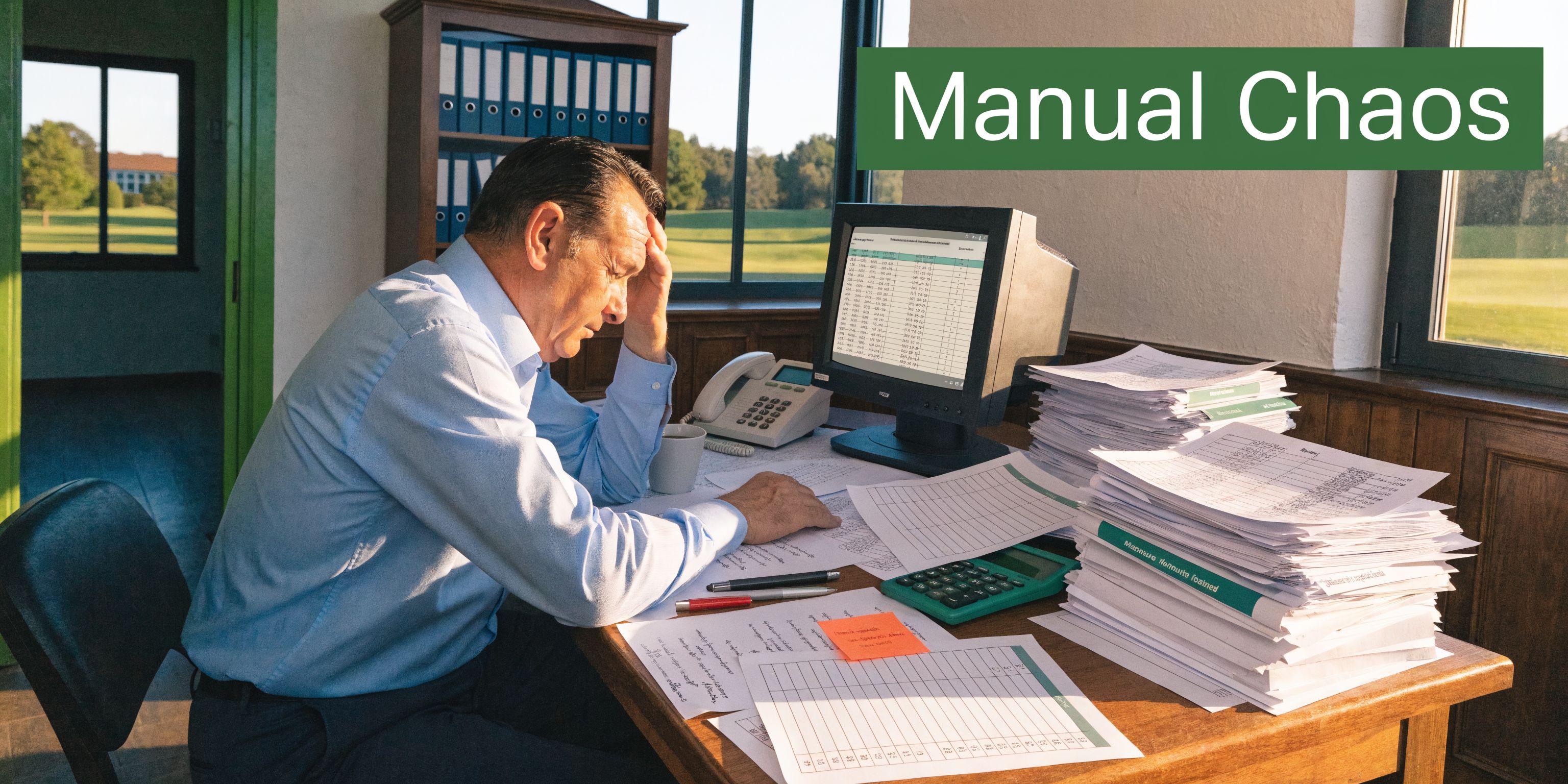
The Manual Handicap Headache
On tournament morning, the trouble rarely starts with one big failure. It starts with a chain of small ones.
A member emails a revised index the night before. Another player writes an old number on the signup sheet. A staff member copies a figure from one spreadsheet to another and misses a decimal. Net scores still get produced, but now everyone wants to know whether they can trust them.
Where the day starts slipping
Most operators do not begin with bad systems. They begin with systems that were good enough for smaller events.
A simple member-guest becomes a league playoff. A charity outing adds side games, multiple divisions, and net prizes. Suddenly, the old workflow depends on one person who knows where everything lives. If that person gets pulled to the counter, the event slows down.
The primary headache is not the math alone. It is the handoff.
One person prints scorecards. Another checks handicaps. A third enters totals. If those people are not working from the same live record, every correction turns into a scavenger hunt across paper sheets, text messages, and separate files.
Why freeware looks attractive
Here, golf handicap freeware gets attention. It promises a cleaner way to store scores, calculate indexes, and move away from manual lookups.
For a small social group, that can be enough. If the goal is to track rounds and generate a reasonable handicap for casual play, freeware can remove a lot of drudgery. It can also bring some consistency to a process that was previously handled with guesswork.
Practical takeaway: Operators usually do not look for freeware because they want free software. They look for it because they want fewer moving parts on event day.
The issue is that tournament operations are not just handicap operations.
You are managing player records, tee assignments, score verification, net calculations, format rules, and often a stream of questions from golfers who expect quick answers. A tool that solves only one slice of that workflow can still leave the hardest parts untouched.
That is why some courses feel temporary relief after adopting freeware, then run into the same stress during the next larger event. The handicap number may be easier to produce. The event itself is not necessarily easier to run.
Understanding Golf Handicap Freeware
Registration closes in an hour. A player walks up asking why his course handicap changed from last month, and your staff is staring at a free app that tracks his scores well enough but does not explain the event-side conversion clearly. That is the moment golf handicap freeware stops being a golfer convenience and becomes an operations question.
Golf handicap freeware usually sits between a simple calculator and a full event platform. In practice, most of these tools are built for individual score tracking first. A player enters rounds, the software applies a handicap formula, and the app returns an index or estimate that is easier to maintain than paper records. Some are older desktop programs. Others are browser tools or mobile apps.
That design choice matters.
For casual groups, freeware can do a respectable job. A golfer wants a place to log rounds, see trends, and keep a current number for weekend games. Free tools handle that well enough, especially if the player understands what the number is and is not.
What these tools usually do well
The best freeware products remove friction from score entry and basic handicap maintenance. They give golfers one place to store rounds instead of spreading scores across paper cards, notes apps, and texts to the club pro.
Some also follow familiar WHS-style calculation logic, which is why golfers tend to trust them for informal play. If you need a quick refresher on the formula itself, this guide on how to calculate golf handicaps is a useful operational primer.
That said, operators should judge freeware by the admin workload it removes, not by how clean the player screen looks.
How the calculation works in plain terms
Handicap software interprets scores through course difficulty, not raw scoring alone. Course rating and slope matter because an 85 from one set of tees does not necessarily mean the same thing as an 85 from another.
A typical WHS-style process works like this:
Scores are entered: The player logs adjusted score details from each round.
Course difficulty is applied: The software factors in course rating and slope.
Better recent differentials carry more weight: The calculation looks at stronger scoring records instead of treating every round equally.
An index is produced: That index is later converted into a course handicap for a specific event setup.
For personal tracking, that can be perfectly acceptable. The underlying logic is not fake by default. The trouble starts when event staff assume a mathematically sound handicap calculator is also an event-ready operations tool.
Where tournament operators get caught out
Freeware is a broad category, and that label hides a lot of variation. Some products are quick calculators. Some are score journals with handicap features. Some are freemium apps that reserve exports, admin controls, or shared access for paid tiers.
From a tournament desk, those differences create trade-offs. A golfer only needs his own record to be accurate. An operator needs every player record to be current, explainable, and available to multiple staff members at once. If one volunteer can view the handicap history but another cannot adjust pairings or verify a tee set, the free tool has solved a narrow problem and left the expensive one in place.
Speed matters too. In event operations, a slow system can introduce hidden costs. Delays at check-in turn into backed-up tee sheets, rushed rulings, and avoidable disputes over net scores.
Freeware can be legitimate. It is often useful for golfers and small groups. For tournament operators, the key question is narrower and more practical: does this tool support the handicap calculation inside the full event workflow, or does it leave staff to patch the rest together by hand?
Evaluating Common Freeware Capabilities and Limits
A lot of confusion comes from judging freeware by its best screen instead of its full workflow.
The best screen is usually the handicap screen. It looks clean. It calculates an index. It may even generate a certificate. For an individual golfer, that can feel complete.
For an operator, it is only one piece.
What typical freeware usually includes
Most golf handicap freeware products offer some mix of these basics:
Feature | Typical Golf Handicap Freeware | Professional Tournament Platform |
|---|---|---|
Handicap calculation | Usually yes, often for individual tracking | Yes, tied directly to event setup and scoring |
Round history | Usually yes | Yes, with event context |
Player database | Basic, often individual-focused | Built for roster management and event administration |
Live leaderboard | Rare or limited | Standard expectation |
Group scoring workflows | Often manual | Designed for staff and player coordination |
Multi-round event control | Limited | Core function |
Pairings and flights | Often outside scope | Built in |
Format support | Usually basic stroke play logic | Supports varied formats and side games |
Shared staff access | Often weak or inconsistent | Expected across devices |
That gap becomes obvious as soon as the event stops being simple.
A player tracking app may do an acceptable job recording scores for one golfer. It usually does not know how to organize a full field, apply event rules, and keep multiple staff members aligned from check-in through payout.
The solo golfer problem
Freeware is strongest when one person controls the data.
That is why it works better for personal handicap maintenance than tournament administration. Once several players, staff members, or volunteers are involved, manual friction increases fast.
One source puts that plainly. Free tools are 85% accurate for solo handicaps, but drop to 45% effectiveness for group events because of manual entry errors and lack of integration, and setup time can be 3x higher than with integrated platforms (Golf Software Review summary via referenced video source).
Those numbers fit what many operators already feel. The handicap itself may not be wildly wrong. The process around it becomes fragile.
Operational limits that show up fast
In practice, freeware often falls short in the same places:
Pairings control: You still end up exporting names or rebuilding groups elsewhere.
Format support: Match play, Ryder Cup formats, and multi-round structures are often outside the product’s strengths.
Live adjustments: Last-minute player changes usually require manual intervention.
Scoring visibility: Staff and players may not share the same real-time view.
Event documentation: Tee sheets, cart signs, and scorecards often live in separate tools.
That separation creates hidden labor. The software may be free, but your staff time is not.
This is similar to web operations. In digital businesses, a slow system can introduce hidden costs even before anyone sees an invoice. Tournament software works the same way. Delay, rework, and fragmented tools show up as labor cost, player frustration, and preventable mistakes.
Key point: The biggest weakness in golf handicap freeware is not that it calculates badly for everyone. It is that it rarely manages the event around the calculation.
The practical line
For small societies and casual leagues, freeware can still be enough.
If the group is comfortable with some manual oversight, a free handicap tool may be a reasonable bridge between paper and a more advanced system. But once the course is hosting events where speed, transparency, and polished execution matter, the limits stop being theoretical.
They become the reason the shop phone keeps ringing during scoring.
The Hidden Risks of Using Freeware for Tournaments
At 4:40 p.m., the scoring table is backed up, two teams are questioning net totals, and the golf shop is trying to confirm whether a player’s handicap is acceptable for prizes. In that moment, freeware stops feeling free. It becomes an operations problem.
Tournament operators usually discover the risk on event day, not during setup. A handicap tool can look fine in a demo or work well for a casual group, then create delays once several staff members need the same records, players expect quick answers, and every correction affects pairings, payouts, or flight results.
Local data creates live-event bottlenecks
Many free handicap tools were built for one user on one computer. That can be manageable for personal recordkeeping. It is a poor fit for tournament administration.
If the roster, indexes, and notes sit on a single machine, staff end up passing files around, reading updates over the phone, or waiting for one person to make changes. Those workarounds slow down registration, delay scoring decisions, and increase the chance that someone is working from an outdated version.
The problem is not aesthetics. It is control.
A tournament needs shared visibility. The golf shop, starter, and scoring table should be able to confirm the same player details without hunting through emails or printed sheets. Freeware often leaves that coordination to staff discipline, which is risky in a busy event.
Handicap validity creates the hardest disputes
The most uncomfortable conversations usually start after scores are posted.
Players often assume any app-generated handicap should count. Operators know the standard is narrower than that. For net events, member-guest competitions, and any tournament with prizes or formal conditions, the primary issue is whether the handicap used for competition is recognized under the event’s rules.
As noted earlier, player confusion around official handicap status is common, and that confusion lands on staff once results are on the line (18Birdies handicap overview). If your committee has not set a clear policy before the first tee time, the scoring table ends up settling a software dispute instead of running the event.
For operators handling questions about score acceptance and timing, this guide to posting a golf score correctly is useful background.
Operator rule: If a handicap affects prizes, flights, or net results, verify the source before the round, not after the complaints start.
Freeware failures get expensive when the field gets bigger
A casual weekend game can absorb a few manual fixes. A tournament with multiple flights, side games, or consecutive rounds cannot.
Scale adds pressure in places freeware rarely handles well. Staff need simultaneous access. Handicap changes need a clear audit trail. Tee assignments, pairings, and results need to stay aligned when a player withdraws, shows up late, or gets moved to a different division.
Common trouble spots show up fast:
Version conflicts: One staff member updates a player record while another prints from an older file.
Unclear handicap source: A player shows a number on a phone, but no one can confirm whether it meets event rules.
Last-minute edits: A substitution or correction forces manual changes across multiple documents.
Result challenges: Once net payouts are involved, every missing note and unexplained adjustment becomes a credibility issue.
I have seen operators spend far more time defending a result than producing it. That labor never appears on a software pricing page, but it is still a cost.
There is also the reputational hit. Players will tolerate a slow beverage cart. They will not forget a tournament that looked disorganized at scoring. When handicap records are murky and answers come slowly, confidence in the entire event drops.
Freeware can still serve a small group that accepts manual oversight. For tournament operators responsible for pace, accuracy, and a professional finish, the hidden cost is not the download. It is the cleanup.
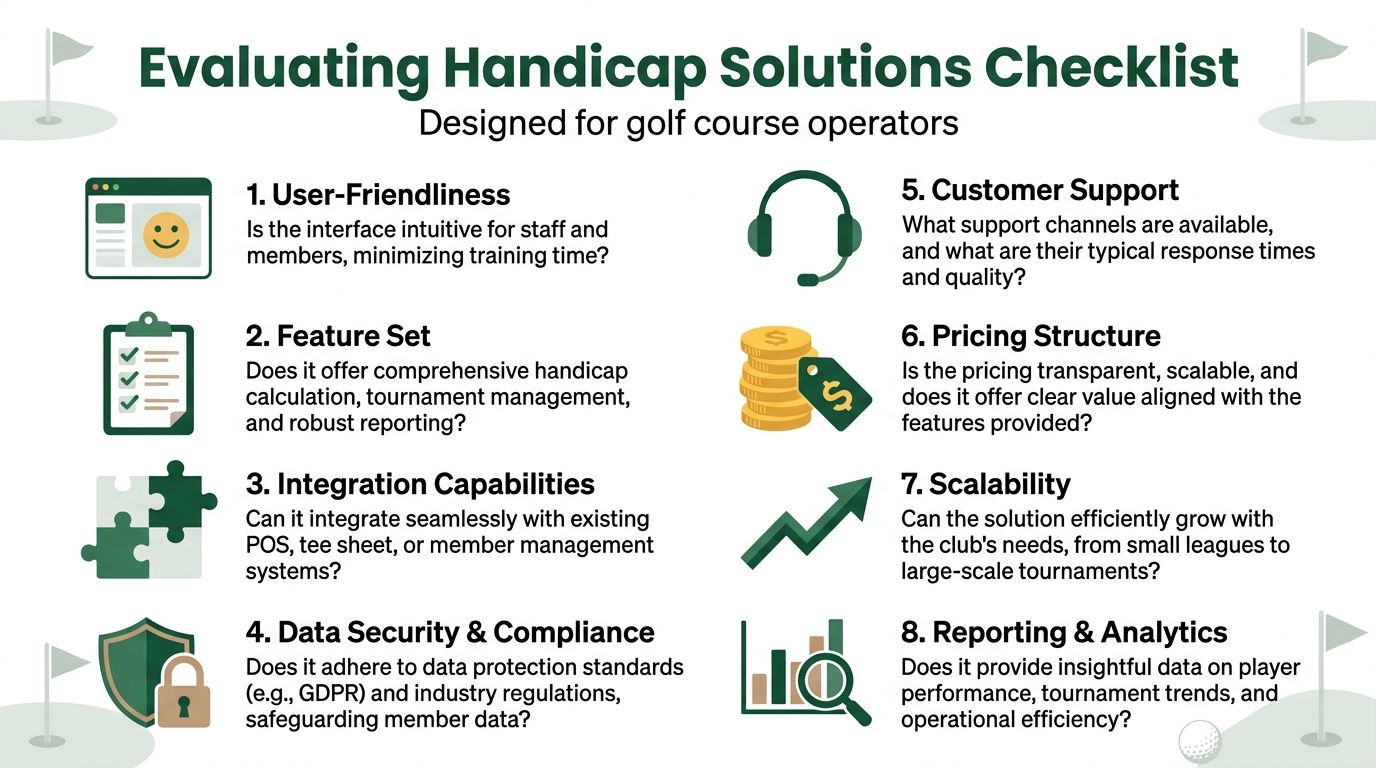
A Practical Checklist for Evaluating Handicap Solutions
Registration closes at 5:00, a player withdraws at 6:15, two handicaps need verification at 6:40, and the starter wants clean pairings before the first group goes out. That is the test. Any handicap solution you choose has to stay accurate when the event is already under pressure.
Operators usually do not struggle with finding a handicap calculator. They struggle with finding a system that holds up when staff, volunteers, and players all need answers at the same time.
Start with access and control
Access problems create scoring problems.
Ask two plain questions first. Where does the data live, and who can change it? If the file sits on one shop computer, or one staff member has to relay every update, you already have a bottleneck. That may be manageable for a casual outing. It is a poor setup for a multi-flight tournament with live changes.
Check these points early:
Multi-device access: Can the golf shop, starter, scoring table, and event lead view the same event record from different devices?
Real-time updates: When a player changes tees, withdraws, or gets reassigned, does every screen reflect it right away?
Permission control: Can volunteers enter scores without getting access to player records, setup rules, or payout data?
Data export: Can you pull your player list and event history out without a messy manual rebuild?
Evaluate the event workflow
A handicap tool can still be the wrong fit.
Tournament work depends on sequence. Registration feeds pairings. Pairings feed score entry. Score entry feeds results, skins, flight standings, and payout reviews. If the software handles only the handicap number, staff end up stitching the rest together with spreadsheets, printed sheets, text messages, and last-minute rekeying.
That is where mistakes usually start.
Use questions that reflect real event-day work:
Registration handling: Can the system keep player details, divisions, and special requests in one place?
Pairings support: Can staff build and revise groups without copying names between separate files?
Format coverage: Does it support the event formats your course runs, including team play, flights, and side games?
Scoring flow: Can scores be entered quickly during play and reviewed cleanly at the end?
Look at the failure points, not just the feature list
Feature lists are easy to read. Failure points are what save an event.
I look for the moments where staff usually lose time or credibility. Can the software show where a handicap came from? Can someone review an edit after the fact? Can you produce pairings, score sheets, and final results without formatting them by hand five minutes before distribution? Can a new staff member learn the workflow without slowing down the shop?
Those details decide whether the tool reduces work or just relocates it.
Review these areas carefully:
Handicap verification: Can staff confirm that a player's handicap fits the event rules you set?
Audit trail: Does the system show who changed a record and when?
Reporting output: Can it generate the documents your team uses on tournament day?
Support availability: If something breaks before tee-off, is there anyone to contact?
Scalability: Will the same process still work when the field grows or the event format gets more complicated?
The checklist operators should keep handy
Use this list before you commit to freeware, a lightweight app, or a full tournament platform:
Can more than one staff member work from the same event data without version confusion?
Can the system handle the formats, divisions, and side games we already run?
Can we verify handicaps in a way that stands up if results are questioned?
Can staff and players use it quickly on a busy event morning without extra training?
Can we make late changes without rebuilding pairings, score sheets, or reports by hand?
Can it produce the operational documents the event requires, not just handicap numbers?
Can it support our next larger event, or will we be shopping again next season?
A lot of freeware misses this checklist because it was built for individual record-keeping, not event operations. That does not make it useless. It makes it expensive in staff time once tournaments become more complex.
Planning Your Migration from Freeware to a Tournament Platform
Moving away from freeware feels bigger than it usually is.
Most operators worry about losing player history, confusing staff, or creating disruption during the season. Those are valid concerns. The good news is that migration usually goes best when you treat it as a process upgrade, not a software swap.

Step one is cleaning the data
Do not migrate clutter.
Before you move anything, review your player records and event templates. Remove duplicates. Check naming consistency. Decide which data is still useful and which data was only kept because the old system made deletion risky.
The goal is not to preserve every quirk from the old process. It is to carry forward what your staff needs.
A good pre-migration review should cover:
Active player records
Current handicap references
League and tournament templates
Common report outputs
Recurring event notes and setup preferences
Test with a real past event
Do not judge a new platform with a blank demo alone.
Take a tournament you already ran. Build that event in the trial environment. Use your groupings, scoring rules, flights, and edge cases. If the software works only in a clean sample scenario, that tells you very little.
A replay test exposes the issues that matter:
Last-minute withdrawals
Pairing changes
Division handling
Mid-event score edits
Final leaderboard verification
That kind of testing gives staff confidence because they can compare the new workflow against something they already understand.
Roll out in phases
Courses get into trouble when they try to change everything at once.
A cleaner approach is to start with a contained event. Use a smaller league, an internal staff event, or a low-risk outing to establish the routine. Once the staff can manage setup, scoring, and reporting without friction, move the platform into larger tournaments.
This phased approach usually works best:
Pilot on a small event: Focus on roster setup and live scoring flow.
Train the core staff: Get the golf shop and event lead comfortable first.
Standardize templates: Save repeatable settings for common event types.
Expand to signature events: Once the process is stable, use it for larger fields.
Tip: The first successful rollout matters more than the first ambitious rollout.
Communicate the change clearly
Players do not need a software lecture. They need confidence that the event will be easier to follow.
Staff need something slightly different. They need to know who owns setup, who handles scoring oversight, and what to do when a player asks for help. Keep that communication simple and role-based.
Useful migration messages include:
For staff: What changed in the daily process, and where to find event data
For players: How to access scoring and leaderboards
For leadership: What time is being saved and what manual work is being removed
A migration succeeds when the new workflow becomes less visible, not more visible. If players notice anything, it should be that results are easier to follow and event questions get answered faster.
The strongest sign that a course has migrated well is simple. Staff stop inventing workarounds.
Choosing the Right Tool for a Professional Experience
The trouble usually shows up at the worst possible moment. Cards are coming in, a playoff scenario is developing, and someone on staff is still checking whether a free handicap tool matches the event's scoring setup. Players do not see the spreadsheet tabs, the copied handicap indexes, or the last-minute manual corrections. They only see delays, confusion, and a leaderboard they are not sure they can trust.
Golf handicap freeware still has a place. For casual play or a small group that can tolerate manual oversight, it can be a reasonable starting point. It proves golfers are comfortable with digital handicap tracking, and for an individual player, that may be enough.
Tournament operations are different.
An event team needs more than a handicap calculator. It needs controlled setup, consistent player data, scoring oversight, and results that hold up when prizes, flights, and net standings are on the line. If the software handles only one part of that chain, staff end up stitching the rest together by hand. That creates workload before the event and risk during it.
The right choice depends on what kind of experience your course is trying to deliver. A small informal outing can survive with freeware and a staff member who knows how to check everything twice. A member event, association tournament, corporate outing, or charity fundraiser usually cannot. Once expectations include live scoring, clear leaderboards, and quick dispute resolution, the software has to support the whole operation.
That is why I look at event software through an operator's lens first. Can staff set up formats without workarounds? Can they trust the handicap inputs used for net results? Can they monitor scoring without chasing players or rebuilding reports after the round? If the answer is no, the lower price at signup rarely stays low in practice.
A useful next step is to compare your current process against what solid golf tournament management software is expected to handle across registration, scoring, leaderboard management, and post-event reporting.
The better tool is the one that removes event-day labor, reduces scoring disputes, and gives players confidence that the competition is being run properly.
If your course is ready to move beyond spreadsheets and pieced-together golf handicap freeware, Live Tourney is worth a look. It gives operators a web-based way to run tournaments, leagues, and outings with real-time scoring, flexible formats, and simple setup on any device, with no app downloads required. For teams that want a more professional event experience without adding complexity, it is a practical next step.