Mar 6, 2026
Learn to design, print, and deploy flawless golf cart signs. This guide offers practical tips for creating professional signs that impress players and sponsors.
Golf cart signs are the printed materials you see attached to every cart at a tournament, usually showing player names, hole assignments, and sponsor logos. They are absolutely essential for organizing events, speeding up the start of play, and giving your tournament a professional touch that makes a great first impression.
Why Great Golf Cart Signs Are a Game Changer

It’s always the small details that separate a good golf tournament from a truly great one. And one of the most impactful—yet often overlooked—details is a set of professional, well-executed golf cart signs. Think of them as more than just labels; they're the first real touchpoint for your players and a powerful tool for keeping your event running smoothly.
Ever seen the chaos of a shotgun start? Players are scrambling, asking where their cart is or what hole they start on. Now, picture a perfectly staged fleet of carts, each with a crisp, clear sign displaying names and assignments. That simple piece of paper transforms potential chaos into a smooth, impressive start, setting a positive tone for the whole day.
Elevating the Player Experience
A well-designed sign does a lot more than just direct traffic. It instantly makes each participant feel like a VIP. When a player walks up and sees their name professionally printed and waiting for them, it creates a sense of importance. This is a game-changer for corporate outings and charity fundraisers, where making your guests feel valued is the top priority.
This kind of attention to detail sends a clear message: your event is buttoned-up and you care about the player experience. It’s a subtle but powerful way to build goodwill and elevate your brand, whether you’re a high-end country club or a local charity. For a deeper look at event planning, check out our complete guide on how to organize a golf tournament.
Boosting Operational Efficiency
The benefits go way beyond just how players feel. For your tournament staff, clear signage is a massive time-saver. It streamlines check-in, cuts down on repetitive questions, and helps get golfers to their starting holes faster. That kind of efficiency is critical on tournament day.
The golf cart is central to the modern game—the global market is projected to hit USD 1.79 billion by 2026, serving the 15,332+ courses in the U.S. alone. Based on our own data at Live Tourney, we’ve found that using customizable, easy-to-read signs can slash on-course confusion by up to 40%. That’s a huge win for any event organizer.
The real return on investment for quality golf cart signs is measured in saved time, reduced stress, and happier players. It's a small effort that pays huge dividends in event quality.
Designing Signs That Actually Get Read
When it comes to golf cart signs, function always trumps flash. It’s tempting to create a mini-masterpiece, but the real goal is dead-simple communication. This is your guide to designing cart signs that look professional but, more importantly, get players where they need to go without any confusion.
The key is scannability. Picture a golfer walking down a long line of carts. They should be able to spot their name from several feet away. That means using a clean layout, smart font choices, and a clear visual hierarchy to make the information pop.
Balancing Essential and Optional Details
Here’s the most common mistake we see: trying to cram way too much information onto a small sign. The result is a cluttered mess that nobody can read, which completely defeats the purpose. A good design starts by separating the "must-haves" from the "nice-to-haves."
What’s absolutely essential?
Player Names: This is the #1 priority. Make them big and bold. It's the first thing anyone looks for.
Starting Hole: For any shotgun start, this is non-negotiable. It needs to be prominent and easy to spot.
Cart Number: If you’re assigning specific carts, this is just as critical as the hole assignment.
These are the core details. Everything else is secondary and should take a backseat in your design.
The ultimate test is simple: Can a player find their name and starting hole in less than 3 seconds? If not, it’s time to simplify your design.
Of course, secondary info can add a nice touch. Tee times are great for rolling starts, and sponsor logos are a fantastic way to deliver value. But they can't overpower the essential details. A sponsor logo is great, but it shouldn't be bigger than the player's name.
If you really want to dial in your designs, it’s worth learning a few principles of high-impact graphic design layouts. The same rules that make billboards effective apply here, just on a much smaller scale.
Layout and Font Best Practices
A strong layout guides the eye right where you want it to go. Always put the most important information—the player names—at the very top in the largest font. A good rule of thumb is to make the names at least twice the size of any other text on the sign.
For fonts, stick with clean, sans-serif options. Think Arial, Helvetica, or Open Sans. They’re far more readable from a distance than fancy script fonts.
To help you prioritize, here’s a quick reference table breaking down what really matters on your signs.
Essential vs. Optional Information for Your Cart Signs
Information Element | Priority Level | Best Practice Tip |
|---|---|---|
Player Names | Essential | Use a large, bold font. Place them right at the top. |
Starting Hole/Cart # | Essential | Make this highly visible, often in a corner or right by the names. |
Sponsor Logo(s) | Optional | Place at the bottom or side, ensuring it's smaller than the player names. |
Event/Tourney Name | Optional | Can work as a header, but keep it a modest size. Don't let it compete for attention. |
Flight or Division | Nice-to-Have | Only include if it's crucial for organization. Use a small, clean font. |
This structured approach makes everything easier to read and digest at a glance.
This is the same thinking that goes into designing other key tournament materials. In fact, many of these design rules also apply to figuring out the best golf scorecard layout. Clarity is king. Follow these tips, and you’ll create signs that look great, cut down on confusion, and help your event run like clockwork.
How to Automate Your Cart Sign Creation
I’ve seen it a hundred times: a well-meaning tournament organizer, buried in a spreadsheet, manually typing out player names for cart signs. It's a recipe for disaster. This old-school approach is not just a massive time sink; it’s a direct path to typos, last-minute panic, and confusion on tournament day.
There's a much better way. Modern tournament software completely eliminates this headache. Instead of entering data over and over, you use the software as the single source of truth for all your player info. Upload your roster once, and the platform does the heavy lifting, automatically filling your signs with the right names, pairings, and hole assignments.
The Automated Workflow Explained
The process is refreshingly simple. Once your player roster and pairings are set in the system, you just head over to the report or sign builder. Think of it like a mail merge for your tournament—it pulls the data directly from your master list and drops it into your sign template.
This guarantees 100% accuracy between your tee sheet and your signs. Someone drops out at the last minute? No problem. Just update the roster, and the software instantly regenerates the correct sign. This is a game-changer for event staff, freeing them from the soul-crushing task of proofreading every single sign. You can see how this fits into the bigger picture in our guide to golf tournament management software.
This flow chart breaks down just how simple it is. You move from gathering information to finalizing the layout in a few quick steps.
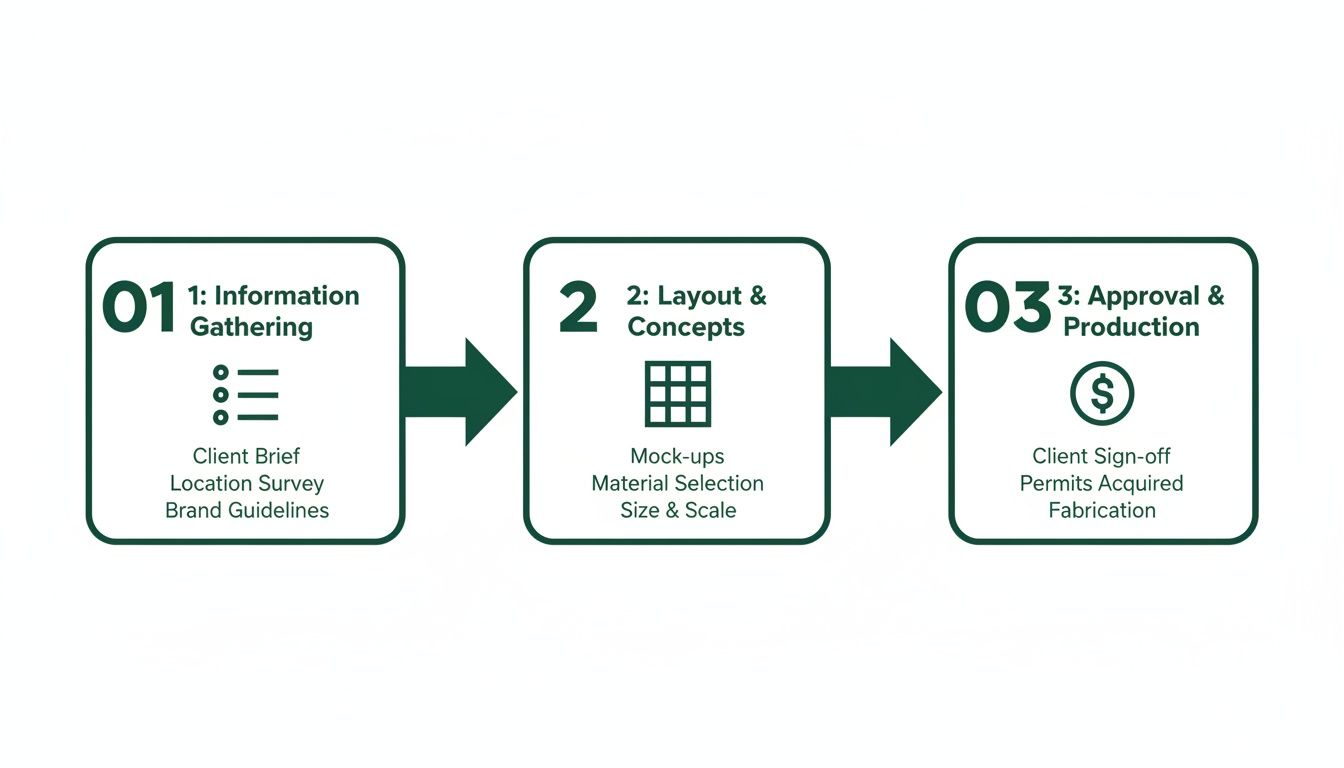
The real magic here is turning a tedious, complex task into a quick and manageable one. The time savings are enormous.
Customization Meets Efficiency
Let's be clear: automation doesn't mean your signs have to look generic. Good tournament software, like Live Tourney, includes a report builder that gives you full control over the final product.
You can easily:
Adjust layouts to fit your event's brand and style.
Add sponsor logos to deliver real value and drive revenue.
Include other details like the tournament name, date, or special rules.
The difference is, you only have to design the template once. The software then applies that design across every sign, saving you hours of repetitive clicking. For those who use other design tools, you can get similar time-saving benefits if you learn how to automate Canva for personalized images at scale for creating other custom graphics.
Automation isn't just about going faster—it's about accuracy and freeing up your people. Instead of your staff spending hours hunting for typos, they can focus on high-impact tasks that actually improve the player experience.
Ultimately, this approach takes sign creation from a major logistical hurdle and turns it into a simple task that takes just a few minutes. You can produce professional, accurate, and fully customized golf cart signs with almost no effort, ensuring a smooth start to your event. Your time is far better spent greeting players, not fighting with a printer.
Choosing the Right Materials for Printing
You’ve got your cart sign design dialed in. Now, how do you actually get these things printed and ready for tournament day? The paper and materials you choose are a bigger deal than you might think—they directly affect how professional your event feels and how well your signs hold up.
Your choice really comes down to balancing cost, weather, and the overall impression you want to leave with your players.
Basic, Better, and Best Options
The quickest and cheapest route is to use standard 8.5" x 11" office paper. For a small, casual outing on a perfectly sunny day, this can work just fine. But be warned: it’s the least durable option out there. A bit of morning dew or a gust of wind can leave your signs looking sad and wilted before the first group even tees off.
For a noticeable upgrade, go with cardstock. It’s much sturdier than regular paper and holds up better against a little humidity or a breeze. A 65 lb or 80 lb stock is a great choice—it feels substantial but is still thin enough to run through most office printers without jamming.
If you want your signs to look pristine from start to finish, laminating your cardstock is the gold standard. This creates a fully waterproof and tear-proof sign that can handle rain, humidity, and anything else the day throws at it. Lamination also adds a professional sheen that makes your logos and colors really stand out.
A small investment in lamination can be the difference between a soggy, unreadable sign and one that looks sharp all day. It’s a detail that tells your players you’ve got everything covered.
When it comes to printing, doing it in-house is fine for smaller batches. But if you’re running a larger event, sending the job to a professional print shop saves you a ton of time and hassle while delivering a higher-quality result.
Comparing Cart Sign Material Options
To help you decide, here's a quick breakdown of the most common material choices. Consider your budget, the weather forecast, and the level of professionalism you're aiming for.
Material | Durability | Professionalism | Best For |
|---|---|---|---|
Standard Paper | Low | Low | Small, informal events with tight budgets and perfect weather. |
Cardstock | Medium | Medium | The go-to for most events; a solid balance of cost and resilience. |
Laminated Cardstock | High | High | Corporate outings, charity events, or any tournament where a premium look and weatherproofing are essential. |
Ultimately, choosing the right material shows you care about the details, which is a key part of creating a great player experience.
Attaching Signs to the Carts
Once your signs are printed, you need a solid plan for attaching them to the carts. The last thing you want is staff scrambling on tournament morning trying to figure out what works.
Here are the most common methods:
Plastic Sleeves: These are clear, rigid holders that clip or slide onto the cart's windshield. They offer fantastic protection and look incredibly clean. The only catch is you need to make sure the sleeves fit the specific carts at your host course.
Binder Clips: The old standby. They’re cheap, easy, and get the job done for clipping paper or cardstock to the windshield frame. It’s not the slickest look, but it’s reliable.
Adhesive Holders: Some organizers use temporary adhesive clips or pockets. These can look great but be careful—you need to make sure they can be removed cleanly without leaving sticky residue on the carts.
Getting these small details right is what separates a good event from a great one. It’s a key factor in the global golf market, which was valued at USD 2.3 billion in 2025 and is on track to hit USD 3.6 billion by 2034. With 15,332 courses in North America alone, competition is fierce.
Platforms like Live Tourney have streamlined the sign creation process for over 10,000 outings, and we’ve seen that well-executed materials contribute to a 40% increase in live scoring adoption. For more on industry trends, check out the latest reports from IMARC Group.
A Proven Workflow for Tournament Day Distribution

You've designed and printed the perfect cart signs. Now for the final hurdle: getting them on the right carts without creating a total logjam on tournament morning. A fantastic sign is useless if it causes chaos.
Believe me, I've seen it happen. A battle-tested workflow is your best defense against the frantic scramble of players searching for their carts. It's what separates a polished, professional event from a stressful one.
This whole process starts way before the first golfer shows up. The single most important thing you can do is sort your printed signs based on the tournament format. This one step dictates the entire flow of your morning.
Sorting for a Seamless Start
For a shotgun start, you should always sort your signs numerically by the starting hole number. This lets your team stage the carts in a logical sequence that matches how players will head out to the course. Carts for hole 1A and 1B are lined up together, followed by 2A and 2B, and so on down the line. It just makes sense.
But for events with tee times, the strategy is completely different. Here, you’ll want to sort the signs alphabetically by the last name of one player in each group. When players arrive for their tee time, they can quickly find their name in the alphabetized staging area, hop in their cart, and get to the first tee without any drama.
The Power of a Dedicated Team
Whatever you do, don't try to handle sign placement by yourself. Assign a dedicated volunteer or staff member (or a small team if it's a big event) to be in charge of cart signs. Their only job should be getting the right sign on the right cart.
Give this team a master cart staging map that you’ve created with the course staff. This map should clearly lay out where each group of carts will be parked. This takes all the guesswork out of it and empowers your team to work fast.
Well-managed signs are dynamic tools that slash setup time and boost player engagement. The right process transforms a chaotic outing into a polished operation. This mirrors the growth of the golf cart industry itself, which is projected to climb from USD 1.41 billion in 2021 to USD 2 billion by 2030. If you want to dive deeper, you can explore detailed golf cart statistics and facts.
Handling Last-Minute Changes Gracefully
No matter how buttoned-up your plan is, last-minute changes are going to happen. Someone gets sick, a client is running late, or a pairing needs a quick swap. The key isn't to prevent them—it's to have a system ready to handle them.
Here’s a simple, effective method that works every time:
Bring a printer. Have a printer ready to go at the registration table. When a change comes through, you can quickly edit the pairing in your tournament software and print a new sign on the spot.
Keep blank signs handy. Always have a small stack of blank cardstock and a few sharpies nearby. In a real pinch, a neatly handwritten sign is way better than no sign at all.
Communicate with your team. Use a walkie-talkie or a group chat to immediately tell your cart sign team about any changes. They can then find the cart and swap out the old sign for the new one, preventing any player confusion before it starts.
This structured approach to distribution ensures your tournament starts smoothly, reinforcing that professional image you've worked so hard to create.
Common Questions About Golf Cart Signs
Even with the best-laid plans, things always come up in the final stretch of tournament prep. When it comes to golf cart signs, we see the same few questions and pain points surface for almost every organizer.
Here are some quick, practical answers to the most common questions we hear. Getting these details right will save you a ton of stress on tournament morning.
What Do I Do About Last-Minute Player Changes?
This is the number one source of anxiety for tournament organizers, and for good reason. The good news is, handling last-minute player changes is simple if you’re prepared. The key is to treat your tournament management software as the single source of truth.
When a player inevitably drops out or a pairing gets shuffled, make that change in your software first. This keeps your master roster, tee sheet, and live leaderboards accurate from the start.
Your best defense against last-minute chaos is a small, dedicated setup at your registration table. A laptop connected to your software and a reliable printer are your two most valuable tools on tournament day.
With this station ready to go, you can print a new, correct sign in seconds. It’s also smart to have a stack of blank cardstock and a sharpie on hand for absolute emergencies. A neat, handwritten sign is always better than sending players to the wrong cart or leaving them confused.
How Far in Advance Should I Print My Signs?
Printing cart signs should be one of the very last things you do. You want to wait until your pairings are as close to final as you can possibly get.
For most tournaments, printing them 24 to 48 hours before the event is the sweet spot. This window gives you a buffer to catch the majority of last-minute cancellations while still leaving plenty of time to print, sort, and organize the signs for placement. Printing any earlier is just asking to reprint a huge stack of signs.
Should My Signs Be One-Sided or Two-Sided?
The right answer here depends entirely on how the golf course stages its carts for the event.
One-Sided Signs: These are perfect if carts are staged in a single-file line where only one side is visible to players as they walk up. It saves on ink and printing time.
Two-Sided Signs: If carts are staged in a large, open area or parked back-to-back in rows, two-sided signs are a must. They guarantee players can spot their names no matter which direction they approach from.
Always confirm the cart staging plan with the golf course staff beforehand. It’s a simple conversation that can prevent a massive logistical headache and ensure a smooth start for everyone. Making the right call here shows a level of attention to detail that elevates the entire experience.
Ready to stop worrying about manual sign creation and last-minute errors? Live Tourney automates the entire process, letting you generate professional, accurate golf cart signs, tee sheets, and scorecards in just minutes. See how easy it is to run a flawless event by visiting https://livetourney.com.