
Mar 22, 2026
Elevate your tournament with our guide to GHIN post score procedures. Learn player posting, bulk exports, and troubleshooting for seamless handicap management.

If there's one thing that can make or break the integrity of your tournament, it’s the handicap system. For tournament directors, making sure every valid score gets posted to GHIN isn't just an administrative chore—it's the bedrock of fair competition.
This process upholds the trust of your players and the credibility of your entire event.
Why Accurate Scores Are Everything in a Tournament

The entire handicap system is designed to create a level playing field, letting a 20-handicap player go head-to-head with a scratch golfer. It's the great equalizer.
But when scores are missed or posted incorrectly, that system falls apart. Handicaps get skewed, and players start questioning whether the competition is truly fair. The ghin post score process is what keeps everything honest.
A Long Tradition of Fair Play
This idea isn't new. The USGA created its first official handicap system way back in 1911 to solve a simple problem: golfers of all skill levels wanted a fair way to compete.
By 1912, the first handicap list was out, covering 324 member clubs and setting the stage for events like the U.S. Amateur. That history matters because it established a core principle that’s still true today: handicapping makes golf accessible to everyone.
When you and your committee enforce that every score gets posted, you're honoring that tradition. It’s a clear signal that you value fairness above all else.
The bottom line: An accurate handicap system is the foundation of a great tournament. As a director, your commitment to the
ghin post scoreprocess directly shapes the integrity of your events and the trust your players have in you.
From Paper and Pencils to Modern Tech
We’ve come a long way from handwritten scorecards and manual math. The World Handicap System (WHS), which rolled out in 2020, brought different global systems under one roof, making the ghin post score function more critical than ever.
Now, the system updates daily. A score posted today literally changes a player's Handicap Index for tomorrow. This speed is huge, especially for multi-day events where a player's Course Handicap could change overnight based on their previous round's score.
This puts a few key responsibilities on your plate:
Enforce the Rules: Make sure all acceptable tournament scores are posted. This should be a non-negotiable condition of the competition.
Educate Your Players: Make it clear whether players are expected to post their own scores or if the committee will handle it for them. No ambiguity.
Keep Data Clean: Double-check that the score, date, and course info are all correct before anything gets submitted. Garbage in, garbage out. You might also want to check out our deep dive on the fundamentals of scoring in a golf tournament.
Mastering the ghin post score process isn't optional for running a modern tournament. It's how you put the century-old principle of fair play into action.
How Players Can Post Scores Themselves

As a tournament director, one of the best things you can do for your sanity is to get players to post their own scores. When everyone knows how to handle their own ghin post score entry, it means you aren't stuck chasing down old scorecards and manually punching in dozens of rounds.
Players have three main ways to get it done: the GHIN mobile app, the GHIN website, or the posting kiosk at a club. They're all pretty simple, but walking your players through the process ahead of time can save you from a lot of headaches and ensure every score gets recorded correctly.
Using The GHIN Mobile App
The official GHIN mobile app is, by far, the easiest and most common way for players to post. Most golfers have their phones with them anyway, so they can log their score the second they walk off the 18th green.
Once they're logged in, it's a piece of cake:
Log In: Players just need their GHIN number and the password for their digital profile. They can hit "Remember Me" so they don't have to do it every single time.
Tap 'Post Score': There’s a big, obvious button on the app's home screen to get started.
Select The Course: They can search for the course or, even better, the app will show recently played courses to make it fast.
Choose A Posting Method: The app gives them a choice: hole-by-hole, hole-by-hole with stats, or just the total score.
You should always push for the hole-by-hole option. This is a huge time-saver because the app automatically handles all the weird score adjustments required by the World Handicap System. The player doesn’t have to do any math, and you know the score is compliant.
Posting On The GHIN Website
For anyone who prefers a computer or maybe just left their phone in the car, the official GHIN website works just as well. The process is almost identical to the app, making it a great backup plan.
After logging in with their GHIN number and password, they’ll see a "Post a Score" button right on the dashboard. From there, it’s the same drill: select the date, find the course and tees, and enter the score. Just like the app, the website offers both hole-by-hole and total score entry.
Key Takeaway: Both the GHIN app and website automatically calculate a player's score differential using the Course Rating and Slope Rating. This is what makes sure every
ghin post scoreis standardized properly for their handicap.
Understanding The Adjusted Gross Score
This is the part that trips up so many golfers, especially if they opt to post a total score instead of going hole-by-hole. The score you enter into GHIN isn't always what you actually shot—it's your Adjusted Gross Score.
The adjustment is all about a rule called Net Double Bogey. It sets a maximum score on any single hole for handicap purposes. The formula is: Par of the hole + 2 (for Double Bogey) + Any handicap strokes the player gets on that hole.
So, if a player with a 15 Course Handicap makes a 9 on a par-4 where they get one handicap stroke, their max score for that hole is a 7 (Par 4 + Double Bogey 2 + Stroke 1). Even if they wrote a 9 on the card, they have to adjust it down to a 7 when calculating their total for GHIN.
This is exactly why the hole-by-hole posting method is the way to go. It does all this heavy lifting automatically, which is why you should recommend it to every player.
What Makes A Score Postable Under WHS Rules
Not every trip to the course ends with a score you can post to GHIN. Before you even think about the ghin post score process, you need to know if the round itself is valid under the World Handicap System (WHS).
These aren't just arbitrary rules; they're the foundation that keeps the entire handicap system fair and accurate for everyone. If a round doesn't meet these standards, it simply shouldn't be posted.
The Minimum Number of Holes
First things first, you have to play enough holes. The absolute minimum to post a score is 9 holes. An 18-hole score is the standard, of course, but the WHS is built to accommodate shorter rounds.
A 9-hole score is perfectly acceptable. It gets combined with another 9-hole score down the road to create a single 18-hole score differential. This way, even your after-work rounds count.
What about those rounds cut short by darkness or weather after, say, 14 holes? You can still post it. The system takes the scores for the holes you played and calculates a probable score for the ones you missed.
Playing With Others and By The Rules
That peaceful, solo round you played at dawn? Great for the soul, but not postable for your handicap. To be valid, a round must be played with at least one other person. They don't have to be your official marker, but someone needs to be there to provide some peer review.
The round also needs to be played mostly by the Rules of Golf. A casual round with friends might have its share of "mulligans" and generous "gimmes," but a score meant for your handicap needs to reflect a legitimate effort.
The Impact of Course and Slope Rating
A critical piece of the puzzle is that the round must be played on a course with an official Course Rating and Slope Rating. These two numbers are the engine of the WHS, making it possible to compare a score from your easy local muni to one from a U.S. Open venue.
The introduction of the Slope Rating System back in 1987 was a game-changer for the USGA. It finally solved the problem of a 12-handicap from an easy course holding the same value as one from a brutally tough track.
When a player posts their score, the system uses the Course Rating and Slope to calculate a Score Differential. This differential, not the gross score, is what truly matters for handicap calculations. You can explore our guide on how handicap differentials are calculated to better understand the math behind it.
A Quick Guide to Acceptable Scores
Sorting through what is and isn't postable can get confusing. We put together this quick reference table to help you make the right call based on WHS guidelines.
Scenario | Is It Postable | How To Post It |
|---|---|---|
Standard 18-hole round | Yes | Post your 18-hole score. |
Standard 9-hole round | Yes | Post your 9-hole score. |
10-17 holes played | Yes | Post the scores for holes played; the system fills in the rest. |
Playing alone | No | Solo rounds are not acceptable for handicap purposes. |
Match Play (with conceded putts) | Yes | Record your "most likely score" for any holes not completed. |
Four-Ball / Best Ball | Yes | Record your "most likely score" (up to Net Double Bogey) if you pick up. |
Scramble / Shamble | No | These formats don't involve playing your own ball for the entire hole. |
Using non-conforming clubs | No | The round must be played with equipment that conforms to the Rules of Golf. |
This table should clear up most common questions, ensuring that only valid scores make it into the GHIN system.
Scores from Different Formats
A lot of golfers wonder if scores from formats other than basic stroke play count. The answer is often yes, but you have to know how to record your score properly.
Match Play: You're playing a match and your opponent concedes a short putt. You don't just leave the score blank—you record your "most likely score." If you had a two-footer for a 5 and it was conceded, you write down a 5.
Four-Ball (Best Ball): Your partner just drained a birdie putt and you're still in the fairway. If you pick up, you should record your most likely score for that hole, making sure it doesn't exceed your Net Double Bogey limit.
In any format where you don't hole out, the "most likely score" principle is your guide. It’s the key to making sure you can still post a valid round for your handicap.
A Director's Playbook For Bulk Score Posting
If you're a tournament director, you know the headache of chasing down players to make sure they post their scores to GHIN. It’s an administrative nightmare. The best, most reliable approach is for the tournament committee to just own it and post all scores themselves. This guarantees 100% compliance for tournament rounds and protects the integrity of everyone's Handicap Index.
While that might sound like a huge task, it's surprisingly simple if you have the right workflow. The key is using your tournament software to generate a single file that you can upload directly to the USGA’s system. This turns a multi-hour chore into something you can knock out in less than five minutes.
The Foundation: A Clean Data Export
The entire process lives or dies by a clean data export from your tournament management software. Your goal is to create a report—almost always a CSV (Comma Separated Values) file—that has all the information needed for a successful bulk score upload.
Think of this CSV as the universal translator between your tournament software and the GHIN system. When you get the format right, it gives the USGA everything it needs to process every score accurately, no manual work required.
To make this happen, your export file must include these essential data fields for every player:
GHIN Number: The unique ID for each golfer.
Adjusted Gross Score: The final score after Net Double Bogey adjustments.
Course Rating: The rating of the specific tees played.
Slope Rating: The slope of the specific tees played.
Date of Play: The day the round was played.
The switch to the World Handicap System (WHS) back in 2020 unified six different global systems, making this kind of straightforward posting essential for the 25 million+ golfers it covers. The WHS now averages the best 8 of a player's last 20 score differentials, giving a much truer reflection of their potential. Recent updates in 2024 even expanded rules for 9-hole scores and short courses, making the game more accessible.
Setting Up Your Workflow For Success
A smooth bulk posting process starts long before the final putt drops. If you think ahead, you can automate most of the work and sidestep the common traps. It all comes down to making data collection a priority from the very beginning.
The most important step is to collect every player's GHIN number during registration. Make it a required field on your sign-up form. Hunting for numbers after the event is a time-consuming mess. Having this data upfront ensures your roster is complete and ready to go.
Pro Tip: Before you export, run a quick audit of your player roster inside your tournament software. Look for obvious typos in names or GHIN numbers. A single wrong digit can make an upload fail, so a 60-second review can save you a ton of troubleshooting later.
Many modern tournament platforms, including our own golf tournament scoring software, have built-in features to make this easy. They often include a dedicated "GHIN Report" or "Handicap Export" function that spits out a pre-formatted CSV file, so you don’t have to build it from scratch.
This visual guide shows the essential rules that decide if a score is even eligible for posting in the first place.
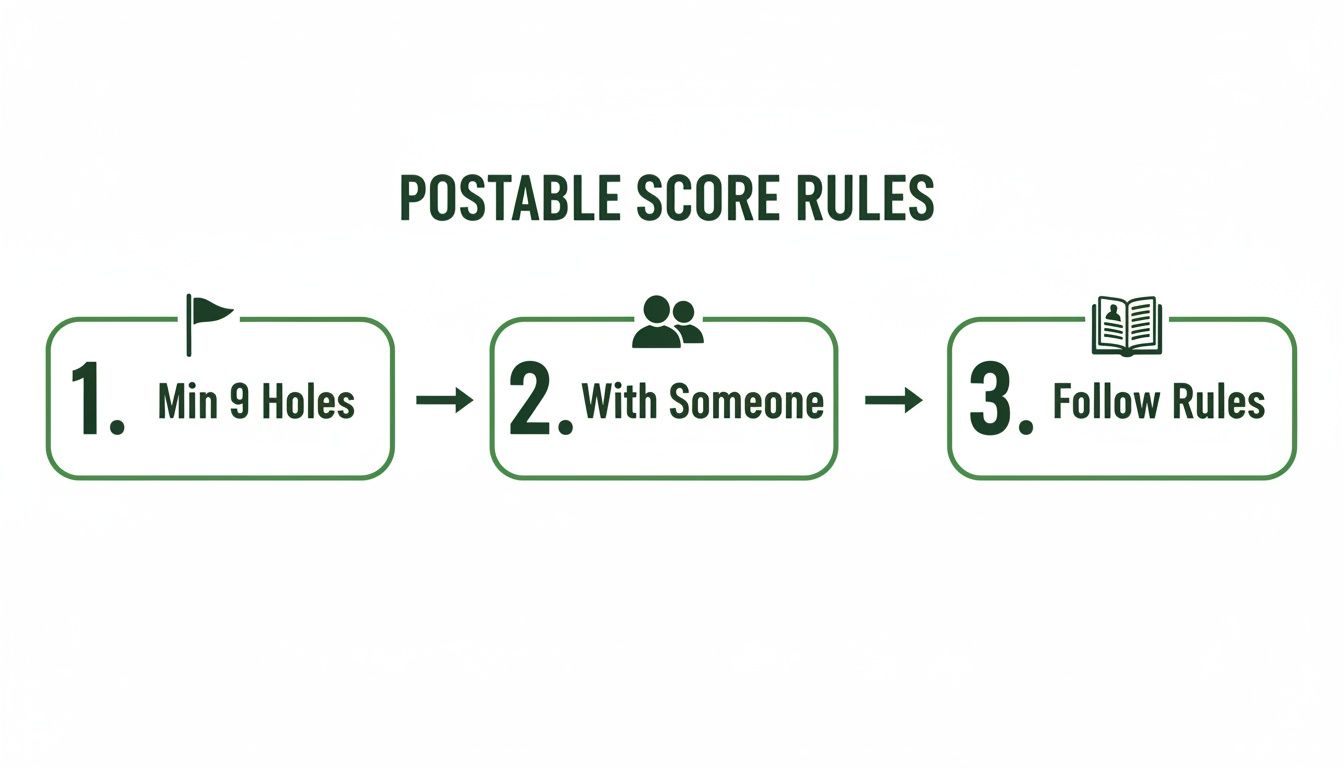
These three core requirements ensure every round meets WHS standards, keeping things fair and consistent.
Ultimately, mastering the bulk score posting method is about being efficient and protecting the integrity of your event. It takes the guesswork out of player-led posting and ensures every legitimate tournament score gets accounted for, reinforcing the fairness of your competition.
Troubleshooting Common GHIN Posting Errors
Even when you’ve run a flawless tournament, things can still go sideways during the bulk upload. A single typo or data mismatch is all it takes to get a score rejected by GHIN, creating a frustrating logjam right at the finish line.
Knowing how to spot and fix these common issues is the key to finalizing your results quickly. Let’s walk through the most frequent problems that pop up and how to solve them so every player's ghin post score is accounted for.
Decoding The "Player Not Found" Error
This is the big one. You submit your file, and the system immediately tells you it can't find half a dozen players. It’s a classic problem, but the fix is almost always simple. In fact, 99% of the time, it boils down to a basic data entry mistake.
The GHIN system is looking for a perfect match to a player's official profile. Any little difference will trigger a "Player Not Found" rejection.
Here are the usual suspects:
A typo in the GHIN Number. This is hands-down the number one cause. One wrong digit or a couple of transposed numbers, and the match fails.
A name mismatch. The name in your tournament software has to be exactly what's in their GHIN profile. If your roster says "Bill" but his profile is "William," it won't work. Same goes for "Robert Smith" vs. "Robert Smith Jr."
An inactive GHIN Number. The player’s handicap status might be inactive, making their number invalid for posting scores until it's reactivated.
To fix it, start by triple-checking the GHIN number in your export file. If that looks right, verify the exact spelling of their first and last name. A quick search on the GHIN website or app is the fastest way to confirm their official profile details.
Handling Scores From Out-Of-State Players
Another common hiccup happens when you have players whose GHIN numbers are from a different state or Allied Golf Association (AGA). Your local system might not recognize them automatically, leading to a posting error.
This happens because different regional associations manage the handicap data, and the communication between them isn’t always instantaneous. If a player from Florida is in your California event, their score might get flagged.
The solution is usually just a checkbox away. Most bulk upload tools from state and regional golf associations have an option to include "out-of-club" or "out-of-state" players. Just make sure that box is checked before you hit submit. This tells the system to expand its search beyond the local database to find the player.
Key Insight: The World Handicap System is universal, but the admin tools can sometimes be regional. Always double-check that your software is set to search for all players, not just local ones. This one small setting change solves the vast majority of these cross-state posting issues.
Correcting A Score After It Has Been Posted
So, a score has been posted, but it's wrong. Maybe a player signed an incorrect scorecard, or someone made a typo during data entry. You have to get it fixed to protect the integrity of that player's handicap.
Luckily, there’s a process for this, but it requires admin access. Players can't edit a score after the fact (though some apps let them delete one immediately after posting if they catch it right away).
As a tournament official or club administrator, you have the power to edit or delete an incorrect score. You’ll need to log into your club's GHIN admin portal, search for the player, and find the specific round in their scoring record. From there, you can either edit the details or remove the score entirely. It's the only official way to fix a score once it's in the system.
Common Questions About Posting Scores to GHIN
Posting scores to GHIN should be straightforward, but a few questions always seem to pop up for both players and tournament directors. Let's clear the air on some of the most frequent ones.
Handicap Index vs. Course Handicap: What's the Deal?
It’s easy to mix these two up, but the distinction is pretty simple.
Think of your Handicap Index as your portable, baseline skill level. It's the number that represents your potential on a course of standard difficulty and travels with you everywhere.
Your Course Handicap is what that index translates to on a specific course, from a specific set of tees, on a specific day. It's adjusted based on the Course and Slope Ratings, giving you the actual number of strokes you get for that round.
How Fast Will My Score Update My Handicap?
Almost instantly. The World Handicap System (WHS) crunches the numbers every single day.
As long as you get your ghin post score entry in before midnight local time, it will be baked into the calculations that run overnight. Your updated Handicap Index will be fresh and ready to go for the next morning.
Can I Post a Score if I Played by Myself?
This is a firm no. A solo round doesn't count for handicap purposes. To ensure the integrity of the system and allow for peer review, the Rules of Golf require you to play with at least one other person.
A common headache for tournament directors is double-posting. What happens when a player and the tournament committee both try to post the same score? Thankfully, the GHIN system has a built-in safety net. It automatically flags and rejects duplicate entries for the same player, course, and date. The first one in is the one that counts.
Managing every single detail of your tournament, from registration to that final score posting, is a huge job. Live Tourney makes it simple with an intuitive, app-free platform that makes running events feel effortless. You can handle rosters, automate scoring, and give every player a professional experience. See how you can transform your next event by trying Live Tourney.





