
Apr 20, 2026
Run your golf tournament with free golf tracking. This DIY guide shows you how to use spreadsheets, forms, and email to manage scoring and leaderboards.

You’re probably here because you want one thing that sounds simple and usually isn’t. You want players to enter scores from their phones, a leaderboard to update without staff hovering over a laptop, and the whole event to look organized without paying for heavyweight software.
That’s a reasonable goal. Free golf tracking has come a long way. Players already use free tools for personal scorekeeping, GPS, handicap monitoring, and stat review, so the idea of stitching together a no-cost tournament workflow feels possible. In many cases, it is possible.
The catch is that “free” usually means you’re replacing software cost with setup time, testing discipline, and a willingness to manage a few rough edges live. If you go in with that mindset, a DIY system can work well for a small outing, a league night, or a straightforward club event. If you expect polished tournament software behavior from a spreadsheet and a form, event day gets stressful fast.
The Allure and Reality of Free Golf Tracking
The classic scene is familiar. Cards come in damp, handwriting is shaky, one foursome forgot to total the back nine, and someone on staff is trying to update a spreadsheet while answering questions about skins. That setup works right up until the moment players start asking for live results.
Free golf tracking is appealing because it promises a cleaner version of that day. And the appeal is grounded in something real. The availability of free golf tracking tools has democratized performance analysis for millions of amateur golfers worldwide, with platforms such as Free Golf Tracker and Greenskeeper.org making detailed handicap and stat monitoring available at no cost, which changed how amateurs improve their games according to Free Golf Tracker.
For individual golfers, that shift has been huge. For organizers, it creates a useful expectation. Players are already comfortable entering scores on phones and checking stats online. That means you’re not introducing a foreign behavior. You’re adapting an existing one for an event.
Free works best when the tournament format is simple and the staff member running scoring is organized before the first tee time.
There’s also a less glamorous side. A free setup usually has no built-in guardrails for group assignments, no elegant correction workflow, and no real buffer for operator error. One broken formula can reshuffle a leaderboard in public. One badly designed form can let a player post a score for the wrong hole, wrong partner, or wrong team.
If you’ve ever looked at paid platforms and then backed away at the last minute, that’s understandable. There’s room in the middle. A DIY approach can absolutely get you through an event, especially if your main objective is visible scoring and cleaner collection than paper alone. If you want context on what dedicated systems are built to solve, it’s useful to review what golf tournament management software is designed to handle so you can decide what you’re willing to do manually.
Assembling Your Free Golf Tracking System
A workable DIY setup doesn’t need many parts. It needs the right parts doing narrow jobs.

The core stack
For most events, I’d use these tools:
Google Sheets for the master scoring file, leaderboard logic, roster control, and anything you need to publish.
Google Forms for score entry on phones. It’s simple, familiar, and tied directly to the sheet.
Email or text messaging for one clean distribution link to players and volunteers.
A simple website builder such as Google Sites or Carrd if you want a more polished public leaderboard page.
A backup paper scorecard for every group, even if you hope nobody needs it.
That’s enough to run a basic net or gross event, a scramble, or a simple league round.
Why these tools fit free golf tracking
Google Sheets is the best anchor because it gives you live collaboration, formulas, filters, and publishing options without forcing anyone to install software. It also makes recovery possible. If something goes wrong, you can inspect rows, sort entries by time, and fix bad data manually.
Google Forms is useful because it limits how much players can break. People are much more likely to tap a dropdown and enter one number than edit a live spreadsheet cell correctly on a phone.
Practical rule: Don’t let players touch the leaderboard sheet itself. Let them submit through a form and keep the calculations in a protected tab.
Your communication tool matters more than most organizers expect. The biggest scoring failures often come from sending too many links. Use one message, one scoring link, one leaderboard link, and one fallback contact number.
If your event leans on GPS-based pace or shot-location habits, it helps to understand how GPS trackers work at a practical level. Not because you need a technical deep dive, but because many organizers assume location data is automatically precise enough for every scoring task. It isn’t. For free golf tracking, GPS is excellent for access and convenience, but it’s not a substitute for clean score-entry design.
What to prepare before build day
Create these assets before you start wiring anything together:
Item | Purpose |
|---|---|
Master player list | Standardizes names and prevents duplicate entries |
Group or tee sheet | Tells you who should be scoring for whom |
Format rules | Clarifies gross, net, team best ball, scramble, or quota logic |
Hole-by-hole structure | Keeps entries aligned with front nine, back nine, or full round |
Correction plan | Decides who can fix mistakes and how players report them |
The key trade-off is simple. Free golf tracking gives you flexibility, but it also makes you the system administrator.
Configuring Your Score Collection Engine
The backbone of the whole setup is the spreadsheet. If the sheet is messy, the event will feel messy even if the course operation is smooth.
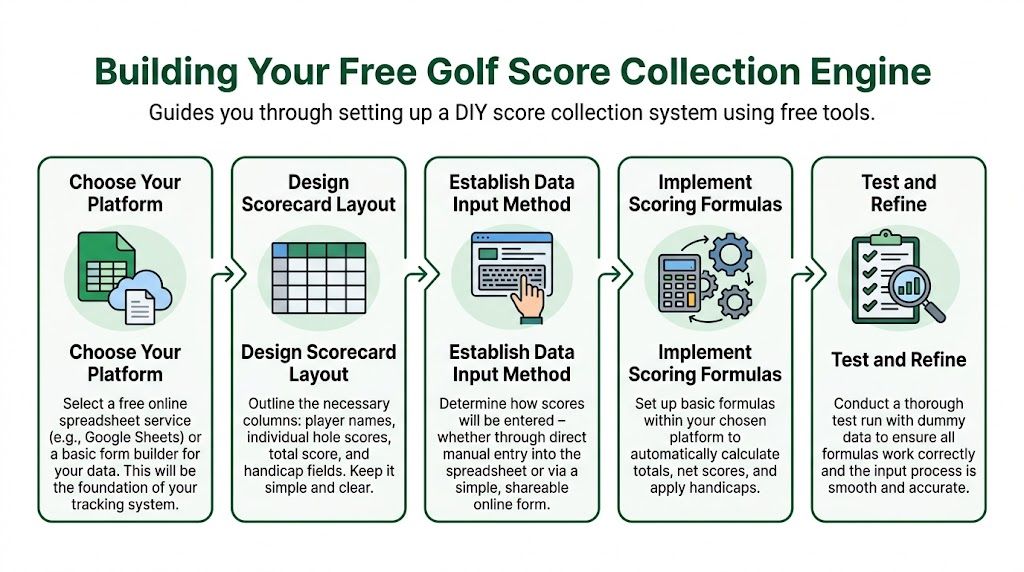
Build the sheet in layers
Don’t make one giant tab that does everything. Use separate tabs with one purpose each.
A clean structure looks like this:
Roster tab
Player name, team name, handicap, flight, tee time, and scorer assignment.Form responses tab
Raw entries from Google Forms. Don’t edit this manually unless you’re correcting an error.Scoring tab
Pulls response data into a cleaner layout for calculations.Leaderboard tab
Displays only the standings players need to see.Admin tab
Notes, format settings, and any lookup tables.
This separation matters. Raw data should stay raw. Presentation should stay presentational.
Set the roster first
Your roster tab should be the source of truth. If “Mike Smith,” “Michael Smith,” and “Smith, Mike” all appear during the event, your free golf tracking system starts duplicating players and breaking formulas.
Include columns such as:
Player name
Team or group
Handicap
Scorer name
Starting hole
Division or flight
Use that tab to power the dropdown choices in your form whenever possible.
Create the form around one scoring action
Most DIY systems fail because the form asks players to do too much at once. Don’t ask for all 18 holes in one submission if you can avoid it. On a phone, shorter forms reduce errors.
A practical form structure is:
Scorer name
Group or team
Hole number
Player A score
Player B score
Player C score
Player D score
If you’re running a scramble, reduce it further:
Scorer name
Team name
Hole number
Team score
That design makes troubleshooting easier because each submission represents one hole.
The best form is usually the one a tired player can complete correctly while walking to the next tee.
Connect calculations without making the sheet fragile
Once responses are landing in the form tab, use formulas in a separate scoring tab to summarize totals.
Useful formulas include:
SUM for front, back, and total score
VLOOKUP to pull handicap or team data from the roster tab
SORT to rank the leaderboard
IF to handle blanks and avoid ugly error chains
ARRAYFORMULA if you’re comfortable automating entire columns
A simple example for total score is straightforward:
Total =
SUM(Hole1:Hole18)
A lookup for handicap can use:
Handicap =
VLOOKUP(PlayerName, RosterRange, ColumnNumber, FALSE)
For a scramble leaderboard, the core logic is usually simpler than people expect. You just need one score per hole, one row per team, and a total.
For a net event, complexity rises quickly. That’s where many organizers underestimate the work involved in golf tournament scoring formats and calculations. Gross scoring is easy to patch manually. Net scoring with flights, pops, and tiebreak logic is where spreadsheet shortcuts start biting back.
Protect the cells that matter
After formulas are in place, protect the tabs and ranges that nobody else should edit. Leave only the form open to the field. If a volunteer or player can type over formulas in the leaderboard tab, someone eventually will.
At minimum, protect:
Leaderboard formulas
Handicap lookup columns
Sorting logic
Published tabs
Then test with fake entries. Enter a clean round. Enter a bad hole. Enter duplicate submissions. Delete one. Correct one. Watch what happens.
Keep the leaderboard readable
Players don’t want your internal logic. They want standings.
Your leaderboard tab should show only a few fields:
Display field | Why it matters |
|---|---|
Rank | Immediate context |
Player or team name | Clear identification |
Through | Tells viewers whether scores are complete |
Total | Main result |
Net or gross label | Prevents confusion |
Hide everything else.
A free golf tracking setup works best when the front end looks smaller than the back end. The organizer can wrestle with formulas. The player should see a clean table and trust it.
Broadcasting a Live Leaderboard for Free
Collecting scores is only half the job. If players can’t see standings without asking the shop, the experience still feels manual.

Publish the right tab, not the whole workbook
In Google Sheets, create a dedicated leaderboard tab with only public-facing information. Then use the publish-to-web function for that tab alone.
That gives you a live-updating page you can share by link. In most DIY tournament setups, that’s enough. Players tap the link and refresh as scores come in.
Don’t publish tabs with phone numbers, handicaps you don’t want visible, internal notes, or raw form data. This sounds obvious, but it’s one of the easiest mistakes to make when you’re moving quickly.
Make the page feel intentional
A bare spreadsheet link works, but a simple wrapper looks more professional. A free Google Sites page or a lightweight Carrd page can hold:
Event name
Leaderboard embed
Format note
Contact line for scoring corrections
That small extra step changes the feel of the event. It tells players this wasn’t assembled in the parking lot.
If you want a sense of how players respond to more immediate scoring experiences, this piece on live hole-by-hole scoring is useful context. The key lesson isn’t the technology itself. It’s that visibility changes engagement. Players follow along more closely when results move during the round.
Share two links, not six
Keep distribution tight:
Link one should be the score-entry form, sent only to scorers or designated players.
Link two should be the public leaderboard, sent to everyone.
That’s it.
If players need to install apps, create logins, or hunt through email chains, participation drops. One reason app-free systems work well is that they remove that friction. If you want to compare that approach with dedicated options built specifically for events, review what golf tournament scoring software typically handles beyond a DIY sheet.
If a player can’t open the leaderboard in one tap, expect someone to ask the shop for scores anyway.
Use a refresh habit
Google-published content is live enough for many events, but it won’t always feel instant in every browser on every phone. Tell players one simple thing in advance: refresh the page after entering scores or checking positions.
That small instruction avoids a lot of “the board isn’t updating” complaints that are really just stale browser views.
Put one person in charge of public accuracy
The leaderboard is public. That changes the standard. If there’s a scoring dispute, one staff member should decide when to correct the sheet and when to wait for card verification.
Free golf tracking can deliver a surprisingly good public experience. But once the board is visible to the field, errors feel larger than they are. You need one operator making calm, consistent calls.
Avoiding Chaos with DIY Tracking Best Practices
DIY scoring usually doesn’t fail because spreadsheets are weak. It fails because nobody designed recovery procedures.
The biggest operational mistake is assuming players will use the form exactly as intended. Some will. Some won’t. A few will enter scores for the wrong hole, post on behalf of the wrong group, or skip the form entirely until three holes later.
Build friction in the right places
You want the form to be easy, but not loose. Good friction prevents bad data.
Use these controls:
Dropdowns for names and teams so people don’t free-type variations.
Required fields for hole number and scorer identity.
Short instructions at the top like “One submission per hole” or “Only the assigned scorer should enter.”
Confirmation message after submit so players know the score posted.
Data validation in the sheet to catch impossible values before they contaminate totals.
A lot of score-entry confusion disappears when one person per group is responsible. That should be decided before tee off, not on the second green.
Test the ugly scenarios
Most organizers test the perfect path. They enter a normal score, watch the leaderboard update, and call it done. That isn’t enough.
Test these instead:
A duplicate hole submission from the same group
A wrong player selected in the form
A scorer with poor cell service who submits late
A team that starts on a different hole
A volunteer who needs to correct a posted score quickly
Those are the moments that reveal whether your free golf tracking setup is resilient or just technically functional.
Your backup plan should fit on one sheet of paper. If it takes a paragraph to explain, nobody will use it under pressure.
Communicate like an operator, not like a marketer
Before the event, send one message that includes:
What to send | Why |
|---|---|
Who enters scores | Prevents duplicate submissions |
When to enter them | Keeps the board current |
The exact scoring link | Removes search friction |
The leaderboard link | Gives players visibility |
A correction contact | Stops public confusion |
Don’t bury these details in a long welcome email. Put the links near the top and use plain language.
Know where free golf tracking stops helping
Basic stats are manageable in a spreadsheet. Advanced performance analysis is a different story.
For tournament organizers using free stat tracking, Strokes Gained reveals performance gaps that basic stats can hide, and players often misread their weaknesses when they rely only on fairways hit and greens in regulation, according to Draw More Circles. That matters because many DIY event systems capture only surface-level scoring data.
If you try to force a spreadsheet into advanced analytics during a live event, you usually end up doing two jobs badly. Keep the event workflow simple. If you want richer player analysis later, treat that as a separate project.
Recognizing the Limits of a Free System
A free setup is a smart move when the event is small, the format is straightforward, and one organized person can supervise scoring. It stops being smart when the workaround becomes the job.

Signs your DIY system is costing too much time
Watch for these trigger points:
You’re running multi-round events and carrying standings from one day to the next.
Your formats are getting more complex, such as match play, Ryder Cup style scoring, or side games that need separate logic.
Registrations and payments are still managed in one tool while scoring lives in another.
Roster changes happen late and force manual updates in several places.
Staff training takes too long because the system only makes sense to the person who built it.
At that stage, “free” often means hidden labor, correction stress, and a public experience that feels less polished than the rest of the operation.
The biggest structural gap
This is the issue that catches many organizers. The integration of free individual golf tracking apps with tournament and league management remains poorly addressed, and those apps are strong for solo use but weak for multi-player events, rosters, and real-time leaderboard needs, leaving operators stuck with paper or paid software despite stronger demand for live scoring engagement, as noted in the Hole19 app context and related event-management gap.
That’s the dividing line.
A personal golf app helps one golfer track one round. A tournament platform has to coordinate a field, enforce structure, and reduce staff intervention. Those aren’t the same job.
Use the right tool for the right season
There’s no shame in starting with a spreadsheet. In fact, it’s often the right first step because it teaches you what your events entail.
But once you’re hosting frequent outings, leagues, or member events, you’ll usually want three things a DIY build struggles to provide consistently:
App-free score entry that players use without coaching
Built-in roster and event controls
A leaderboard that looks finished, not improvised
If your staff keeps saying “we can make it work,” that’s often the moment to ask a harder question. Should they have to?
If your events have outgrown the spreadsheet stage, Live Tourney is worth a look. It gives courses and organizers a simpler way to run tournaments, leagues, and outings with app-free live scoring, real-time leaderboards, and management tools that remove a lot of the manual work described above. It’s a practical next step when you want the event to feel modern without asking staff or players to fight the system.





