
Apr 17, 2026
Digital golf scorecards - Modernize your golf tournaments with digital scorecards. Save time, boost engagement, and discover best practices for platforms and

If you run golf events long enough, you learn where the day really breaks down. It usually isn't the shotgun start. It isn't the lunch service. It's the hour after the round, when carts roll in, paper cards pile up, and your staff turns into a scoring department.
One card is missing a hole. Another has handwriting nobody can read. A team wrote the gross score where the net score should go. Two players disagree on what happened on the par 5. Meanwhile, people are standing near the leaderboard asking when results will be ready, sponsors are waiting for recognition, and the energy that carried the event all afternoon starts to fade.
That's why digital golf scorecards matter. For players, they're convenient. For operators, they're operational control. They cut down the post-round bottleneck, reduce avoidable scoring mistakes, and make the event feel organized from check-in through awards. The biggest mistake I see is treating scoring as a player feature instead of a tournament workflow. The delivery method you choose affects staff time, player adoption, and how much cleanup you'll do in the end.
The End of the Post-Round Scramble
The paper process usually fails in the same order. First, cards come back unevenly. Then somebody has to sort them by flight, team, or format. Then staff members start checking math by hand while groups crowd around asking for standings. If you're running a scramble, a member-guest, or a charity outing, that delay doesn't just slow scoring. It drains the room.
I've seen good events lose momentum because the scoring table became the choke point. Staff members who should be resetting carts, handling sponsor questions, or getting the dinner program lined up end up doing arithmetic and chasing missing information. Players don't see that as a back-office issue. They see it as a disorganized finish.
What the old process really costs
Paper scorecards look simple because the burden is hidden. The work shows up later.
Manual review: Someone has to verify every total, every handicap adjustment, and every side game entry.
Error correction: Illegible cards and incomplete holes create disputes that are hard to solve after the round.
Delayed awards: The longer scoring takes, the harder it is to keep people engaged in the clubhouse.
Staff drag: Your team gets pulled into clerical work instead of player service.
Practical rule: If scoring depends on one table, a calculator, and a stack of cards, the event is more fragile than it looks.
Digital golf scorecards change that dynamic because scores move into the system during the round, not after it. That means fewer surprises at the end. It also means the event feels more professional. Players can see that the operation is under control, and staff can focus on running the day instead of reconstructing it.
A smoother finish looks different
With digital scoring, the round doesn't end in a paperwork rush. Groups enter scores as they play, leaderboard movement is visible, and staff spend the closing stretch reviewing exceptions instead of building results from scratch. The difference isn't cosmetic. It's operational.
That shift is what modernizes tournament management. You're not replacing a piece of paper with a screen. You're removing a workflow bottleneck that has been wasting staff time for years.
What Exactly Are Digital Golf Scorecards
At the simplest level, digital golf scorecards replace the paper card and pencil with a score-entry interface on a phone or tablet. A player opens a link or an app, selects the event or foursome, and enters scores hole by hole. The system stores the round, updates totals, and can feed a live leaderboard.
That sounds basic, but the practical effect is bigger than most operators expect. The scorecard stops being a one-time paper record and becomes part of your event system. Results, standings, pairings, and history all sit in one place instead of being scattered across printed cards, spreadsheets, and staff memory.
Think of the shift like mobile banking
Paper scorecards are a lot like paper checkbooks. They work, but they put the burden on the user to write everything down correctly, carry the record around, and reconcile it later. Digital systems move the recordkeeping into the platform itself.
For tournament golf, that means:
Real-time entry: Scores can be added during the round instead of after it.
Central visibility: Staff can monitor progress and spot missing data before the event ends.
Shared access: Players, organizers, and sometimes sponsors can follow standings without waiting on a scoring table.
Stored history: Results remain accessible after the event instead of disappearing into a drawer or file cabinet.
They aren't just for tech-heavy events
A lot of organizers still assume digital scoring is best suited to competitive members or younger players. In practice, the right setup works for casual outings too. The key is reducing friction. If the scoring method is obvious, mobile-friendly, and easy to access, most groups adapt quickly.
The best digital scorecard is the one players can open and use without asking your staff for help on the first tee.
That's why the delivery method matters so much. Some platforms ask every player to install software, create an account, and learn a new interface. Others let a group open a simple browser page and start scoring immediately. Both are digital, but they create very different experiences for the operator.
What they usually include
A digital scorecard can be as simple or as rich as your event needs. At minimum, it should handle hole-by-hole scoring and totals. In stronger systems, it also supports formats, side games, pairings, and live displays.
For operators, the most important point is this: digital golf scorecards aren't a novelty feature. They're the front-end experience for a broader tournament workflow. If that front end is clunky, your staff absorbs the consequences. If it's clean, your whole event runs better.
Beyond the Score The Transformative Benefits of Going Digital
The operational payoff shows up before the last group reaches 18. A paper event leaves staff waiting on cards, checking math, resolving missing holes, and rebuilding standings at the exact moment players expect answers. A digital scorecard shifts that work into the round, where problems are easier to spot and much cheaper to fix.
Speed and accuracy improve together
Paper scoring creates a lag between play and review. By the time a bad total or wrong handicap reaches the scoring table, the group may already be in the clubhouse and no one is fully confident about what happened on No. 7. Digital entry reduces that gap. Scores are recorded hole by hole, calculations happen automatically, and staff can catch obvious issues while the group is still on the course.
That matters most in events with net scoring, side games, and multiple flights. If the platform applies the rules correctly every time, the staff is no longer stuck doing manual cleanup on the back end. For organizers comparing systems, this breakdown of what a golf tournament scoring app should handle during live play is a useful place to start.
As noted earlier in 18Birdies' overview of digital score tracking, digital platforms can also track more than gross totals, including common stats and handicap-adjusted scoring. The operational benefit is consistency. Staff spend less time recalculating and more time managing the event.
Live scoring changes the event for everyone on site
Players follow the leaderboard more closely when standings update during the round. That part is obvious. The less obvious benefit is what it does for the operation.
The golf shop gets fewer "who's leading?" questions. The scoring table is not buried under a stack of cards all at once. The awards portion starts faster because results are already close to final.
It also changes the energy in the room. Players walk in talking about the event they just watched unfold, not waiting around while staff piece it together after the fact.
Live scoring keeps the competition visible and cuts the post-round bottleneck that slows down the entire day.
Better data helps operators, not just players
Digital scorecards collect information that paper usually loses or hides. That can help players review trends over time, but from an operator's side, the bigger win is visibility into the event itself.
You can see which groups are entering scores consistently, where corrections keep happening, and whether a format is creating confusion. Over a season, that helps refine setup, simplify rules sheets, and reduce avoidable questions at check-in. Paper cards give you results. Digital records give you something you can improve from event to event.
The event feels tighter and more professional
Players notice the finish, even if they never see the workflow behind it. Fast results, fewer scoring disputes, and a live board in the clubhouse all signal that the event is being run with control.
Operational area | Paper process | Digital process |
|---|---|---|
Score collection | Cards returned after play | Scores entered during play |
Result timing | Depends on manual review | Mostly review and finalize |
Error handling | Found late | Found earlier |
Player visibility | Limited until cards are tallied | Leaderboards can update live |
That polish has practical value. Sponsors get a better presentation. Staff deal with fewer complaints. Players are more likely to come back to an event that starts and finishes cleanly.
Going digital still has one hard requirement
The system has to reduce work, not relocate it. If score entry is clunky, if golfers need too much setup, or if staff cannot monitor progress without chasing groups, the tool is solving the wrong problem.
That is why digital scoring is not just a player-experience decision. It is an operating model decision. The wrong delivery method creates support tickets, adoption problems, and security headaches. The right one cuts admin time, improves participation, and keeps scoring data under control.
Comparing Delivery Methods Apps vs Web Links vs PDFs
At 7:15 on event morning, the scoring decision shows up fast. One format sends players straight to the tee with a link or QR code. Another creates a line at registration while staff help with downloads, passwords, and phone settings.
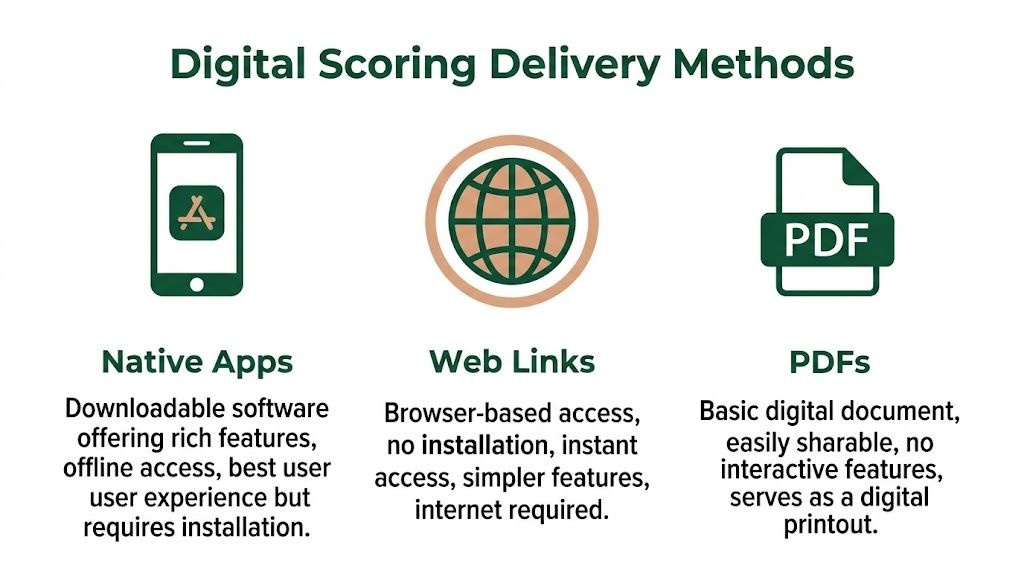
Apps, web links, and PDFs all qualify as digital scorecards. For a tournament operator, they solve very different problems.
Native apps
Native apps can do a lot. They often include player accounts, saved rounds, GPS, stat tracking, and longer-term history. That matters for golfers who use the same tool every week.
Tournament operations have a different priority. The first question is not feature depth. The first question is how many players can get into scoring without help.
App delivery adds steps at the worst time. Players need to find the app, install it, accept permissions, create or recover a login, and learn the layout. In a member league with repeat users, that can be manageable. In corporate outings, guest-heavy invitationals, and charity golf tournaments, it usually creates work for staff.
I have seen this pattern enough times to treat it as a staffing issue, not a technology issue. If even a small share of the field needs help, registration slows down and starters wait on groups that should already be moving.
Web links
Web links remove most of that friction. Players tap a link from email or text, or scan a QR code on a cart sign or starter sheet. The scorecard opens in the phone browser. No app store visit. No install. Fewer support conversations before the first tee shot.
That matters because adoption drives the value of digital scoring. A live leaderboard is only useful if the field is entering scores. Browser-based access usually gives organizers the best chance of broad participation, especially with mixed groups that include occasional golfers, sponsors, and first-time guests.
The operational advantages are practical:
Quicker launch: Players can start scoring in seconds.
Less check-in support: Staff spend less time fixing account and install problems.
Simpler distribution: Access can be placed in emails, texts, printed materials, and signage.
Cleaner device coverage: The same instructions work across iPhone and Android browsers.
A good example is this overview of app-free scoring tools for golf tournaments, which explains a browser-based approach built around links instead of downloads.
Web access is not automatically the right answer for every event. It still depends on decent mobile connectivity and a scoring page that works well on different phones. But if the goal is low-friction participation with less staff intervention, web links are usually the stronger operating choice.
PDFs
PDFs serve a narrower role. They are useful for printable scorecards, branded handouts, pairings sheets, and backup documents. They are weak as the primary scoring method for a live event.
A PDF does not give staff a current leaderboard. It does not consolidate scoring as groups play. It does not reduce the post-round collection problem unless someone still re-enters the numbers elsewhere.
That means PDFs help with presentation and backup planning, not live tournament control.
Side-by-side operational view
Criteria | Web Link (App-Free) | Native App | Static PDF |
|---|---|---|---|
Player adoption friction | Low. Opens in browser | Higher. Requires install | Low to open, weak for live use |
Staff workload | Lower at check-in and start | Higher if players need setup help | Higher after the round |
Live leaderboard potential | Strong | Strong | Weak |
Best fit | Tournaments, leagues, outings | Repeat individual users, feature-heavy tracking | Backups, printouts, reference files |
Main drawback | Depends on reliable browser access | Installation and account friction | Not interactive |
The security and control question
Organizers also need to look past the player screen. Delivery method affects who can access the event, how scoring links are distributed, what personal data gets collected, and how easily staff can monitor entries across the field.
Apps often collect more account-level information because they are built for ongoing user relationships. That can be fine for consumer use, but tournament directors should ask whether that data collection is necessary for a one-day event. Web links often let you keep entry lighter and more event-specific, which can simplify privacy and reduce login issues. PDFs avoid account collection, but they also leave staff without live control or validation.
The practical answer is straightforward. Use web links when the event depends on fast adoption, lower staff workload, and tighter control over a single scoring session. Use apps when you have a repeat audience that will benefit from deeper player features. Use PDFs as support material, not as the scoring system itself.
Evaluating Features for Tournament Success
At 6:45 a.m., the real test is not whether the score entry screen looks polished. It is whether your staff can fix a late scratch, reprint a cart sign, update a pairing, and get the first groups out without turning the golf shop into a support desk.

That is why I judge tournament scoring platforms from the operations side first. Players need an easy interface, but organizers carry the consequences of weak setup tools, limited format support, and messy reporting. If roster edits take too many clicks or payout reports need manual cleanup, the software adds work instead of removing it.
The features that actually reduce staff work
Start with the admin side. These features save hours before, during, and after the round:
Roster import tools: Load players, teams, and divisions in bulk instead of building groups by hand.
Editable pairings and tee sheets: Adjust groups quickly when players cancel, arrive late, or switch teams.
Print support from the same system: Produce cart signs, scorecards, bag tags, and starter sheets without exporting data into separate templates.
Tournament format support: Scrambles, best ball, match play, multi-round events, and team formats all need different scoring rules.
Side game management: Skins, closest-to-the-pin contests, team games, and payout tracking should fit into the event setup without spreadsheet patchwork.
If you want a practical example of what to compare, Live Tourney's guide to modern scorecard workflows stays focused on setup, scoring control, and tournament operations rather than consumer app features.
Competitive scoring needs more than score entry
For leagues, member events, and repeat tournaments, round history matters because staff gets asked for it later. Players want past results. Committees want scoring records. Organizers want cleaner handicap review and fewer disputes.
Platforms that store hole-by-hole results, keep player histories, and support handicap-related workflows give operators a better paper trail than printed cards alone. The gain is administrative. Staff can verify results faster, resolve questions with less back-and-forth, and run the next event with better data already in place.
Choose the platform your staff can run under pressure.
A practical buyer's checklist
I use a short filter when evaluating tournament software:
Can staff build the event quickly? Last-minute changes are part of tournament work.
Can pairings be edited without rebuilding the field? They should be.
Can one player enter scores for the group? That lowers confusion in many outings.
Can the platform score your actual formats and side games? Many tools look fine until you leave basic stroke play.
Can staff print shop materials directly from the system? Digital scoring rarely removes every paper need.
Can results be shared cleanly at the end of play? The finish matters as much as the setup.
This matters even more for fundraisers and community outings. If you're planning charity golf tournaments, expect a field with mixed tech comfort, sponsor obligations, and more player questions at check-in. The right platform reduces that burden on staff instead of adding to it.
What to avoid
Be careful with platforms that depend on every player creating an account, bury admin controls inside consumer features, or make staff work around the system with manual exports and side spreadsheets.
Tournament software should serve the golf shop first. If the tool cannot support the people running registration, pairings, scoring review, and results, it will not hold up on event day.
A Practical Guide to Implementation and Player Adoption
Good software still needs a clean rollout. Most adoption problems aren't really software problems. They're communication problems. If players don't know how scoring works before they arrive, the first tee becomes the help desk.
Before the event
Set expectations early. The registration email, confirmation email, and any player memo should explain how scoring will work in plain language. Keep the instructions short and visual if possible.
Include the access method players will use on site. If you're using web-based digital golf scorecards, send the link in advance and place it in the same message as tee time details. If one player per group will handle entry, say that clearly. People are more comfortable when they know they don't all need to do the same task.
A simple pre-event checklist helps:
Name the scorer: Tell each group whether one person or all players can enter scores.
Explain access: Share the QR code, link, or event code before arrival.
Set the timing: Let players know whether scores should be entered after each hole or at set intervals.
Flag support: Identify where they can get help at check-in or the starter area.
On the day of play
Placement matters. Put the access point where golfers naturally look: cart signs, printed scorecards, starter sheets, and registration materials. If the scoring link is buried in an email from two days earlier, some players won't find it when they need it.
Assign one staff member to own the launch. That person doesn't need to solve every issue. They just need to be the clear point of contact for access problems and first-hole questions. That alone prevents the confusion that spreads when every staff member gives a slightly different explanation.
The cleanest rollout is boring. Players scan, open, score, and move on.
Use a short verbal script at the first tee. Keep it consistent. Tell groups who should enter scores, where to find the scorecard, and when to ask for help. You don't need a speech. You need clarity.
After the round
The job isn't finished when the final score is posted. Share results quickly while the round is still fresh. If the platform allows post-round sharing, use it. Players want to review standings, team results, and side game outcomes without waiting for a manual recap.
Then ask a narrow question for feedback. Don't send a broad survey if all you need to know is whether scoring access was easy. Operators get better adoption by fixing one or two points of friction, not by collecting vague opinions.
A simple implementation rhythm works well:
Phase | Focus | What to get right |
|---|---|---|
Pre-event | Communication | Clear instructions and easy access |
Day-of | Launch | Visible QR codes or links, one support contact |
Post-event | Follow-through | Fast result sharing and targeted feedback |
If the rollout is simple, players accept digital scoring as part of the event. If the rollout is messy, they'll blame the technology even when the underlying issue was setup.
Measuring ROI and Real-World Success Stories
At 5:30 after a shotgun start, the pressure point is obvious. Cards are coming in, dinner is starting, players want standings, and staff are stuck checking handwriting and fixing math. Digital scorecards change that part of the operation first, which is why ROI usually shows up in labor savings before it shows up anywhere else.

For organizers, the return is simple to spot. If staff stop rebuilding results by hand, they can handle sponsor needs, confirm payouts, reset carts, and keep the event on schedule. That matters at a private club, a public facility, or an association event where one scoring delay can throw off the entire finish.
What ROI looks like in practice
Start with the old failure points. Then check whether digital scoring removed them.
Less score reconciliation: Staff verify entries instead of keying in every card.
Fewer scoring disputes: Hole-by-hole records make it easier to resolve questions before they become clubhouse arguments.
Faster event closeout: Leaderboards, skins, and flight results can be reviewed while players are still paying attention.
More consistent event execution: Once staff know the workflow, each outing takes less supervision than the last.
The operational gain is not just speed. It is fewer handoffs, fewer correction steps, and less dependence on one staff member who knows how to patch the scoring together.
Publisher-provided information for this assignment says Live Tourney has powered many events, supported large scoring volume, increased live scoring participation, and shortened setup time. Those figures come from the publisher brief, not an independent third-party study, so they are best read as product claims.
Real-world success is usually operational
The best examples are not flashy. A charity outing gets awards started on time because results are already organized. A member-guest keeps the golf shop clear because players are not lining up to ask who won the back-nine tiebreaker. A course wins repeat business because the planner remembers a smooth event instead of a delayed dinner and a scoring backup.
That is also where the app-versus-web decision affects ROI. If players need to download an app, create logins, or troubleshoot device restrictions, staff absorb the fallout. If scoring opens from a web link, adoption is usually higher and support demand is lower. For operators, that difference affects payroll hours, event pacing, and how confident the team feels running a full field.
Security matters too. Paper cards get misplaced. PDFs get forwarded. A controlled web-based scoring system gives organizers tighter access, cleaner records, and fewer loose files floating between staff phones and inboxes.
Courses comparing platforms should review the full workflow, not just the score entry screen. This guide to golf tournament management software for courses and organizers is a useful next step if the goal is to reduce staff workload while keeping player adoption high.
A scoring system earns its keep when staff can run the event instead of chasing the scorecards.
The bottom line
Digital golf scorecards are an operations decision before they are a player feature. The right setup reduces cleanup, improves adoption, protects event data, and makes the end of the day easier to manage.
That is why web-based scoring stands out for many tournaments, leagues, and outings. It lowers friction for players without adding support work for the golf shop, which is the trade-off that decides whether digital scoring saves time or creates more of it.
If you're looking for an app-free way to run digital golf scorecards, live leaderboards, pairings, registrations, and tournament administration in one place, Live Tourney is built for that workflow. It gives courses and organizers a web-based scoring system that players can access instantly on any device, while staff manage events from a practical back office designed for real tournament days.





