
Jun 2, 2026
tournament hosting, golf tournament software, run a golf tournament, live scoring, golf event management
A step-by-step guide to modern golf tournament hosting. Learn to streamline planning, registration, live scoring, and payouts with app-free web tools.

You're probably dealing with some version of the same problem most tournament directors face. The sign-up sheet lives in one place, pairings live in another, payments come in through a mix of calls, checks, and awkward follow-up emails, and someone is still asking on tournament morning whether the cart signs are ready. That's not a tournament strategy. That's administrative drift.
Modern tournament hosting isn't about adding more software for the sake of it. It's about removing friction. The old model asked staff to stitch together spreadsheets, printed sheets, text threads, and manual scoring. The better model uses simple web-based systems that handle registration, payments, live scoring, communications, and reporting in one flow, without forcing players to download an app or your staff to learn a bloated platform.
Why Modernizing Your Tournaments Matters
A lot of golf events still run on habits that should've been retired years ago. Someone exports a list from one system, builds pairings in a spreadsheet, collects payments separately, prints materials late, and spends half the day answering questions that should've been automated. Staff work hard, but the process is fragile.
That matters because tournament hosting isn't a side task anymore. Organized competitive events are big business in their own right. One market research report valued the global esports tournament organizer market at $3.8 billion in 2025 and projected $9.6 billion by 2034, with a 10.9% CAGR according to DataIntelo's esports tournament organizer market report. Different sport, same lesson: people show up for structured competition, community, and a polished event experience.
Golf courses can tap into that same appetite, but not with patched-together operations.
Old systems create hidden costs
Manual tournament hosting creates problems that don't always show up on an invoice:
Staff time gets burned on duplicate data entry, payment tracking, and fixing preventable mistakes.
Players feel uncertainty when tee times, rules, or side games aren't communicated clearly.
Event quality slips when the team spends tournament day reacting instead of directing.
Future events get harder because nothing is templated and every outing starts from scratch.
The fix usually isn't “work harder.” It's standardize the workflow and stop asking people to overcome unnecessary friction.
If you're evaluating what that modernization should look like, this guide to golf tournament management software is a useful starting point because it focuses on the practical realities of setup, scoring, and event administration.
The most professional tournaments usually don't feel complicated to players. That's because the complexity was removed before event day.
Better tournament hosting is operational, not cosmetic
Modernizing your tournaments doesn't mean turning every member event into a tech showcase. It means choosing tools that reduce handoffs, centralize information, and make participation easier. The best changes are usually the boring ones behind the scenes: one registration flow, one source of player data, one live scoring method, one place to publish updates.
That's what moves a tournament from stressful to repeatable. And repeatable is what makes an event profitable, scalable, and worth hosting again.
Strategic Planning and Flawless Setup
Most tournament problems start before the first player arrives. They start when the event is underspecified. If the purpose is vague, the format is wrong. If the format is wrong, the schedule gets squeezed. If the schedule gets squeezed, staff start improvising. That's when little issues turn into player-facing mistakes.
Experienced hosts are advised to lock objectives first, then confirm venue and format, and keep an explicit fallback plan for delays, while larger golf outings should allow at least six months for planning and promotion according to event-planning guidance for sports tournaments.
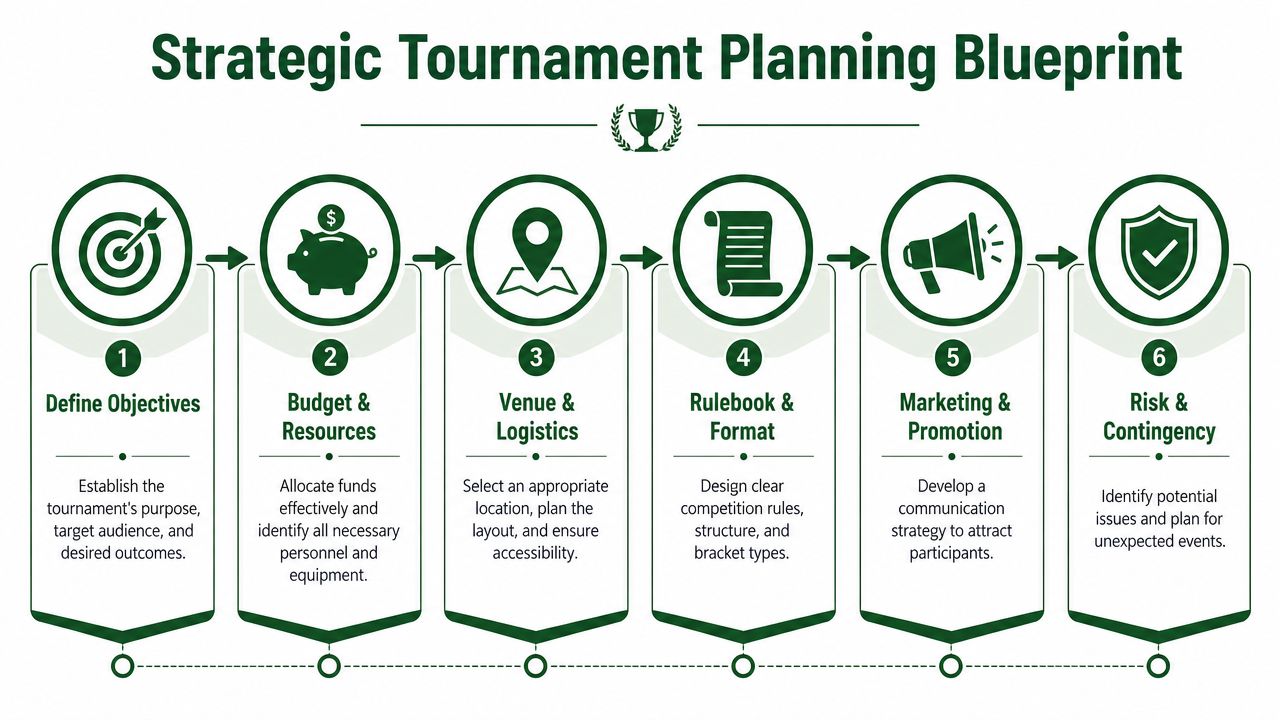
Start with the outcome, not the format
A common mistake is picking the game first. “Let's do a scramble” isn't a strategy. It might be the right call, but only after you know what the event needs to accomplish.
Use these questions first:
What kind of day is this Is it a charity fundraiser, a member competition, a sponsor outing, or a corporate entertainment event? Those don't need the same structure.
Who needs to enjoy it Low-handicap players, casual guests, first-time golfers, and sponsor groups all tolerate complexity differently.
What has to happen on site Silent auction, lunch, awards, shotgun, tee times, sponsor activations, contests, or post-round dinner all affect pacing.
What can the course realistically support Don't build a perfect paper event that the facility can't execute cleanly.
Build a schedule that assumes real life
Too many tournament schedules are written like weather delays, slow check-in, and tech hiccups don't exist. They do. A strong plan includes setup time, player arrival flow, buffer around scoring collection, and enough space for a late change without collapsing the whole day.
Practical rule: If your schedule only works when everything goes right, it isn't a schedule. It's a hope.
That applies beyond golf. In operations-heavy environments, planners who think carefully about sequencing and backup capacity usually avoid expensive chaos. The same mindset shows up in areas like optimizing electric vehicle operations, where timing, asset readiness, and contingency planning decide whether the day runs smoothly or falls apart.
Standardize setup for future events
If you host more than one tournament a year, stop rebuilding from zero. Create repeatable templates for:
Player communications such as registration confirmations, rules emails, weather notices, and leaderboard links
Event settings including format, contests, divisions, side games, and score-entry rules
Printed materials like scorecards, cart signs, tee sheets, and bag tags
Staff run-of-show documents that assign responsibilities by time block
A structured planning workflow saves time, but its greater impact is in reducing judgment calls on tournament week.
For a more detailed planning framework specific to golf events, this golf tournament planning guide is worth reviewing before you finalize your next outing.
Streamlining Registration and Payments
Registration is where a lot of tournaments lose people. Not because the event looks bad, but because the sign-up process feels like work. A player clicks a flyer, lands on a confusing form, has to email a partner name later, wonders how to pay, and decides to deal with it tomorrow. Tomorrow turns into never.
That's why registration isn't just admin. It's conversion.
One overlooked point in tournament hosting is friction at registration and payment. Available guidance often tells organizers to use a form or portal, but under-explains how to reduce drop-off at the actual point of sign-up, as noted in Spent Glory's guide on running a local tournament.
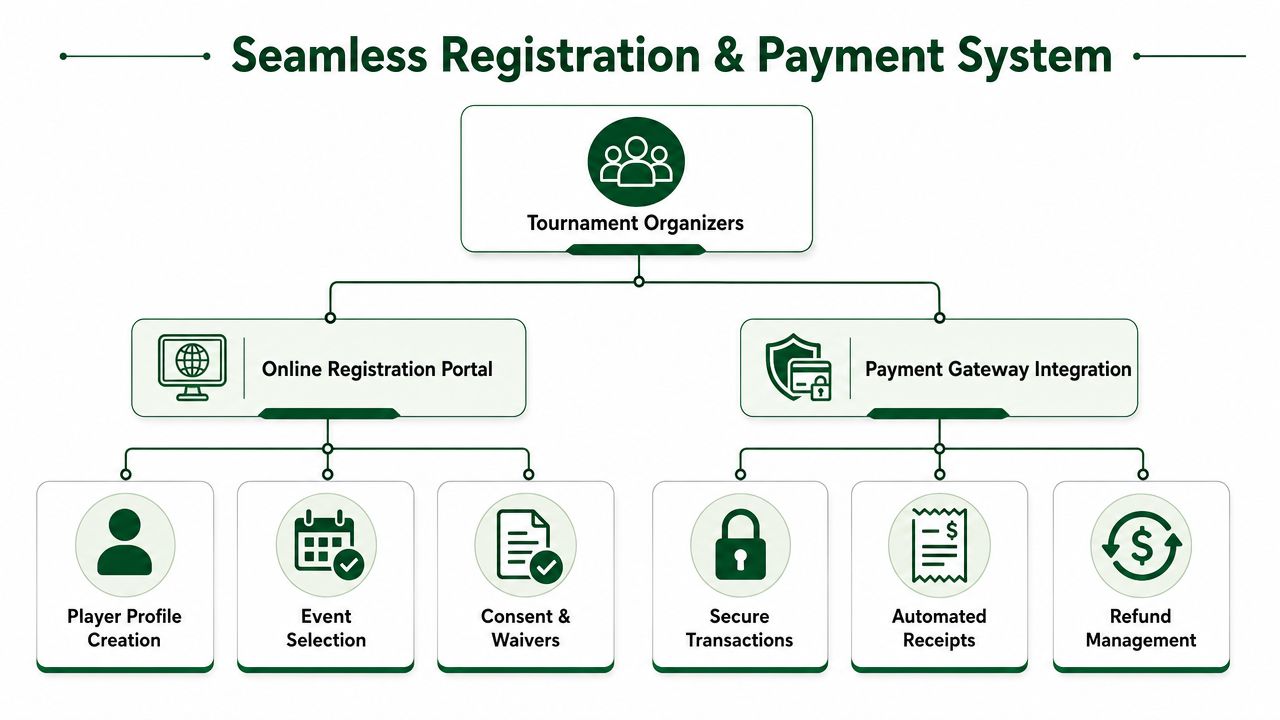
What makes players abandon sign-up
The biggest offenders are usually simple:
Too many steps before a player can reserve a spot
Separate payment instructions instead of built-in checkout
Unclear team entry process for partner or foursome events
No immediate confirmation after registration
Manual follow-up for waivers or details that should've been collected up front
Every one of those adds hesitation. And hesitation kills registrations.
What a modern registration flow should do
The ideal system feels obvious to the player. They open one page, choose the event, enter details, pay, and receive confirmation. Their information then flows directly into your roster and pairing workflow.
A good web-based registration setup should include:
Single-page clarity so entry fee, format, date, and inclusions are easy to understand
Built-in payment collection so staff don't reconcile offline payments later
Flexible player fields for handicap, team name, guest info, dietary notes, or sponsorship selections
Automatic confirmations that reduce inbound calls and reassure players they're in
Admin visibility into who's paid, who's pending, and what needs attention
That's the practical difference between a modern tool and a patchwork process. You don't just collect names faster. You create clean operational data from the start.
If staff have to retype registration data into pairings, scoreboards, or payment logs, the workflow is broken.
App-free and web-first usually wins
Many organizers overcomplicate things. They assume “digital” means a branded app, account creation, and a longer onboarding path. For most golf tournaments, that's unnecessary friction. A responsive web page is easier for occasional players, sponsor guests, and charity participants who don't want one more download just to play in a one-day event.
One practical option in this category is Live Tourney, which uses a web-based flow for registration, payments, pairings, and scoring without requiring app downloads. That approach fits the reality of mixed-skill, mixed-tech-comfort tournament fields better than systems that expect every participant to adopt a heavier workflow.
Engaging Players with Live Scoring and Leaderboards
Paper scorecards still have their place, but relying on paper alone creates a dead zone during the round. Players don't know where they stand. Sponsors can't follow the action. Staff wait until the end to discover errors. Then everyone stands around while results get assembled.
That old model assumes live scoring has to be complicated. It doesn't.
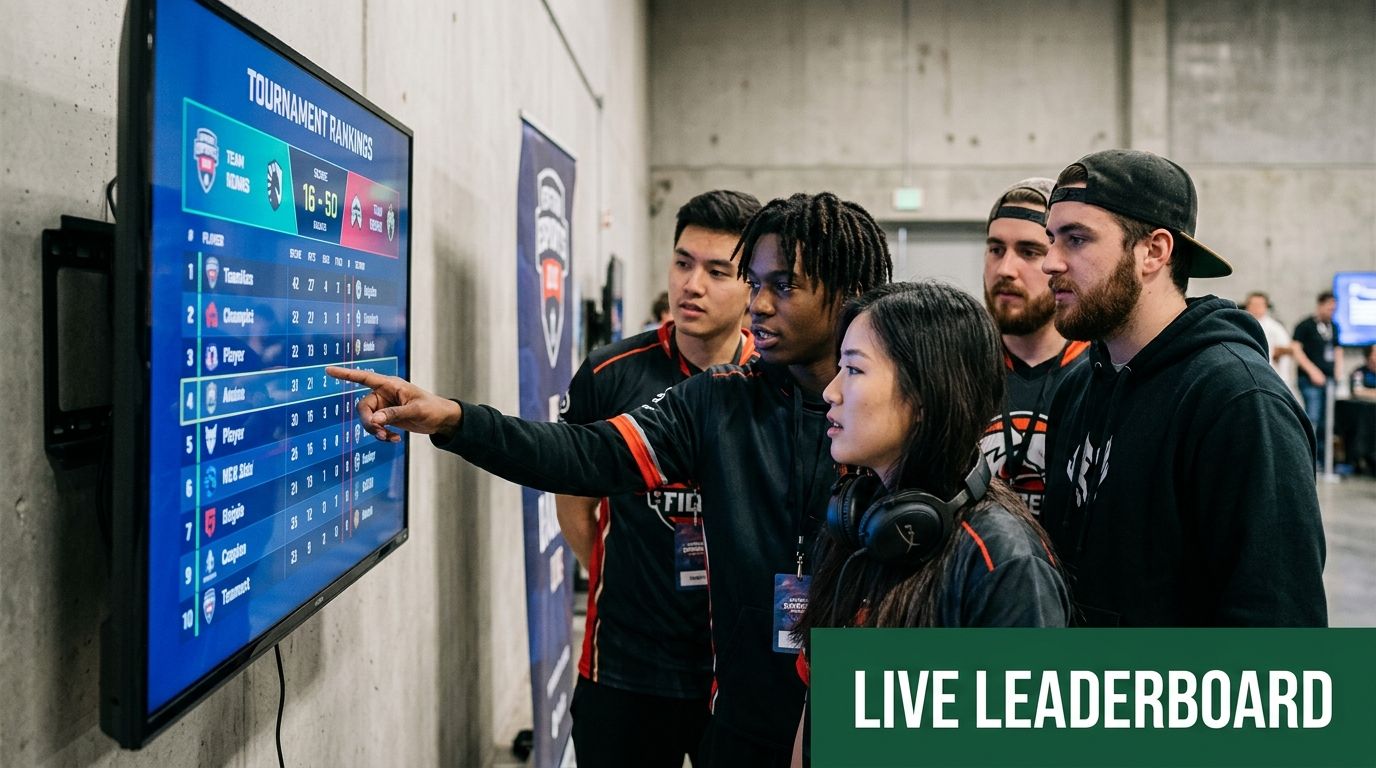
The real issue is participation friction
Tournament hosting is increasingly a UX problem, especially around infrastructure, access, and participation flow. Practical gaming-tournament advice has pointed out issues like venue access, Wi-Fi, doors, and equipment, and also highlighted a gap in explaining whether app downloads create enough friction to hurt engagement, as discussed in this tournament logistics conversation.
Golf has the same issue in a different outfit. If players need to install an app, create a login, remember a password, and learn a new interface on the first tee, some of them won't bother. Others will score inconsistently. Your “modern” feature turns into a support problem.
What actually works on course
A better setup is simple: send players a web link that opens instantly on any phone. They can enter scores hole by hole, view the leaderboard, and move on. No app store. No training session in the cart barn. No awkward moment where one player in each group becomes the unpaid tech rep.
Here's what that changes:
Old approach | App-free web approach |
|---|---|
Players wait until the round ends to see standings | Players can follow results during the round |
Staff collect and re-enter cards manually | Scores feed directly into the leaderboard |
Adoption depends on app comfort | Access is easier for occasional participants |
Questions pile up in the shop | Information is visible in one shared place |
Good live scoring should disappear into the experience. Players should think about the competition, not the tool.
Engagement doesn't stop at scoring
A live leaderboard also improves everything around the round. It gives the awards ceremony a focal point. It gives sponsors something visible to follow. It creates natural energy around side games and finishing holes.
And if you want the prize table to match the quality of the event, a roundup of thoughtful golf prizes can help you avoid the usual forgettable giveaway pile.
Mastering Day-Of Tournament Operations
Tournament day rewards preparation, but it punishes loose role definitions. I've seen events with plenty of people on site still feel understaffed because nobody owned the key touchpoints. More bodies don't fix a weak operating plan. Clear functions do.
That idea shows up in host guidance outside golf as well. For reliable event operations, staffing should be sized by function, not just headcount. Little League guidance, for example, recommends rotating 4 to 7 people for field preparation and 2 to 4 for concessions to reduce bottlenecks and improve service consistency in critical areas, as outlined in Little League's tournament hosting guidance.
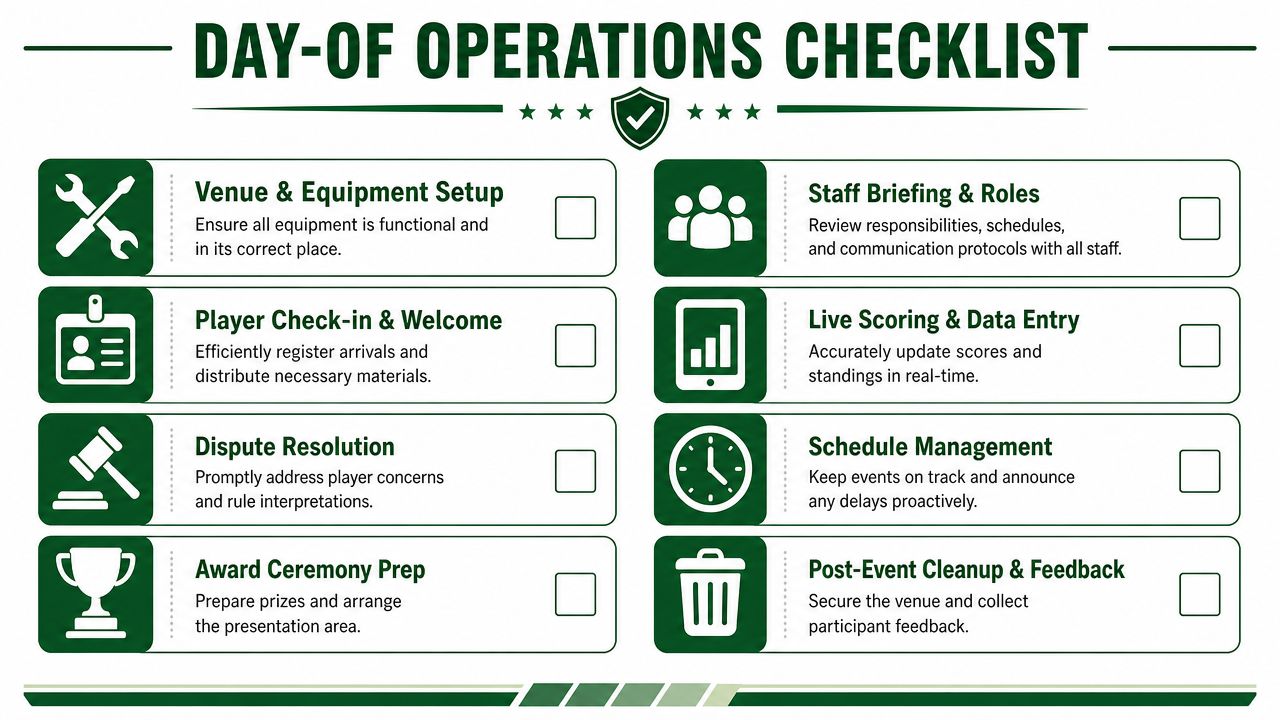
Assign functions before you assign names
On tournament morning, you need coverage in specific places:
Check-in and welcome for registration issues, handouts, and player questions
Starter operations for hole assignments, pace reminders, and late arrivals
Scoring support for groups that need help accessing or confirming live scoring
On-course problem solving for rulings, cart issues, and sponsor needs
Awards and closeout for prizes, side games, and final verification
If one person is trying to float across all of that, you don't have a staffing plan. You have a future bottleneck.
Print less, but print the right things
Modern tournament hosting should reduce paper, not pretend paper is gone. You still need physical backups and visible materials where they help. The goal is to print strategically.
Keep these ready:
Scorecards and pairing sheets Even with live scoring, a backup record matters.
Cart signs and bag tags These reduce confusion fast, especially in large outings.
Rules sheet and contest details Don't rely on verbal explanations at check-in.
Backup leaderboard or flights list If connectivity gets shaky, staff still need a reference point.
One of the easiest ways to look disorganized is to make players ask basic operational questions you should've answered in print or on a mobile page.
Use a central communication channel
Schedule changes spread badly when staff improvise. One person texts some players, another tells the starter, someone else updates a paper sheet, and now three versions of reality are circulating. Use one channel for official updates. That might be event email, text alerts, or a live tournament page, but it should be singular and obvious.
A good day-of command routine looks like this:
Pre-round briefing with staff roles, escalation path, and timing
Single decision-maker for rulings and schedule changes
Shared live document or platform for pairings, scoring, and player status
Post-round verification process before awards begin
That's how you create calm. Not by avoiding problems, but by making sure everyone knows where problems go.
Automating Side Games and Payouts
The ugliest part of many tournaments starts after the golf is over. Players come off the course, head toward drinks and food, and then the tournament staff disappear into a back office with scorecards, calculators, and side game notes. Skins need to be checked. Closest-to-the-pin winners need confirmation. Team results might affect flight payouts. Ties need handling. Somebody always wants to know when the money's ready.
Manual payout work causes two kinds of problems. First, it slows down the finish. Second, it creates doubt. If staff are doing math by hand while players wait, every delay feels like a possible mistake.
Why side games get messy fast
Even a fairly standard outing can involve overlapping competitions:
Team results tied to the primary format
Gross or net skins that require hole-by-hole review
Closest-to-the-pin and long drive contests
Flighted prizes with different payout logic
Split pots or tie handling based on house rules
The issue isn't that any one game is difficult. The issue is that they stack. Once live scores, scorecard verification, handicap adjustments, and tie rules all meet in the same moment, the back office turns into a bottleneck.
What automation actually fixes
A modern tournament platform should calculate side games from the scoring data already collected during the round. That means staff aren't re-entering results or checking each contest separately. They're reviewing outputs, not building them from scratch.
That shift matters because it changes the final hour of the event:
Manual payout process | Automated payout process |
|---|---|
Staff check scorecards one by one | System uses submitted scores as the base record |
Winners are calculated in separate steps | Results can be generated together |
Tie handling is easy to misapply | Rules can be standardized in advance |
Awards are delayed | Announcements happen sooner |
The operational win isn't only speed. It's consistency. Players trust results more when the rules were defined in advance and applied the same way every time.
If you want a practical breakdown of how to structure prize calculations and distribution, this guide to payouts for golf tournaments is a useful reference.
Keep one person responsible for final review
Automation doesn't eliminate judgment. It eliminates repetitive math. You still want one designated staff member to verify edge cases, approve final results, and answer payout questions. That person should not also be checking in sponsors, solving cart issues, and hunting down missing cards.
That's the part many organizers miss. Software should handle computation. A tournament director still owns confidence.
Conclusion and Post-Event Reporting
A smooth tournament usually looks easy from the outside. Players register without calling the shop three times. Payments are already handled. Pairings are clear. Scoring works. The leaderboard stays current. Side games are resolved quickly. Awards start on time. That doesn't happen because the staff got lucky. It happens because the event was built on a cleaner system.
That's the major shift in modern tournament hosting. You stop treating each outing like a custom emergency and start treating it like an operational workflow. Web-based, app-free tools help because they reduce the number of steps, handoffs, and failure points. They don't just make the event look polished. They make it easier to run.
The tournament isn't over when the last group finishes
Post-event work is where good hosts separate themselves from busy hosts. You should be closing the loop while the experience is still fresh.
That usually means:
Sending thank-you messages to players, sponsors, and volunteers
Sharing final results in a format that's easy to revisit
Collecting feedback while people still remember where friction showed up
Reviewing operational notes about check-in, scoring, pace, staffing, and awards
Saving the event structure so the next tournament starts from a template, not a blank page
A tournament report isn't just an archive. It's a record of what should be repeated, what should be changed, and what should never be done that way again.
Better reporting leads to better future events
The smartest tournament directors look at more than who won. They look at where staff time got wasted, where player questions clustered, which communications were unnecessary, and which processes should be automated next time. If registration required too much cleanup, fix that. If live scoring adoption lagged, remove access friction. If side games took too long to finalize, standardize the rules before the next event.
That's how events get better without becoming more complicated.
The best tournament hosting systems don't ask your staff to be heroes. They let your team be organized. That's a much more reliable way to run a golf event.
If you want a simpler way to handle registration, payments, live scoring, player communications, printed materials, side games, and reporting in one web-based workflow, Live Tourney is built for exactly that style of tournament hosting. It gives courses, clubs, and outing organizers an app-free system that's easier for staff to manage and easier for players to use on any device.





