
Oct 31, 2026
golf league site, golf league management, golf league software, golf tournament scoring, golf league registration
Golf League Site basics: what it does, the features to look for, and how to set one up for your course without spreadsheets.

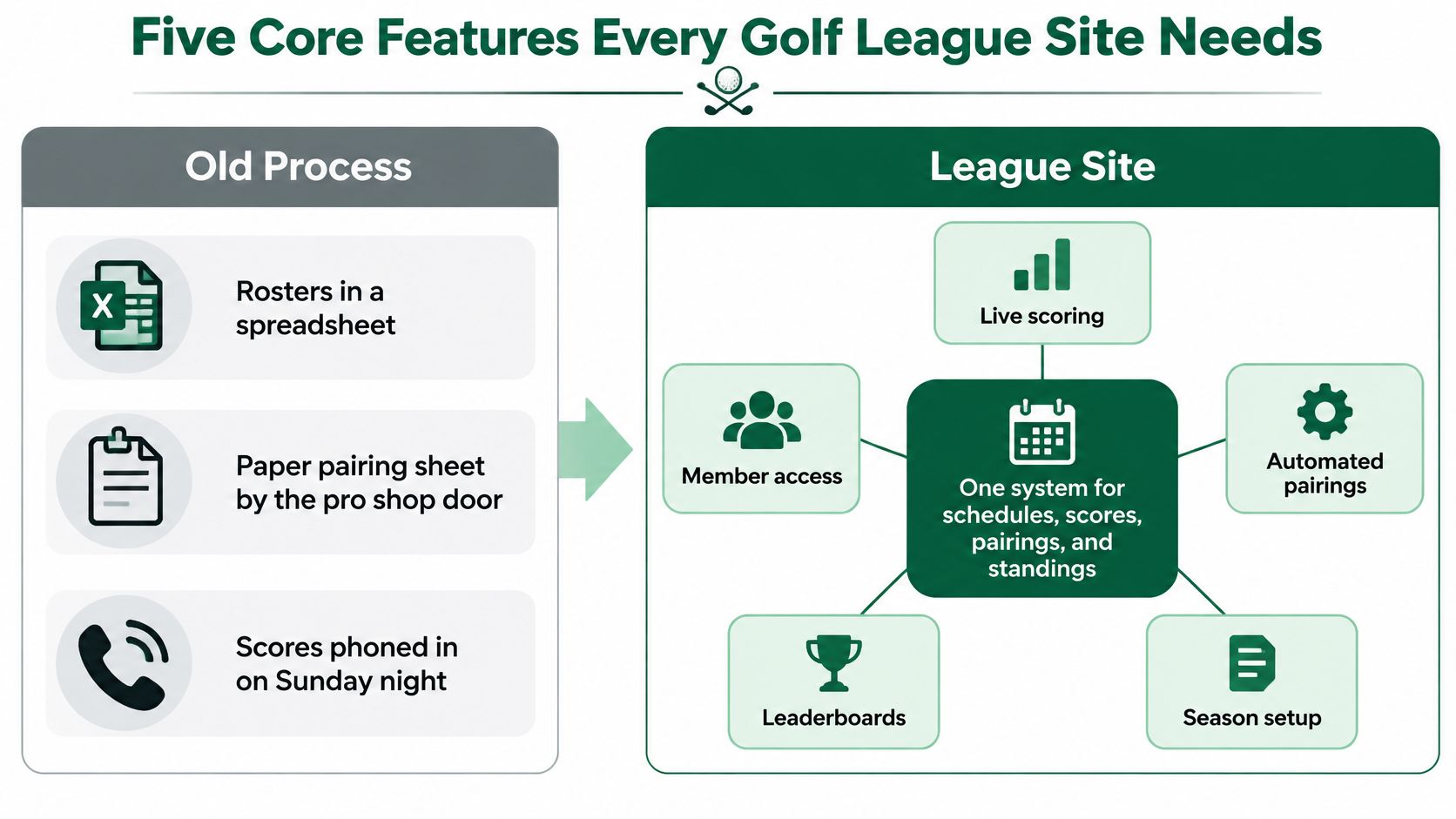
Your roster is in a spreadsheet, the pairing sheet is taped beside the pro shop door, and someone's still phoning in scores on Sunday night. Meanwhile, a substitute wants to know whose points count, and the bookkeeper's payment list doesn't match yours.
A useful golf league site removes that repeated work without creating another system for staff to maintain. Judge it by the hours it saves on an ordinary league night, and by whether you can explain every handicap, standing and payout it produces.
Five Core Features Every Golf League Site Needs
A golf league site is a season-long set of web pages, reached by link, that runs rosters, scheduling, scoring, payments and messages from one shared data set.
Consider a hypothetical Wednesday nine-hole league with 48 players and two substitutes each week. If a substitute accepts a place, staff shouldn't have to change the roster, pairing sheet, scorecard and results workbook separately. The replacement should flow through the system, while the league's substitute policy determines who receives the points.
The same principle applies after play. A score entered once should update standings, calculate the relevant payout and inform the next week's pairings where those pairings depend on results. Otherwise, you've moved the spreadsheet onto a website without removing the reconciliation.
Core league site modules and what to check
Module | What It Must Do | Check Before Choosing |
|---|---|---|
Roster management | Hold members, handicaps, teams and substitutes in one list | Can you import a roster from a CSV file? |
Scheduling | Set weekly dates, tee times, formats and makeup rounds | Can you add rainout and makeup dates without rebuilding the season? |
Scoring | Take hole-by-hole or total scores and update standings | Do standings update without a page refresh? |
Payments | Collect season and entry fees, with optional online payment | Can you see paid, unpaid and refunded status per player? |
Communications | Send email and text reminders, pairings and results | Can you message one team or the whole roster? |
We designed Live Tourney for golf courses, leagues and tournament organizers. That season-long operating context matters more than a polished page for an isolated event.
U.S. courses recorded more than 500 million rounds in each year from 2020 through 2025, according to the National Golf Foundation. Recurring play deserves a dependable workflow, not an improvised weekly publishing job.
For an indoor extension of your season, the winter league ideas from GolfRep can help you consider formats before building the calendar.
Start any demonstration with three questions: Can you import the roster in one file? Does a score update standings without a page refresh? Does it run nine-hole formats? Have the demonstrator perform those actions, rather than answer yes.
Handicap Allowances and Scoring Rules to Configure
Giving everyone their full Course Handicap, regardless of format, is an easy way to publish the wrong net results. Set the competition format first, then apply its allowance.
Recommended handicap allowance by format
The USGA's Appendix C recommends 95% for the listed individual formats, 85% for the listed four-ball stroke-based formats and 90% for four-ball match play.
Format | Recommended Allowance | How It Applies |
|---|---|---|
Individual stroke play, individual Stableford, individual par/bogey, individual maximum-score | 95% of Course Handicap | Each player is scored on their own card |
Four-ball stroke play, four-ball Stableford, four-ball par/bogey | 85% of Course Handicap | Two-person teams, team scoring |
Four-ball match play | 90% of the difference from the lowest Playing Handicap | Lowest Playing Handicap plays off zero, others receive the difference |
The team allowances account for a different scoring structure: partners can cover each other's poor holes. Don't copy an individual competition's settings into a better-ball event and assume the results remain equitable.
Work the calculation before trusting the leaderboard
Take a hypothetical four-ball match with unrounded Course Handicaps of 6, 14, 10 and 18. Applying the USGA's four-ball match-play calculation, the lowest plays off zero, and the others receive the rounded allowance on their differences: 0, 7, 4 and 11.
Keep the distinction between Course Handicap and Playing Handicap clear. Generally, Playing Handicap is the unrounded Course Handicap multiplied by the applicable allowance, rounded to a whole number; the USGA's authorized-format guidance also recognizes nine- and 18-hole individual and four-ball match play, subject to the remaining posting requirements.
In four-ball match play, partners play their own balls and the side's better score determines its result against the opponents on each hole, as described in the USGA's four-ball explanation. Match status, not aggregate stroke total, belongs on the leaderboard.
Use our guide to handicap scoring in golf when separating the inputs from the strokes awarded.
Before publishing, check the format's allowance, confirm the lowest handicap plays off zero in match play, and inspect each side's best score hole by hole. A convincing final total isn't proof that the underlying calculation is right.
Set Up and Test a League Season Step by Step
Use a hypothetical 12-week women's nine-hole league with 32 players in four teams of eight as your setup exercise. An administrator can aim to complete the initial configuration in an afternoon, provided the committee has already settled the policies.
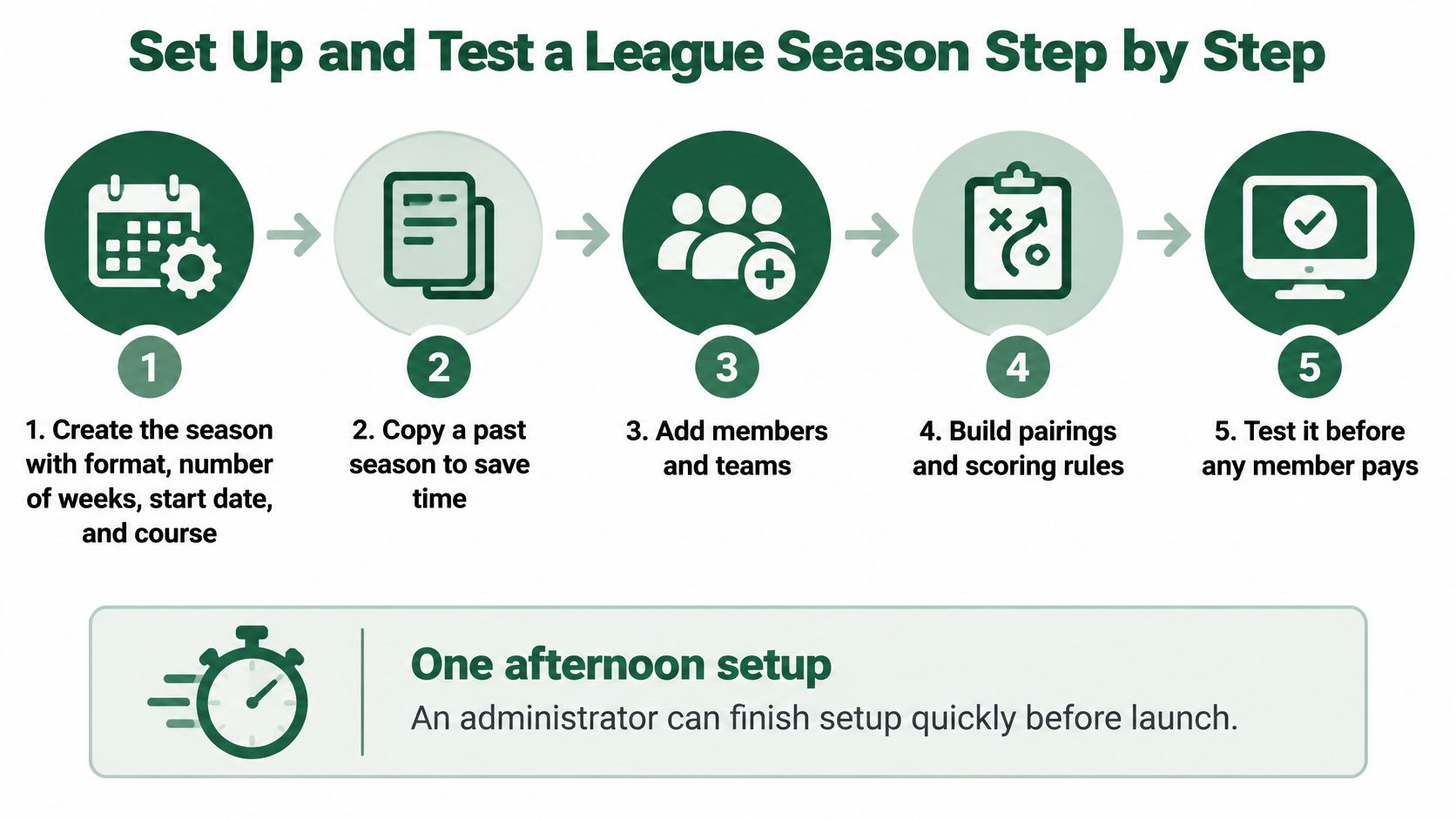
Build the season in operating order
Create the season. Enter the course, selected start date and weekly format for the example's full calendar. Copy a past season if available, but remove inherited dates and old eligibility restrictions.
Set the scoring rules. Configure net or gross scoring, the appropriate allowance, tie points and the handicap refresh policy. For this mixed-skill example, retain nine holes and offer suitable tees rather than treating every player's starting position as identical.
Import and inspect the roster. Upload a CSV containing name, email, handicap information and team, then verify that the example's four teams each contain eight distinct players. Resolve duplicate names and shared email addresses before invitations go out.
Build the weekly schedule. Assign tee times and the correct nine, then reserve makeup dates. Write down whether a rainout cancels the result, moves the fixture or permits an individual makeup, because those choices affect standings differently.
Configure fees and exceptions. Separate the season charge from any weekly entry fee, and establish the payment deadline. Decide how late entrants and withdrawals are treated before someone asks for a special arrangement.
Enable registration and confirmation. Check that the confirmation identifies the league, dates, fees, payment status and cancellation terms. An accepted registration must be distinguishable from an incomplete payment.
Test the scoring link at the course. Use a clearly labeled dummy player and dummy round on a phone. Enter a correction and a substitute as well as an ordinary score, then confirm that neither test record remains in the published competition.
Complete a test registration and payment. Use the payment provider's supported test method, check the resulting status and rehearse a cancellation. Don't expose the public registration page until someone other than the setup administrator has completed the flow.
Test exceptions, not just successful entries
A short written test sheet makes this repeatable. The explanation of what test plan sections cover from 99tests is useful for separating prerequisites, actions and expected results.
Launch check: A rainout, replacement player and corrected score should each produce a predictable result without staff repairing unrelated records.
The quiet setup mistake is importing rounded handicap values and never refreshing them. Preserve the correct underlying handicap information and document when it updates, or you can distort standings from the opening week onward.
Live Scoring and Leaderboards on Any Phone
During play, golfers should open a browser link, enter a hole's score and see the leaderboard change without downloading an app. Keep the scoring screen focused on the current hole, the player and whether the entry has saved.

A full-page reload on a weak outdoor signal can move the screen, interrupt entry or leave a player unsure whether to submit again. Small incremental updates are preferable: preserve the entry position, refresh the changed results and display an unmistakable saved status.
Prioritize usable scoring content before graphics, historical results and other secondary material. Limit JavaScript, image weight and third-party scripts on the scoring route. A decorative clubhouse image shouldn't delay the field a player needs to enter a score.
Check the on-course experience
Test realistic reception. Use a mid-range phone over throttled 4G, then walk through the course's weak-signal areas. Desktop broadband won't reveal the same problems.
Count the taps. Enter a complete hole, including confirmation. Remove unnecessary navigation, but retain enough context to prevent scores going against the wrong player.
Assign correction authority. Name who can approve changes after submission and when results become final. Record the original entry, correction and approving administrator.
Our guide to golf tournament live scoring gives additional context for planning the player-facing workflow.
Say a 6:40 a.m. shotgun has 12 teams finishing on the back nine. The shop can watch for missing scores before releasing the lunch prize, rather than collecting cards from every group.
Score timestamps can also flag groups worth checking for pace, but a missing entry doesn't prove slow play. Have the starter verify the group's position. Live scoring engages players only when the page works reliably where they're playing.
Registration, Payments and Player Messages
Treat registration as a reservation transaction, not a request to complete a membership dossier. Baymard reports that the average checkout contains 11.3 form fields, while 17% of users abandon because the process is too complex, in its checkout field research.
The useful lesson isn't to force everything onto one screen. It's to remove information you don't need to secure the place.
Keep the signup fields purposeful
Collect essentials first. Ask for name, email, necessary handicap or tee information, and payment details. Defer clothing preferences, biographies and other optional profile fields.
Recognize returning players. Offer securely saved details or a magic-link route so they aren't rebuilding their profile each season.
Match the keyboard to the field. Use appropriate numeric or decimal inputs for handicap and payment fields, while supporting the values the handicap field accepts.
Explain the result immediately. Confirm league, dates, fees, payment status, cancellation terms and next action. Players shouldn't need to phone the shop to establish whether they're entered.
The online event registration guide can help you organize that enrollment flow around the player's next action.
Give each message a job
Send a season-start email with the rules and scoring access. A practical proposed schedule is a pairing text 24 hours before play, followed by a score-posted notice and overdue-payment reminders at declared intervals.
For a hypothetical 40-player league with nine late payments, schedule two reminders, then review the unpaid list personally. If most settle after those messages, staff only need to contact the remaining players, but don't assume an automated message guarantees collection.
Keep payment reminders private. The team captain needs the playing roster, not another member's account history.
Before opening week, export payment status and match it against the roster. Keep an audit trail of roster and score changes, restrict the bookkeeper from editing competition scores, and display the mid-season withdrawal policy at checkout.
Choosing Between Spreadsheets, Custom Builds and Platforms
Spreadsheet, custom build and platform compared
Option | Best For | Main Trade-off |
|---|---|---|
Spreadsheet and paper | A single small league with one weekly format | Manual entry every week and no dedicated league audit trail |
Custom-built site | A course with a developer and unusual formats | Ongoing maintenance, mobile performance and payment security |
Specialist league platform | A course running several leagues or outings | Subscription cost, judged against staff hours saved per season |
A spreadsheet you already own may require no new software spending. It's reasonable for a small league with a stable roster and simple scoring, provided someone owns the weekly work. Spreadsheet version history can help recover edits, but it isn't the same as a purpose-built record of approved scoring and payment changes.
A custom golf league site gives you control over unusual formats and member workflows. It also leaves someone responsible for browser updates, access permissions, mobile behavior and payment integration. Use a hosted payment provider rather than building your own storage for card details.

Choose against the work you actually do
List your league sizes, formats, payment requirements, player-entered scoring needs and available staff time. Include whether you need GHIN integration and which exports accounting requires.
If you're considering a broader website rebuild, WebinOne's all-in-one digital experience platform illustrates that wider category. Separate general website requirements from golf-specific scoring rules before deciding that a general platform can replace a competition engine.
We built Live Tourney after searching unsuccessfully for an easy-to-use, affordable alternative to the main tournament software for our home course. That origin doesn't replace your own evaluation.
For a single small nine-hole league, I'd keep a working spreadsheet until its administration becomes a genuine burden. For several leagues and outings, a specialist platform is usually the more practical route; a custom build needs both unusual requirements and dependable developer capacity.
Run a one-week operational trial with a real league night, if the provider permits it. Check contract terms, data ownership, usable exports and support arrangements before committing.
Live Tourney Plans and the Cost Test
Live Tourney plan comparison
Plan | Annual Price | What It Adds |
|---|---|---|
Live Tourney | $2,700 per year | For courses, league managers and tournament organizers; GHIN integration, intuitive setup, extensive game library and satisfaction guarantee |
Live Tourney Pro | $3,900 per year | Everything in the standard plan, plus Sand Trap handicap integrity, Pace of Play insights, custom leaderboards, unlimited team seats and unlimited texting |
All plans include GHIN integration, intuitive setup, an extensive game library and a satisfaction guarantee. Choose the Pro additions only when they address work or oversight your operation needs.
The cost test is straightforward: divide the annual subscription by the staff hours it removes during the season. In an illustrative calculation, the standard plan saving 60 staff hours works out to $45 per hour saved.
That's a break-even comparison, not a claim that every course will save that time. Compare the result with your loaded staffing cost, any overtime avoided and what the team can productively do with the recovered hours.
Measure net savings rather than gross promises
Include the time spent importing records, checking results, answering player questions and reconciling payments. Subtract new work such as maintaining duplicate systems or fixing exports. A platform that saves score entry but adds an equally long reconciliation hasn't passed.
Buying rule: Pay for verified reductions in recurring work, not for features nobody has responsibility to use.
Start with one league rather than moving every competition at once. Give a named staff member responsibility for recording the old workflow's time and the trial workflow's time, including exceptions.
Before paying for a full season, complete the go-live checks: a clean roster, approved rules, tested registration, correct payment status, usable mobile scoring and a rehearsed correction. The right golf league site should leave staff with fewer weekly tasks and a result they can defend.
Live Tourney brings league schedules, standings, registration and app-free live scoring into one place. Visit Live Tourney to evaluate it with your roster, your competition rules and a real league-night workflow, then compare the administrative time against what you do today.





