
Sep 23, 2026
round robin, tournament scheduler, golf pairings, Live Tourney, league play
Build fair round robin pairings with a round robin tournament schedule generator. Manual logic, tool tips, and Live Tourney support inside.
The league starts tomorrow, and the schedule still lives in a group chat. Sixteen captains are sending late roster changes, two players have dropped out, and someone has already asked why the same strong pair keeps landing on the same side. Meanwhile, the pro shop needs a usable tee sheet before the morning staff arrives.
That's where a round robin tournament schedule generator earns its place. The software matters, but the challenge comes first: building pairings that give everyone a fair path through the competition, then fitting those pairings into tee times, groups, rest periods, scoring, and tiebreakers.
Why Every League Eventually Needs a Round Robin
A round robin is built on a simple promise. Every player or team faces every other player or team at least once. That promise gives a league coordinator a much stronger answer to complaints about the draw than “that's how the spreadsheet came out.”
In a heads-up league, each entrant gets the same opponent count. The number of rounds follows from the roster, rather than from a coordinator's guess about which matchups will create a good final. That makes the schedule easier to explain before play begins and easier to defend when standings become tight.
The fairness case has several parts:
Equal opposition: Each player or team gets the same basic opportunity to meet the field.
Predictable rounds: Everyone can see how many rounds the format requires and plan around work, travel, and tee times.
Clear standings: Results accumulate across the schedule instead of eliminating someone after one poor opening match.
Defensible tiebreakers: A published order, such as wins followed by head-to-head results or differential, gives tied competitors a known path.
A knockout bracket serves a different purpose. It creates immediate drama, but one bad match can end a strong player's event, and the draw can determine who faces the toughest opposition early. Pool play offers guaranteed games, yet it still requires a second structure to decide who advances. Once a weekly group grows beyond a small circle of regulars, the round robin's consistency often matters more than the bracket's spectacle.
Practical rule: If players care more about proving who was strongest across the group than about producing a sudden final, start with a round robin.
For club championships, heads-up leagues, and recurring skins groups, the format also reduces arguments about weak draws. The golf league program guide shows how league administration becomes a broader operating problem once rosters, rounds, and results all need to stay aligned.
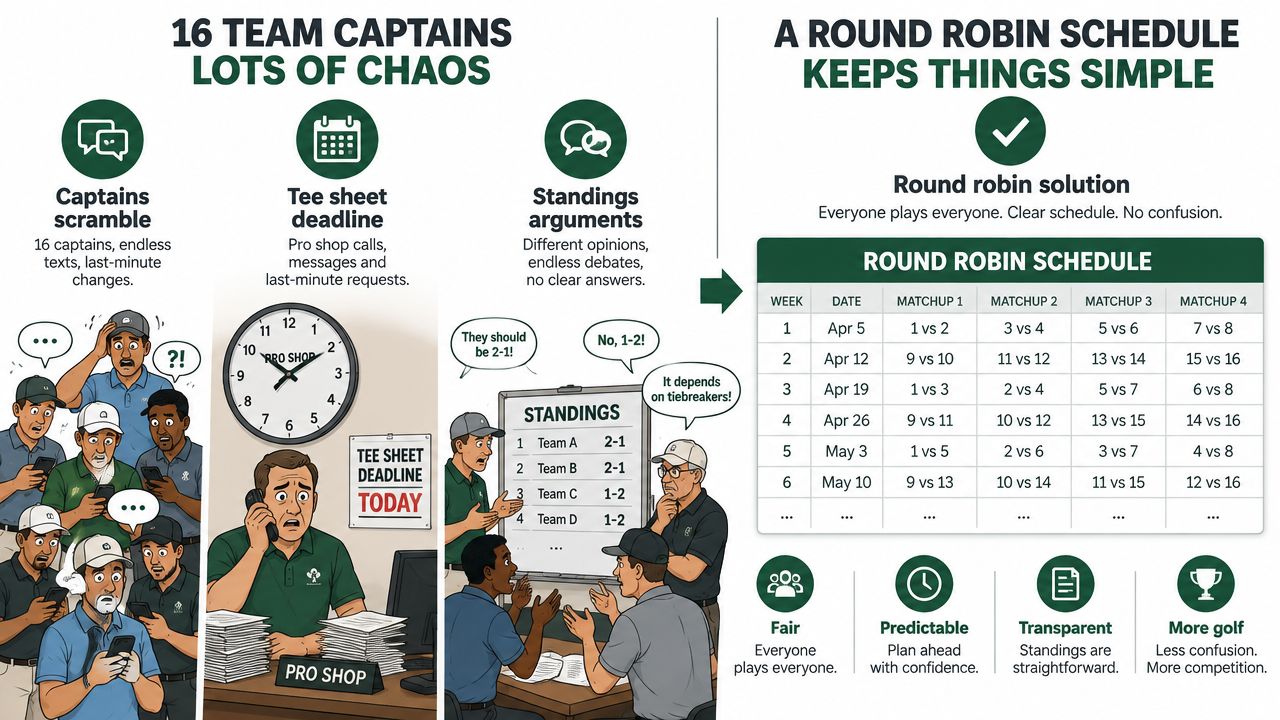
The important distinction is that round robin scheduling is a pairing problem before it's a software problem. A generator only helps if you understand what a valid schedule must protect. The circle method is the cleanest place to start.
The Circle Method Explained Without the Jargon
The circle method creates the fixture list by fixing one player and rotating the rest. You can do it on paper, on a whiteboard, or on the back of a scoresheet.
Use six players for the example. Label them 1, 2, 3, 4, 5, and 6.
Set the positions
Place player 1 at the top of a circle and distribute players 2 through 6 around the remaining positions. Player 1 stays fixed for the entire schedule. The other five players move clockwise after each round.
Pair players who sit opposite one another. The first arrangement produces:
1 versus 6
2 versus 5
3 versus 4
Record that as the opening round. Then rotate players 2 through 6 clockwise by one position while leaving player 1 where they are. Pair the new opposite positions again.
The process continues until the moving players return to their original arrangement. With six players, the schedule contains five rounds, because the round count is the number of players minus one. Each player meets every other player once, and each round gives every player one opponent.
Watch the rotation boundary
The common hand-built mistake is rotating the group one step too far after the final valid round. That makes the last arrangement match the first, creating duplicate pairings while the coordinator thinks the schedule is complete.
Keep a checklist of opponents for every player. When each player has faced all other players exactly once, stop. A valid schedule has no duplicated opponent and no missing opponent.
Odd-sized groups need one extra position. Add a phantom entry called bye. Whoever is paired with the bye sits out that round, while the remaining players compete. Rotate the bye through the circle so the rest period moves fairly rather than staying attached to one person.
A bye isn't a free pass from the event. In a golf league, the coordinator can assign that player to a stableford or skins match, or arrange another non-ranking activity, depending on the rules. The key is to distinguish a scheduled rest from a missing fixture.
A round robin breaks only when the schedule repeats an opponent before the field has been covered. A generator should refuse that duplication unless you deliberately add another leg. If the league wants repeat matches, create a second pass with a clear home-and-away or first-leg-and-second-leg rule. Don't let a rotation error decide who plays twice.
Pairing Examples for Common Group Sizes
A league organizer can build a valid pairing matrix and still create a poor playing day. The field size determines the number of rounds, while the format determines how those pairings become twosomes, foursomes, tee waves, and rest periods. Start with the pairing problem, then use software to manage the practical constraints.
Eight players
Eight players require seven rounds, with every player facing each opponent once and no bye. If the format uses four-player groups, divide the field into two foursomes per round. The individual pairing matrix still helps verify opponents, but it does not automatically balance partners, walking routes, or tee movement.
Eight is a manageable size for a spreadsheet. A coordinator can check each round against an opponent list, print the schedule, and adjust a stable weekly roster without much administrative overhead. The trade-off appears when the roster changes. Replacing one player can force several pairings to be rebuilt, and a manual correction may create a duplicate elsewhere.
Ten players
Ten players produce five paired matches per round, with nine rounds needed for a complete single cycle. That distinction matters because the five matches describe one round, while the nine rounds describe the full schedule. For team play or foursomes, convert the individual pairings into the group structure used by the course rather than assuming the fixture list creates balanced groups automatically.
A dual-tee arrangement can spread ten players across morning and afternoon waves. If a particular flight has an odd number of active players or teams, add a phantom bye and rotate it through the schedule. This gives each affected competitor a defined rest round instead of leaving the omission to an informal decision.
Twelve players
Twelve players require eleven rounds for a complete single round robin. At this size, a spreadsheet becomes harder to audit when substitutes arrive, players request different partners, or the coordinator must preserve foursome balance. The pairing calculation remains simple. Keeping the rest of the event fair takes more work.
A generator can apply the circle rotation, display the rounds, and show group assignments and bye positions for inspection. Add another leg only when repeat opponents are intentional. A shortened schedule with selected repeat matches is a different format, so state that clearly before play begins.
Group Size | Rounds Needed | Players per Group | Bye Handling | Best Format |
|---|---|---|---|---|
8 | 7 | 2 or 4 | No bye | Weekly league or compact shootout |
10 | 9 | 2 or 4 | Add a bye if the active flight is odd | Wave-based league day |
12 | 11 | 2 or 4 | No bye for individuals, check each team flight | Recurring league with automated scheduling |
For a larger team-field example, review these 12-team round robin formats. Group size affects more than the round count. The coordinator also has to provide fair rest, sensible tee intervals, and enough variation that players do not keep the same partners throughout the event.
Generator Options From Spreadsheets to Full Platforms
A spreadsheet is not automatically a bad choice. For a stable group of eight, the circle method plus a few carefully built INDEX and MATCH formulas can produce a reliable fixture list. The coordinator can inspect every pairing, print the result, and make changes without learning another system.
The trouble starts when the roster moves. A replacement player changes the rotation. A request to avoid repeated partners changes group composition. A foursome structure adds constraints that the basic opponent matrix doesn't understand. Each manual fix can create a duplicate elsewhere.
A free web generator handles the pairing calculation faster than a blank workbook. That's useful when the only deliverable is a list of rounds and opponents. It usually stops there, though. The coordinator still has to manage check-ins, tee assignments, score entry, standings, notifications, and tiebreaker calculations in separate places.
A full tournament platform joins those jobs into one workflow. Live Tourney, for example, supports round robin event setup, roster management, pairings, scoring, leaderboards, and tiebreaker handling. Its relevance here is practical rather than magical. The golf pairing software overview is useful for comparing scheduling with the administrative work that follows it.
Need | Spreadsheet | Web Generator | Live Tourney |
|---|---|---|---|
Stable small roster | Strong fit | Strong fit | Useful, though more structured |
Roster changes | Manual rebuilds | Often requires a new export | Managed within the event workflow |
Group balancing | Possible with careful formulas | Limited in many tools | Built into event setup options |
Live scoring | Separate process | Usually absent | Included with tournament management |
Tiebreakers | Coordinator calculates them | Often manual | Set the rule and track standings |
Player communication | Email or text | Usually separate | Pairings and event information can be published |
Best use | Small, stable groups | Quick fixture generation | Recurring leagues and active events |
The trade-off is clear: A manual tool costs less to start, while an integrated platform costs less of the coordinator's attention once the event becomes active.
My cutoff is operational, not ideological. If you're running recurring play for twelve or more golfers, with substitutes, guests, changing pair requests, and live results, a spreadsheet often becomes a liability by the third week. Use it when the group is stable and the stakes are modest. Move to a connected workflow when every change affects more than the pairing grid.
Setting Up Round Robin Pairings in Live Tourney
A coordinator should be able to create the event from a phone before the first match, then review the result on a larger screen when there's time. In Live Tourney, the practical path starts at Events, where you choose Round Robin as the event format.
Build the event
Enter the player list directly or pull names from the league roster. Confirm that every spelling is correct before generating pairings, because a duplicate name or missing substitute creates confusion on the tee sheet even when the rotation itself is valid.
Set the group size next. Use 2 for individual match play and 4 for team play when your event uses foursomes. Then choose the total number of rounds. The appropriate setting depends on whether you want a complete single cycle or a shorter format with selected repeat legs.
Select Generate. The engine applies the circle method, assigns a bye when the active count is odd, and rotates pairings so the same opponent isn't repeated during the intended cycle. For team play, review partners separately from opponents. A valid opponent rotation can still produce an unhelpful partner pattern if the group structure isn't checked.
Review before publishing
Open the round-by-round pairings grid and inspect it as a coordinator, not just as a mathematician. Look for repeated teammates, a player receiving the least convenient tee position, a bye that creates an unreasonable rest pattern, or a group that will finish far later than the others.
If a pair request comes in, drag to swap the affected players and check the surrounding rounds again. Don't patch one matchup without reviewing the player's other assignments. Publish only after the schedule still satisfies the event's fairness rules.
Put the schedule in players' hands
Once published, pairings can be pushed to each player's event view with the tee time, hole assignment, and matchup card. That removes the familiar league-night question, “Who am I playing, and where do I go?”
As cards finish, live scoring updates the leaderboard. Standings and tiebreakers remain available from the same event workflow, so the coordinator doesn't need to rebuild the ranking in a second workbook before the final round. The advantage is continuity. Pairings, results, and the table use the same event data.
Troubleshooting Pairings, Tee Times, and Tiebreakers
A mathematically clean schedule can still produce a poor league night. The usual failures happen after the pairing calculation, when coordinators try to fit real people, real tee times, and real course delays into an idealized fixture list.
Start with the partner pattern. If the same two strong players stay together every round, the league may technically contain varied opponents while still giving one team an unfair continuity advantage. Check partners as well as opponents. With an odd-numbered league, rotate the bye and give the resting player a stableford or skins option if the format allows it.
Tee intervals create another hidden problem. A schedule that looks efficient on paper fails when the slowest group needs more time than the gap allows. Build a buffer into the tee sheet and reserve time for the post-round conversation at the 19th hole. The provided operating plan calls for eight minutes per foursome as a practical pad, but the right allowance depends on course pace, format, and how much movement your event requires.
Publish the tiebreaker before the first match
Tied standings are normal in a round robin because competitors share the same field and can finish with matching records. The argument starts when players learn the rule only after the final result.
Write the order into the event rules:
Total wins
Head-to-head result
Best differential
Chip-off, if the competition still needs a final decision
A generator can calculate the standings automatically once the rule is configured, but it can't repair a rule that was never announced. Give players the order before round one and keep the decision-maker's authority clear for disputes.
Keep a printed pairing sheet and paper scorecards in the starter's area. Course Wi-Fi can fail at the exact moment the final group needs to submit a result. A digital workflow reduces administration, but a physical backup keeps one technical problem from becoming the story of the day.
Live Tourney combines round robin pairing generation with roster management, tee sheets, digital scorecards, live standings, and tiebreaker tracking. Visit Live Tourney to set up your next league schedule and give players a clear matchup card before they reach the first tee.





