
Oct 4, 2026
roster form examples, golf registration forms, golf tournament templates, golf league management, tournament rosters
Explore 7 roster form examples for golf tournaments, leagues, and outings, with practical fields, layout ideas, and print-ready planning tips.

A basic roster form can be a single page with 12 questions, while a sample youth team roster may record 16 registered players. The best format depends on the event workflow, because simple player data suits a straightforward tournament, while flights, recurring rounds, teams, brackets, mobile uploads, or junior programs need specialized fields.
The popular advice is to download one blank form and reuse it for every event. That approach usually creates duplicate entry, unclear assignments, and last-minute corrections. A roster isn't just a list of names. It should support communication, grouping, scoring, payments, safeguarding, and event-day logistics.
The seven roster form examples below compare each structure by the problem it solves. For every format, consider the required fields, page or spreadsheet layout, operational strengths, limitations, and practical adaptations. Digital platforms such as Live Tourney can reduce re-entry when roster data needs to move into pairings, live scoring, reports, or player communications. The right form is the leanest one that gives staff enough information to run the event without maintaining unnecessary fields.
1. Basic Player Information Roster
A basic player information roster is the right starting point for a club championship, member registration spreadsheet, or small tournament with uncomplicated grouping. It should capture the player's full name, handicap, membership status, email address, phone number, and preferred contact details. Those fields create a reliable registration record without forcing organizers to collect information they won't use.
Golf registration guidance recommends collecting the purchaser's name, email, and phone number, then adding each participant's name when the event requires individual scorecards, pairings, handicaps, carts, or meal planning. It also recommends requesting handicap information only when it affects pairing, scoring, or eligibility, keeping the form focused on operational needs. This golf tournament registration guidance is a useful reference when deciding which fields belong in the first version.
Use consistent formatting from the beginning. Store names in separate first-name and last-name fields, define how handicap values should be entered, and validate email addresses before sending live scoring links. A registration timestamp helps staff identify the newest record when a player submits an update.
What this format does well
Creates a single source of truth: Keep one current player record instead of copying names between email threads and spreadsheets.
Supports communication: Use a preferred email and mobile field for schedule changes, reminders, and scoring access.
Reduces ambiguity: Standardize capitalization and contact formatting before the roster reaches scorecards or reports.
Protects data quality: Mark handicap information as verified, pending, or not required rather than accepting unexplained values.
A basic roster stops working when the event needs flights, team assignments, sponsor details, or round-by-round history. In that situation, don't keep adding columns indefinitely. Separate registration data from operational assignments and connect the two records through a player ID or email address. Organizers comparing field design can also review this player registration form guidance before publishing their form.
For youth organizations that need a simpler intake experience, organizers can also browse youth sport signup options, then adapt the field order for golf-specific contacts and eligibility needs.
2. Flight and Pairing Assignment Roster
A pairing roster should be built around the outputs staff must produce, not around registration alone. After entries close, organizers need to turn player records into flights, tee-time groups, partner combinations, cart signs, and printable scorecards. Add working fields for flight, group number, foursome, tee time, partner, and pairing notes so each assignment can move from the spreadsheet to the course without retyping.
Handicap-based flights can support fairer competition, yet handicap is only one scheduling constraint. A member-guest event may require partners to remain together. A weekly league may need morning or afternoon preferences. Record those requests, then add a clear status such as requested, approved, or unavailable. That distinction prevents staff from treating a preference as a confirmed placement.
Practical rule: Treat pairing preferences as inputs, not promises. Label the field clearly so staff can separate a request from a confirmed assignment.
Design the roster around its final uses. Keep registration fields on the left and assignment fields on the right, or separate them into tabs for the master roster, event roster, and league roster. A separate assignment view can make sorting and printing easier while preserving the original player record. Include a backup pairing list for cancellations, and export the final group number to the tee sheet, cart signs, and scorecards. Golf pairing software guidance offers a useful reference for connecting roster data with course-ready outputs.
Build around the course workflow
A spreadsheet import works best when each golfer occupies one row, the first row contains column headings, and the file uses a supported XLS, XLSX, or CSV structure with one worksheet. The documented golf tournament workflow requires a last name, so apply consistent naming before importing the file. These spreadsheet roster requirements show how inconsistent schema can prevent a visually polished form from working correctly.
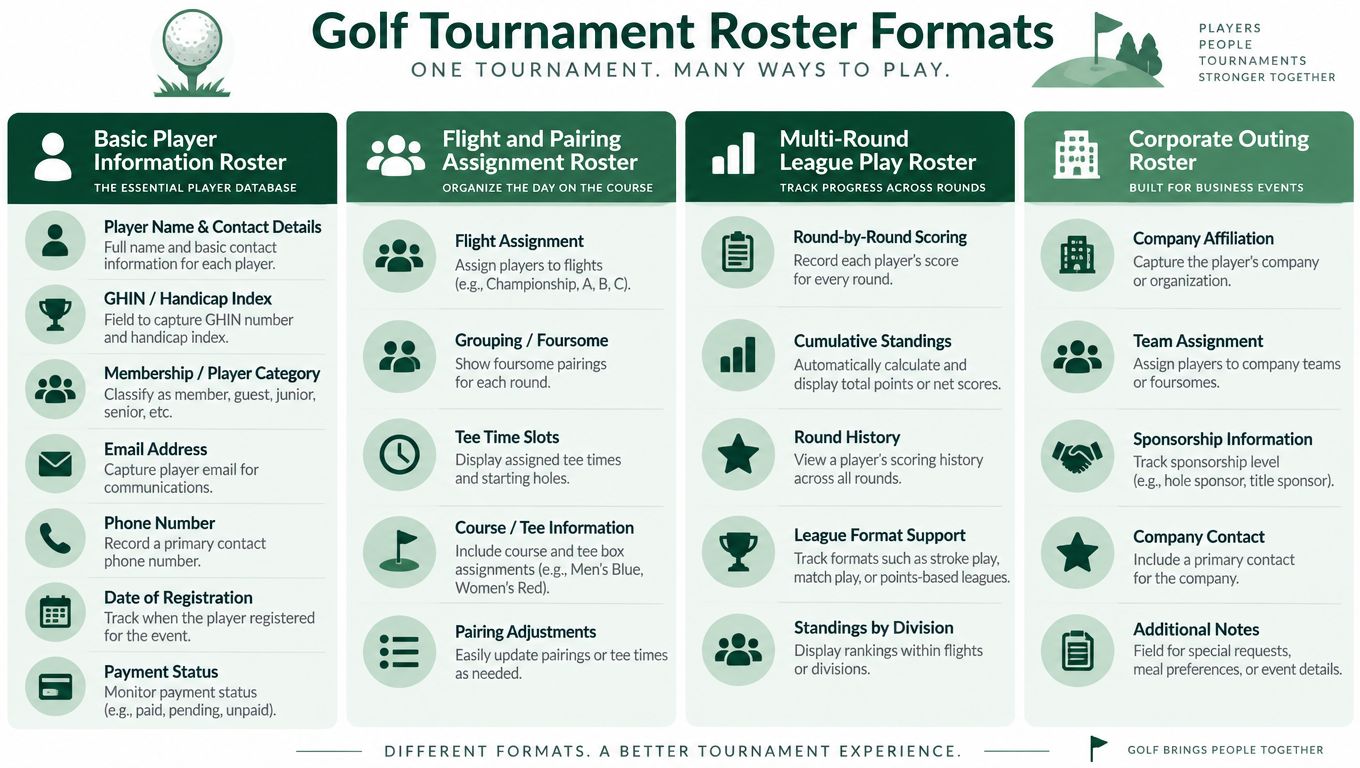
The trade-off is maintenance. A detailed pairing roster gives staff more control, but every cancellation or partner change creates another field to update. Keep the source roster stable, generate assignments from it, and lock the print-ready version only after the final review. That workflow protects the original entries while giving staff a clear operational file.
3. Multi-Round League Play Roster
A multi-round league roster needs to remember what happened before the current event. A basic registration list can't show attendance, weekly scores, running points, handicap changes, byes, or tie-breakers without becoming difficult to read. Recurring men's clubs, ladies' leagues, senior tournaments, and corporate golf circuits need a structure that separates permanent player information from changing round data.
Use a master sheet for names, contact details, membership status, and starting handicap. Create a separate sheet for each round, or use a normalized results sheet with one row per player per round. The first option is easier for volunteers to read. The second is better for automated reports and long-term analysis.
Make absence visible
An absent player shouldn't disappear from the standings. Add explicit statuses such as played, absent, bye, withdrew, or guest, then apply the league's scoring rule consistently. A blank cell can mean anything, while a defined status tells the administrator whether to award no points, apply a participation rule, or reschedule a match.
Useful league fields include:
Round date: Record the date attached to each result, not only the week number.
Gross and net score: Keep both when handicap-based scoring is used.
Points and rank: Calculate standings from visible components so players can understand the result.
Handicap status: Record the value used for the round and any approved adjustment.
Tie-break result: Apply the competition's published rule rather than making a new decision after the final round.
A recurring league also benefits from automatic weekly reports. Staff can send standings, upcoming groups, and attendance reminders without rebuilding the message each time. Round-robin scheduling guidance is relevant when the league format requires players to rotate opponents or groups.
The main trade-off is flexibility versus control. Color coding can make leaders and lower positions easy to scan, but it shouldn't be the only way to communicate status. Use labels as well, because printed reports and mobile screens may not preserve spreadsheet colors. Keep formulas protected, maintain a reusable blank version, and document how the league handles ties, absences, and handicap adjustments.
4. Corporate Outing and Charity Event Roster
Corporate outings and charity tournaments have a broader registration problem than club events. The purchaser may register colleagues, clients, sponsors, guests, and non-golfers, while the organizer must coordinate teams, meals, recognition, payment, and course logistics. A useful roster should capture company or organization, team name, team captain, sponsor information, participant type, dietary restrictions, payment status, and requested add-ons.
The form should make group registration easy. Let one purchaser enter a foursome or company team rather than requiring every participant to create a separate account. Ask for each participant's name when the event needs individual scorecards, pairings, handicaps, carts, or meal planning. A team captain field gives staff one reliable contact without preventing individual communication when it matters.
Separate golf data from fundraising data
A corporate roster often serves two systems at once. The golf side needs names, teams, handicaps, carts, and scoring details. The event side needs sponsor recognition, raffle tickets, mulligan packages, skins entries, meals, gifts, and payment reconciliation. Keep those fields connected, but don't make every participant answer questions that apply only to the purchaser.
For players without a GHIN or verified handicap, provide clear instructions for an estimate. Don't hide the method in a note that participants may miss. If the event uses mixed-skill teams, make the team captain responsible for reviewing the final list before the cut-off date.
A practical roster also records payment amount, payment method, and date received, allowing staff to reconcile contributions regularly instead of waiting for event week. This golf tournament registration checklist includes operational fields such as communication details, team requests, dietary restrictions, payment records, and optional event purchases.
The limitation is that corporate forms can become too long. Use conditional fields so sponsor details appear for sponsors, meal questions appear for attendees, and handicap questions appear only when scoring requires them. Freeze the final team list before producing signage, carts, and scorecards, while retaining a change log for late substitutions.
5. Match Play and Bracket Roster
A match play roster is built around relationships between competitors, not only individual results. It needs seed, ranking or handicap basis, bracket position, opponent, match date, course or starting location, result, advancement status, and next-round position. A standard player list cannot show who plays whom or how a winner moves through the competition.
Use one master player sheet and a separate printable bracket. The master sheet holds contact and eligibility information. The bracket displays the competition in a form players can understand at the clubhouse or on a noticeboard. For odd participant counts, add a bye column and define whether the bye advances automatically or requires a scheduled placeholder.
Design the bracket before collecting entries
The bracket format determines the data you need at registration. If players are seeded by handicap or ranking, collect the value and identify its verification status. If matches use net scoring, record the handicap differential or calculation input used for each match. Don't place formulas inside a public bracket where staff may overwrite them while entering results.
The roster should also record:
Match result: Use a structured result field instead of free text.
Advancement: Show the next bracket position and the responsible player.
Tie procedure: Publish how sudden-death holes or another approved procedure resolves a tied match.
Club points: Track points separately when match outcomes feed an overall club ranking.
Contact status: Record whether both players received the date, time, and location.
For a Ryder Cup style event, add team, match type, partner, and point value. For a ladder competition, add current position and challenge date. These formats look similar on paper but need different operational rules.
The key trade-off is visibility versus privacy. A posted bracket should show what competitors need to follow the event, but it doesn't need personal phone numbers or private eligibility notes. Keep those details in the administrator's roster. In collegiate soccer, official game rosters demonstrate how a simple attendance list can become regulated competition paperwork, including starters, names, numbers, cautions, ejections, and submission deadlines. The NCAA game roster template illustrates the value of separating public display fields from compliance records.
6. Accessible Mobile-First Roster Upload Template
A mobile-first roster upload template solves a specific handoff problem: player details arrive from a pro shop, company coordinator, league administrator, or website form, and staff need to import them into tournament management without retyping each record. The format should support quick entry on a phone while remaining clean enough for staff review and print-ready registration records.
Use plain columns rather than a styled workbook. Include player name, email, phone, handicap, team or company, and any registration choice the platform needs. Keep one player per row, use consistent formats, and avoid merged cells, decorative headers, and hidden columns. A simple CSV or spreadsheet is easier to inspect, correct, and reuse.
Make the template hard to misuse
Provide a downloadable sample with realistic headers and limited personal data. State the rules beside the download: one row per player, no blank rows, no repeated header rows, and no formulas in required fields. A short pilot import before registration opens can expose phone numbers stored as calculations, inconsistent handicap formats, or names entered in a single field that staff cannot sort reliably.
The documented golf spreadsheet workflow accepts an XLS, XLSX, or CSV file with one worksheet, headings in the first row, one golfer per row, and a last name for every record. These roster import instructions provide the schema for building the upload template. Validate that structure with a small pilot file before inviting a larger group.
Review the imported roster before creating pairings or sending live scoring links. Check duplicate names, missing email addresses, invalid handicap values, unexpected blanks, and mobile-entered spelling errors. Save the completed file with the event record, but mark it with the event and revision so staff do not mistake an old roster for current data.
The trade-off is speed versus detail. A compact upload file moves registration into scoring quickly, but it cannot safely carry complex notes, safeguarding information, or bracket instructions. Keep those records in a restricted administrative file and let the upload contain only fields the tournament platform uses.
7. Junior and Developmental Program Roster
A junior and developmental roster has to support instruction as well as competition. It should collect the player's age or age group, skill category, parent or guardian name, guardian contact details, emergency contact, consent status, instructional needs, accommodations, and progress notes. The organizer needs enough information to group players appropriately without turning a registration form into an unstructured coaching journal.
Skill-based flights can use labels such as U-12, U-16, and U-18, provided those categories match the program's published rules. Add a field for playing experience or instructional level when age alone doesn't produce fair groups. A younger experienced player and an older beginner may need different teaching groups even if they enter the same event.
Protect minors and preserve useful history
Parental consent and emergency contact fields should be mandatory where the program requires them. Keep minor records separate from public brackets, scoreboards, and printouts that may circulate beyond staff. Store only the information instructors need, restrict access to sensitive notes, and define when old records should be archived.
Useful program fields include:
Guardian communication preference: Identify the adult who receives schedules, results, and changes.
Accommodation notes: Record practical requirements without exposing private medical detail on public documents.
Learning goals: Give instructors a concise reference for coaching focus.
Progress markers: Track scoring improvement, tournament placements, or completed skills over time.
Advancement status: Note when a player is ready to move into a higher skill group.
Competitive golf workflows show how eligibility controls can be embedded directly into roster design. In a NAIA postseason golf process, electronic submission and signature are tied to a certification deadline, the roster is limited to eligible players, and only listed players may be in uniform. The NAIA coaches manual demonstrates why eligibility, timing, and approval fields should never be treated as optional administrative notes.
The trade-off is detail. A junior program benefits from richer records, but parents may abandon a form that asks for every coaching preference before registration is complete. Use required fields for safety and eligibility, then gather optional development information through a separate coach-facing process.
7-Point Roster Form Comparison
Roster Type | 🔄 Implementation complexity | ⚡ Setup & speed | 📊 Expected outcomes | Ideal use cases | ⭐ Key advantages | 💡 Tips |
|---|---|---|---|---|---|---|
Basic Player Information Roster | Low, simple fields, minimal workflow | Very fast, quick to collect & upload | Accurate contact & handicap records for registration | Small/standard tournaments, club events | Simplicity, easy import, broad compatibility | Verify handicaps, validate emails, timestamp entries |
Flight and Pairing Assignment Roster | Moderate–High, grouping logic and tee scheduling | Moderate, algorithmic or manual pairing takes time | Balanced flights, clear tee sheets, improved pace | Multi‑flight events, member‑guest, championships | Fair competition, streamlined pairings, flexible formats | Use handicap algorithms, include notes, keep backups |
Multi-Round League Play Roster | High, season tracking, formulas and updates | Slow, ongoing weekly maintenance required | Cumulative standings, attendance trends, fair rankings | Seasonal leagues, ladder competitions, recurring play | Tracks progress, auto standings, supports points formats | Automate formulas, separate sheets per round, color-code |
Corporate Outing and Charity Event Roster | Medium, extra team/sponsor/logistics fields | Moderate, more data entry and last‑minute changes | Team organization, sponsor capture, logistics readiness | Corporate outings, charity tournaments, team events | Handles mixed skills, sponsorship data, event logistics | Collect sponsor/captain info, set cut‑offs, estimate handicaps |
Match Play and Bracket Roster | Moderate–High, seeding, bracket logic, tie rules | Moderate, initial setup then straightforward flow | Clear bracket progression and advancement tracking | Match play, elimination tournaments, ladders | Visual brackets, auto advancement, fair seeding | Seed by handicap, include byes, define tie‑breakers |
Accessible Mobile-First Roster Upload Template | Low, structured CSV with strict headers | Very fast, batch import and one‑click integration ⚡ | Rapid setup, live scoring integration, fewer errors | Quick digital events, SaaS platforms, mobile‑first tournaments | Speed, validation, real‑time leaderboards | Provide sample CSV, test uploads, enforce email formats |
Junior and Developmental Program Roster | Medium, added privacy, guardian and progress fields | Moderate, consent and ongoing progress tracking | Safety compliance, development tracking, tailored groupings | Junior academies, developmental tournaments, instruction | Supports minors, progress tracking, parent communication | Collect parental consent, emergency contacts, keep separate minor records |
Turn the Best Template Into a Repeatable Workflow
Choose the leanest roster that still supports the event's real work. A basic tournament may need only names, contact details, membership status, and handicap information. A flighted event needs assignment fields. A league needs round history and attendance. A match play event needs seeding and advancement. A corporate outing needs team, sponsor, meal, and payment data. A junior program needs consent, guardian communication, and safeguarding controls.
Start by listing the outputs staff must produce. If the event requires scorecards, tee sheets, cart signs, bag tags, live leaderboards, reports, or parent messages, work backward from those outputs. Each output should have a clear source field. If no workflow uses a field, remove it or make it optional.
Test the form before publication. Submit a realistic entry, a team entry, a late change, and a cancellation. Confirm that names appear consistently, emails are deliverable, handicap data follows the intended format, and staff can identify the latest version. Standardize names and contact data before importing anything into scoring or pairing tools.
Keep registration separate from operational assignments when the event changes after sign-up. A player may register alone, request a partner, join a company team, or move into a different flight later. If staff overwrite the original registration record, they lose the history needed to resolve disputes. Store assignments in a controlled layer and keep a reusable blank version for future events.
Roster form design also has a practical limit. In mathematics, roster form means listing set elements inside curly braces, but authoritative educational explanations point out that listing becomes impractical when a set is large or not easily enumerated. This explanation of roster notation offers a useful analogy for tournament administration. A list works when staff can inspect it. When the roster becomes too large or changes too often, use structured fields, filters, imports, and rules instead of one oversized page.
Live Tourney is one option for organizers who want to upload rosters, manage registrations, generate pairings and reports, and share live scoring without requiring players to download an app. Use it when the event workflow benefits from moving one clean roster into several player-facing and staff-facing outputs rather than re-entering the same data in separate places.
Live Tourney gives golf organizers roster uploads, registration management, pairing tools, reports, and app-free live scoring from a web-based platform. Review your current roster form, remove fields that don't support a real workflow, and visit Live Tourney to see how a cleaner roster can support the full event.





