Aug 22, 2026
operational cost reduction, golf course management, tournament software, golf business, cost efficiency
Discover proven operational cost reduction strategies for golf courses. Learn how to cut expenses, automate processes, and boost profitability

A tournament day can look profitable from the outside while consuming margin behind the scenes. Players arrive, the event runs, and the leaderboard eventually gets posted. Meanwhile, your staff may be chasing missing registrations, correcting scores, rebuilding pairings, answering payment questions, and printing documents that should have been ready before the first tee time.
That's the practical challenge of operational cost reduction in golf. The strongest savings rarely come from cutting the services players notice. They come from removing repetitive work, preventing avoidable errors, and giving staff better tools for the tasks that still require judgment and hospitality.
The Hidden Costs of Manual Tournament Management
Manual tournament administration creates more than inconvenience. It ties skilled pro shop and event staff to work that adds little value after the initial setup. A team member who spends the morning transferring names from forms into spreadsheets isn't helping a sponsor, preparing the course, selling merchandise, or improving the player experience.
Paper registration, hand-entered payments, printed pairings, and separate scorekeeping files also create multiple points of failure. One incorrect handicap, missing waiver, or duplicated player record can trigger a chain of corrections. The visible error may take a few minutes to fix, but the surrounding calls, emails, reprints, and explanations consume much more time.
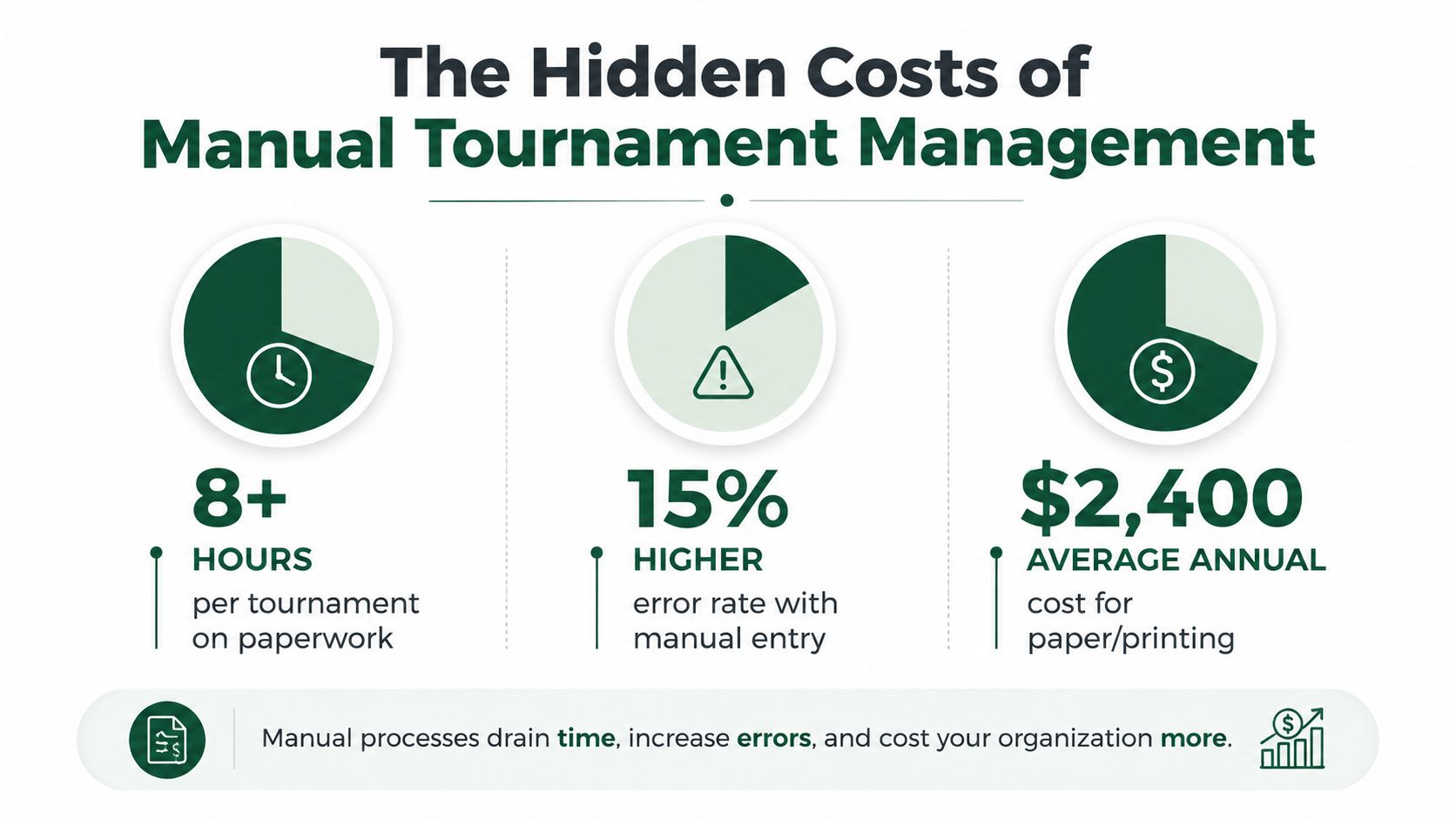
The infographic highlights three planning figures, 8+ hours per tournament on paperwork, a 15% higher error rate with manual entry, and $2,400 in average annual paper and printing costs, as supplied for this operational review. Treat those values as audit prompts, not universal benchmarks. Your own event log should confirm where the largest leakage occurs.
Find the bottleneck before buying software
Start with one tournament and record every administrative action:
Registration: Count form reviews, data entry, follow-up messages, and waiver checks.
Payments: Record time spent reconciling cash, checks, online transfers, and outstanding balances.
Pairings: Track how often staff rebuild groups after late changes or withdrawals.
Scoring: Measure score-entry, correction, leaderboard, and print-related work.
Reporting: Note the time required to produce scorecards, cart signs, bag tags, payouts, and sponsor materials.
This approach resembles the broader discipline described in resources on reducing business expenses in Australia, where leaders are encouraged to examine process-level waste instead of applying blunt cuts. The important question isn't just, “What does this tournament cost?” It's, “Which steps force people to repeat information or repair preventable problems?”
A useful first move is to document the current workflow beside a digital alternative. A free golf tracking workflow can help clarify what information should be captured once, where it should live, and who needs access to it. Once the course can see those handoffs, operational cost reduction becomes a process decision rather than a vague budget objective.
Automating Registration and Payment Processes
Registration is the cleanest place to begin because it's usually repetitive, predictable, and easy to measure. The aim isn't merely to replace paper with an online form. The aim is to collect the complete event record once, then reuse it throughout the tournament.
Build the workflow in the right order
Define the required information. Capture player names, contact details, handicap information, team preferences, meal selections, payment status, and waivers in one controlled form.
Connect payment to registration. Players should be able to pay during sign-up, while staff can see paid, unpaid, refunded, and incomplete entries without searching through separate records.
Create automatic confirmations. Send the player a clear confirmation that includes event details, arrival instructions, and any outstanding requirements.
Lock a reliable roster. Use the registration list as the source for pairings, communications, scorecards, and reports.
This structure prevents the common problem of entering the same player into several spreadsheets. It also gives the tournament director a current view of capacity and outstanding tasks without asking the pro shop to produce another manual update.
A platform such as golf tournament management software can bring registration, payment tracking, roster management, and event communications into one workflow. The right choice depends on your existing payment systems, reporting needs, and the amount of customization your events require.

The practical test is simple. Can a player register without staff intervention? Can the event director identify an unpaid entry immediately? Can a late change update the roster without forcing three people to edit separate documents? If not, the process still carries avoidable administrative cost.
Optimizing Staffing Through Intelligent Scheduling
Staffing becomes expensive when people are assigned around the limitations of a manual system. A tournament may appear to need extra hands for registration, score collection, pairing changes, leaderboard updates, and report preparation. In reality, some of those duties exist only because information isn't flowing automatically.
Begin by separating judgment-based work from transactional work. A professional greeting a sponsor, resolving a player concern, coordinating with the starter, or managing a weather delay creates value that a spreadsheet can't provide. Re-entering a name, copying a score, or printing a revised list usually doesn't.
Schedule by workload, not habit
Review each event role and ask three questions:
What must happen live? Starter coordination, player assistance, rules decisions, and course communication often need a person present.
What can happen before the event? Registration checks, roster cleanup, pairing preparation, and report templates can be completed earlier.
What can happen automatically? Confirmations, score updates, standings, and routine notifications may not need manual handling.
This analysis lets a course assign people to peak moments instead of keeping the same staffing pattern for every event. It also makes cross-training more useful. Staff don't need to memorize every administrative workaround if the system presents a clear roster, current status, and defined exception list.
Practical rule: Automation shouldn't remove the human welcome. It should remove the clerical queue that keeps the human welcome from happening.
Track staff time by task for several comparable events. Don't measure only total hours. Record whether those hours went to registration, correction work, player service, sponsor support, merchandise, or course coordination. The financial value of operational cost reduction comes from both labor avoided and capacity redirected toward revenue-producing or retention-oriented work.
The strongest scheduling model also includes an exception plan. Someone should own late entries, withdrawals, payment problems, and scoring disputes. Automation handles the standard flow. Staff handle the moments where experience and judgment matter.
Streamlining Tee Sheets and Score Management
A paper tee sheet and a digital tee sheet don't create the same workload. With paper, a change usually means editing a master copy, notifying several people, reprinting documents, and hoping every version in circulation is discarded. With a connected system, the change can appear in the same roster used by the starter, scoring team, and event director.
The same contrast applies to scores. Manual entry requires collection, transcription, checking, leaderboard preparation, and correction. Digital scoring lets players submit information closer to the source, while staff focus on incomplete or unusual entries rather than retyping every result.
Traditional and automated workflows
Tournament task | Manual approach | Automated approach |
|---|---|---|
Pairings | Build and revise spreadsheets | Generate and update from a central roster |
Tee sheet changes | Edit, print, and redistribute | Update one shared event record |
Score collection | Gather cards and transcribe results | Capture scores digitally as players submit them |
Leaderboard | Recalculate and publish manually | Display current standings through a live link |
Final reports | Reformat information for each document | Reuse event data in configured reports |

The useful measure isn't whether the software looks modern. Measure how many handoffs disappear. A tee sheet should feed the starter's information, player communications, cart signs, and relevant reports. Scores should move into standings without a second round of data entry.
A detailed guide to tee sheet management is valuable because tee sheets affect more than starting order. They influence check-in flow, cart staging, pace communication, sponsor visibility, and the staff workload during the busiest part of the day.
There's a trade-off. Digital scoring requires clear player instructions and a fallback for poor connectivity or unfamiliar users. A course that removes paper without preparing players may replace clerical work with support calls. The better approach is to provide a simple scoring link, explain it at registration and check-in, and keep one trained staff member available for exceptions.
How Live Tourney Drives Measurable Cost Savings
Purpose-built software earns its place when it changes the work, not just the screen. Live Tourney is one practical example of a web-based platform designed for tournament setup, registration, payments, scoring, communications, pairings, and reporting without requiring players to download an app.
The publisher states that the platform has powered 10,000+ events and recorded 1M+ holes scored, with a reported 40% increase in live scoring participation and setup completed 3x faster than traditional methods. Those are product-specific claims supplied for this article, so a course should validate them against its own baseline before using them in a financial forecast.
Where the savings appear
Consider a charity outing that normally requires staff to move information between registration forms, payment records, pairing sheets, scorecards, and sponsor documents. A connected workflow reduces repeated entry and gives the event director one roster to maintain. The direct saving is the administrative time no longer spent reconciling those records. The operational benefit is that staff can spend the event day assisting guests, managing sponsors, and resolving genuine issues.
A league administrator faces a different problem. Weekly changes can create recurring work, especially when players miss a round, switch groups, or need updated standings. A system that retains player and league information reduces the need to rebuild the event from scratch each time.
For a larger tournament, reporting matters as much as scoring. Configurable outputs for scorecards, tee sheets, cart signs, bag tags, side games, and payouts can reduce the separate document-production steps that often fall on the pro shop.
Live Tourney offers a 10-day free trial and no onboarding fees, according to the supplied product information. That makes a controlled test possible. Run one event with the current process, document the time and errors, then run a comparable event using the digital workflow. Don't assume a trial proves return on investment. Use it to collect evidence.
Measure the handoffs removed, not the features purchased.
Calculating and Tracking Your ROI on Automation
A credible automation case starts before implementation. Record the current process while it's still familiar, including the tasks staff tend to overlook because each one seems small.
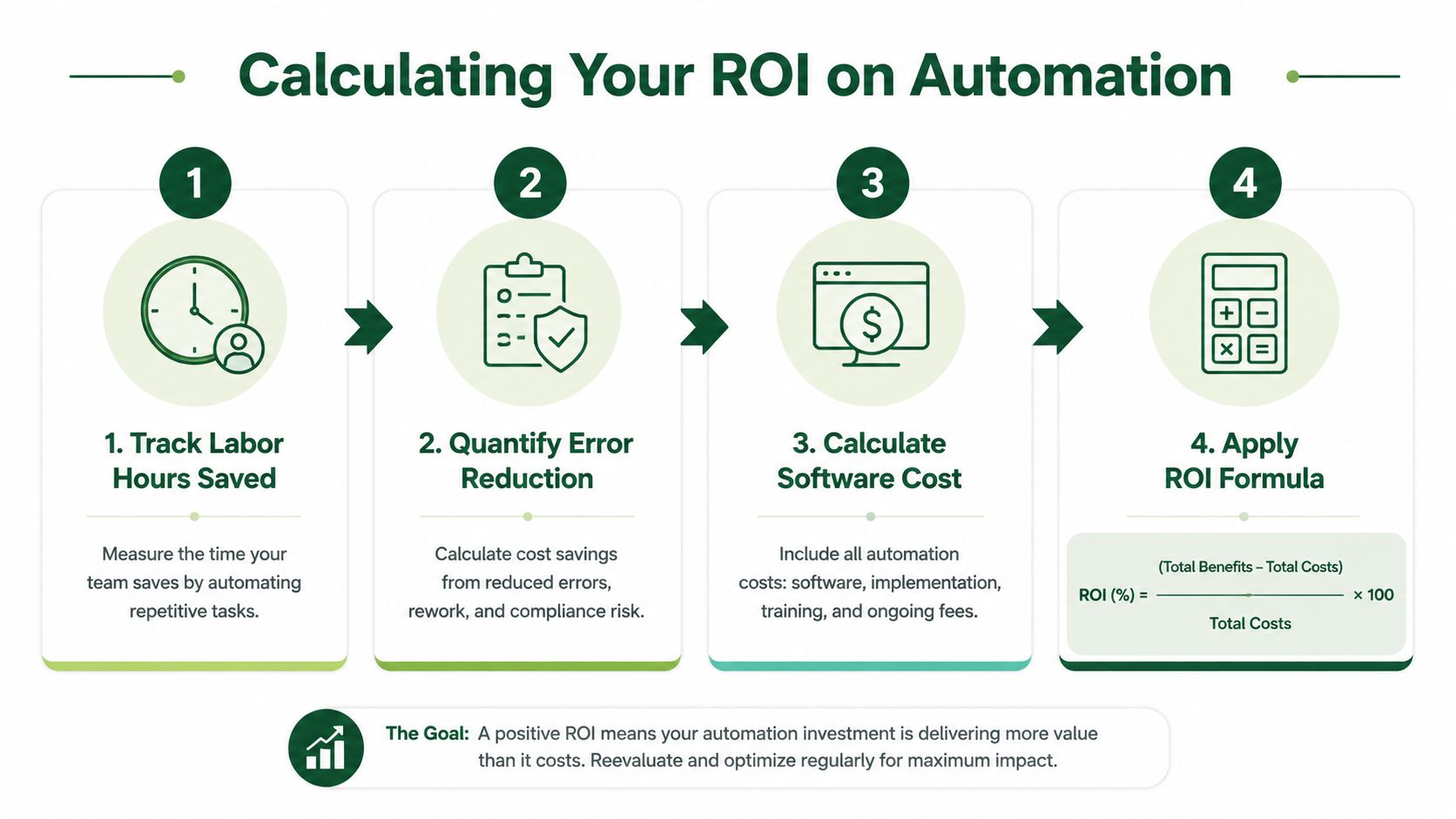
Use four measurements:
Track labor hours saved. Record time spent on registration, payment reconciliation, pairings, score entry, corrections, communications, and reports. Compare the old workflow with the automated one.
Quantify error reduction. Count incorrect entries, duplicate records, missing payments, revised pairings, and score corrections. Include the time spent investigating and fixing each issue.
Calculate software cost. Include subscription charges, payment processing costs, training time, support, and any necessary hardware or connectivity changes.
Apply an ROI formula. A practical formula is:
ROI = (quantified savings minus software cost) divided by software cost.
Don't value every saved hour identically. An hour removed from routine score transcription may create more commercial value if the staff member uses it for sponsor service or merchandise sales. Record that redirected work separately from pure labor avoidance.
Keep the dashboard small
A useful event scorecard might include:
Metric | Baseline | Automated result |
|---|---|---|
Registration administration | Record actual hours | Record actual hours |
Payment follow-up | Record actual contacts | Record actual contacts |
Score corrections | Record actual incidents | Record actual incidents |
Report preparation | Record actual hours | Record actual hours |
Staff time redirected | Describe the work | Describe the work |
The same measurement logic applies to other event programs. For example, teams evaluating campaign attribution for creators also need to distinguish activity from attributable outcomes. Tournament automation deserves the same discipline. A busy event isn't automatically an efficient event, and a polished leaderboard isn't proof of financial return.
Review results after each event, then look for recurring friction. If registration improves but payment reconciliation remains manual, that next bottleneck becomes the logical target.
Your Next Steps Toward Operational Cost Reduction
Operational cost reduction doesn't require a complete technology overhaul on day one. It requires an honest audit of the work your team repeats for every tournament, league round, and outing.
Start with one event on the calendar. Map registration, payments, pairings, tee sheets, scoring, communications, and reports. Mark every point where staff copy information, wait for an update, correct an error, or print a revised document. That map will show whether your first priority should be online registration, digital scoring, tee sheet control, or reporting.
Then choose a measurable pilot. Keep the scope narrow enough that staff can compare the old and new workflows without confusion. Track hours, corrections, follow-up messages, and the work employees complete with the time they recover.
The broader cost-reduction evidence supports a disciplined approach. McKinsey's post-2008 global survey found that more than half of executives reported cutting up to 10% of overall costs, nearly one-third reported reductions of 11% to 20%, and 9% reported cuts of 20% or more (McKinsey's global cost-cutting survey). Those figures show that sustained cost programs can operate at scale, but they don't justify cutting blindly. Tournament operations need targeted changes that protect player service.
Automation is also not self-sustaining. BCG reports that companies achieved only 48% of their 2024 cost-saving targets on average, while 74% of senior leaders and middle managers observed overhead becoming more bureaucratic over time (BCG's 2025 cost-efficiency research). Assign an owner, review the results after every event, and keep improving the workflow after the initial launch.
Live Tourney provides web-based tournament setup, registration, payment management, real-time scoring, live leaderboards, communications, and reporting, with no app download required for players. Visit Live Tourney to test one high-friction event process, measure the time your staff recover, and build operational cost reduction around results you can verify.