Aug 12, 2026
mobile golf scoring app, golf tournament software, live scoring, tournament management, golf leaderboard
Learn what a mobile golf scoring app does, which features matter for events, and how to choose between app-based and app-free live scoring for your course.

Friday afternoon at a busy club is where a tournament either feels under control or starts leaking time. The starter has a stack of paper scorecards, the phone is buzzing with group texts, one player wants to know if skins are live, and the pro shop still hasn't settled on how the leaderboard will be displayed in the clubhouse. That's the moment a mobile golf scoring app stops being a nice-to-have and becomes the operating system for the day.
A good scoring system doesn't just collect numbers. It keeps check-in moving, cuts down on arguments, and gives staff one version of the truth instead of three. The wrong system does the opposite, it pushes work back onto the starter table and forces the committee to clean up the mess after the round.
Why Tournament Scoring Still Breaks on the First Tee
The first tee exposes weak scoring workflows fast. A player shows up late, the cart signs are not ready, one pairing has a handwritten scorecard and another has a text thread, and somebody is already asking whether the side game is gross or net. The round has not started, but the staff is already translating between paper, memory, and urgency.
A mobile golf scoring app fixes that handoff by giving the field one scoring path instead of three. Scores go in once, results update from the same record, and the committee is not stuck retyping everything after the round. The value is not abstract. It is less backtracking at the starter table, fewer arguments over which version is official, and no cleanup job when the last group walks in.
What breaks first is usually not the scoring engine
It is the handoff. Paper gets handed to the wrong volunteer. A group text gets ignored. Someone waits until the turn to ask whether the scorecard is official. By the time the final group comes in, the committee is reconciling a stack of inputs instead of reviewing one clean feed.
Practical rule: if the staff has to explain the same scoring process twice, the process is too slow.
The problem shows up in latency and coverage. If scores take too long to appear, players keep asking for updates and staff keep relaying the same information. If the system cannot handle the format you are running, whether that is stroke play, skins, net games, or side contests, the staff falls back to paper and starts stitching the round together by hand. A live leaderboard only helps when it updates fast enough for the room to trust it. A browser-based scoring setup can be the right answer when the workflow has to stay simple at check-in and the committee wants the same system to cover multiple formats without pushing everyone into a native app.
Live scoring is not a luxury feature. It keeps the round managed instead of improvised.
What a Mobile Golf Scoring App Actually Does
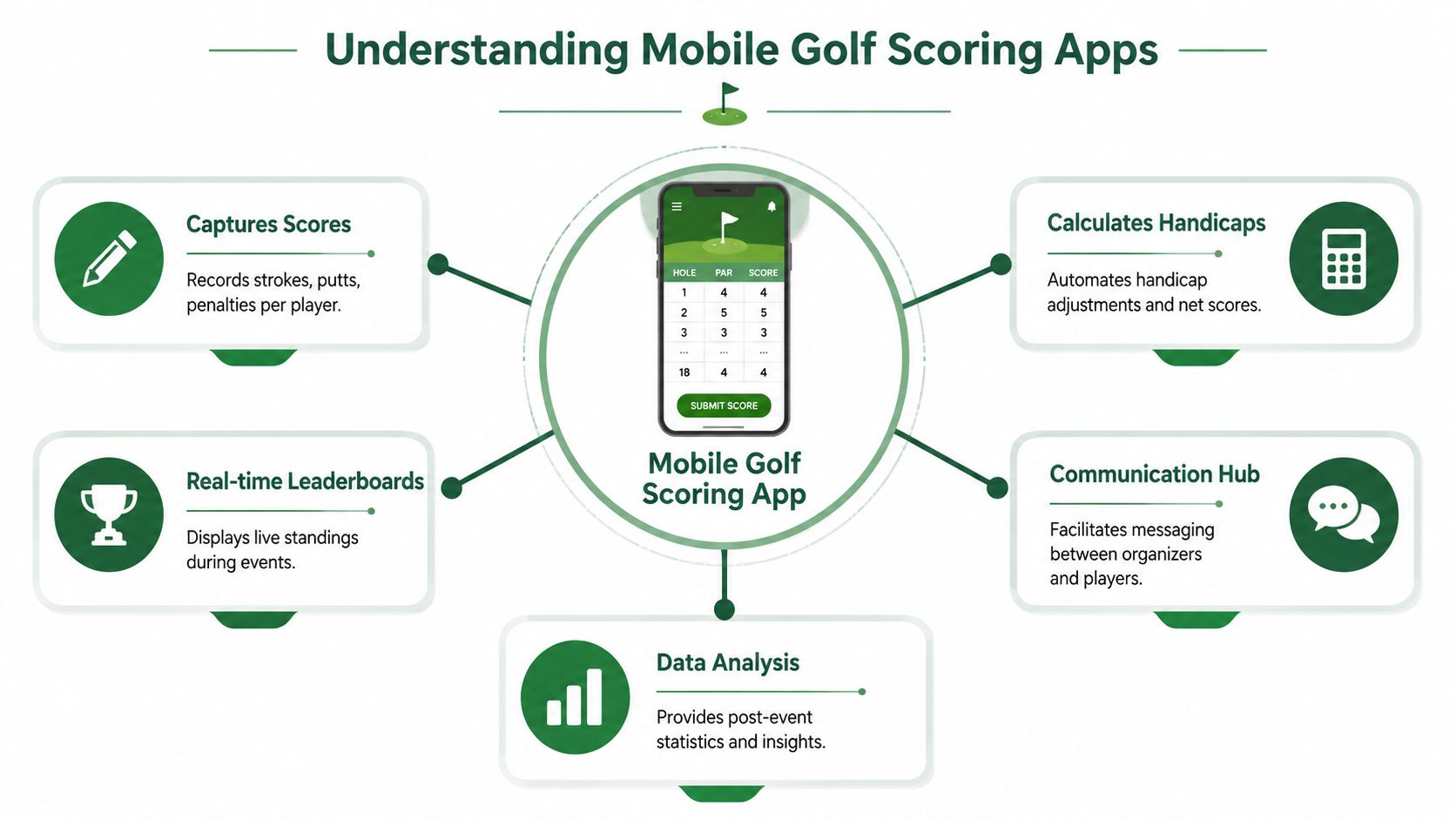
A mobile golf scoring app turns score entry into a live record instead of a pile of cards that someone has to sort later. Players or staff enter scores on a phone, the system sends them to one central record, and the leaderboard changes while the round is still in progress. That matters at the starter table because it cuts down on rekeying, avoids version confusion, and keeps the committee from chasing down the same score twice.
The category now goes far beyond a simple scorecard replacement. Golf GameBook says it offers GPS mapping and rangefinding for over 42,000 courses worldwide, plus stats for scoring averages, birdie counts, fairway hits, putts, chips, and more, while Golfshot says it offers on-course GPS, scoring, statistics, auto shot tracking, and historical round views, and GRGS says it can compute over 200 stats per round and save data to the cloud for access anywhere (Golf GameBook, Golfshot, GRGS). That mix matters because the same product family now serves two very different jobs, personal round tracking and tournament operations, and the workflow should be judged on the job you need done.
Consumer tools and tournament tools are not the same thing
A consumer app is built around the player's own stats, GPS, and shot tracking. A tournament-focused app has to handle tee sheets, pairings, roles, and live standings. That split matters because a personal scorecard may work fine for practice rounds, but it can fall apart the moment one official result has to cover an entire field.
Tournament software also has to hold up in live event conditions, not just clean test runs. GolfStatus says golfers can track and submit scores for every tournament and see where every team stands, while its app lets users record and analyze every shot or round played (GolfStatus). That is the operational standard. If the tool cannot keep pace with live event flow, it is just a record of golf, not tournament scoring.
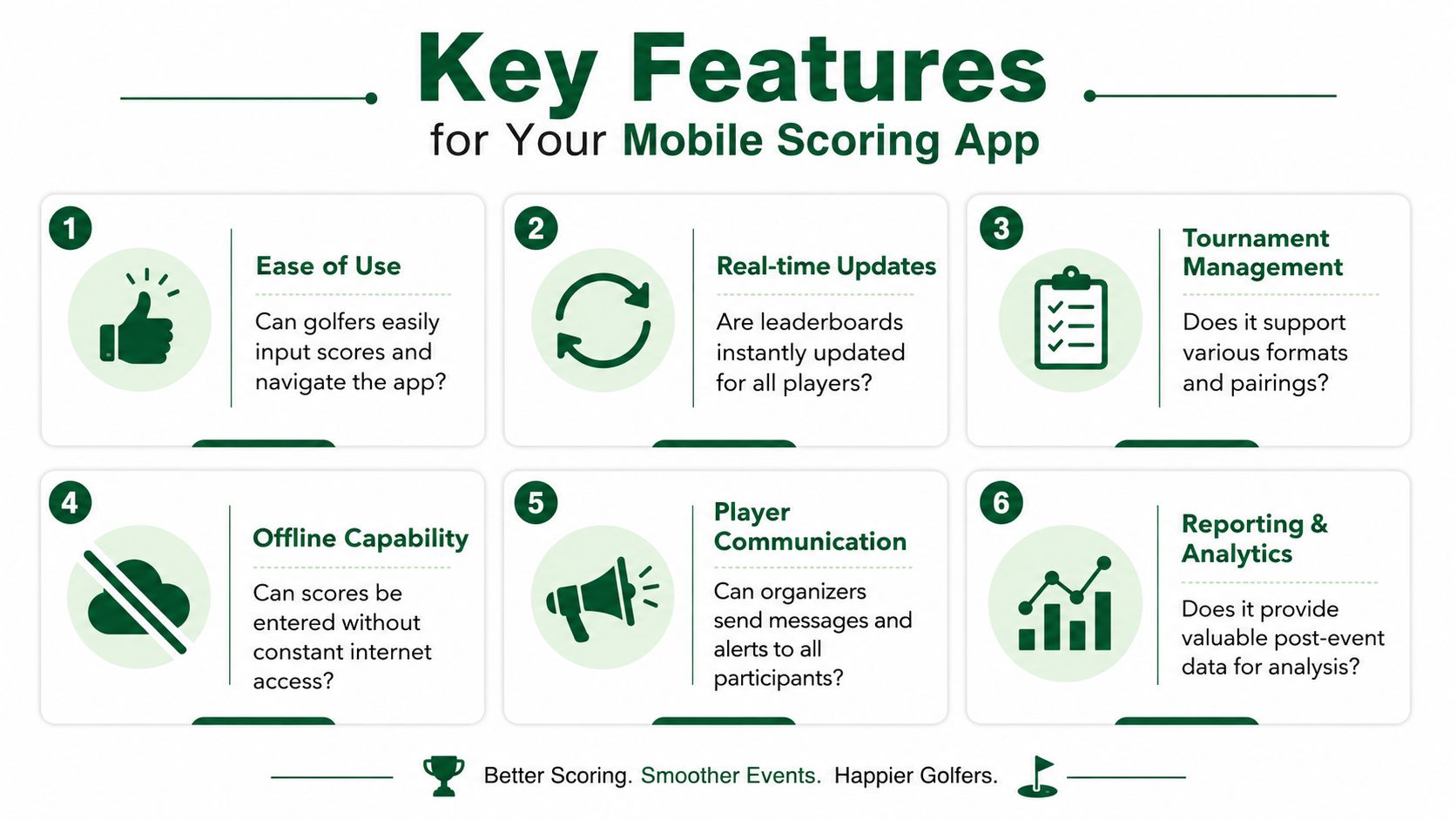
Six Features That Actually Matter When You Compare Apps
Vendors love to lead with a long feature list. Organizers should ignore most of it. The true test is simpler: does the tool cut work at the starter table, keep the clubhouse from chasing score changes, and cover the formats you typically run.
1. Real-time scoring and leaderboard latency
A live leaderboard only earns its keep if the update shows up fast enough to matter. GolfStatus says its app provides simple, reliable live-scoring so users can track a tournament's progress and see where every team stands, while Squabbit says it offers realtime updates that let users see who is leading and get notified when that changes (GolfStatus). If the board lags, staff spend time answering questions that should already have been settled on screen.
Latency also affects trust. When a group posts a score and nothing changes for a while, players assume something broke, even if the app is still catching up in the background.
2. Format coverage
A tool that only handles stroke play will force staff to patch the gaps by hand. Squabbit lists more than 30 formats, including Ryder Cup, Skins, Scramble, Best Ball, Nassau, and Stableford, while PlayThru lists stroke play, point scoring, match play, two-person best ball, four-person best ball, skins, and multi-round tournaments up to six rounds (Squabbit, PlayThru). If your calendar includes side games, team formats, or multi-round events, that coverage matters because the scoring tool should match the event, not force the event to fit the tool.
The practical question is simple, does the app handle the format without staff improvising in a spreadsheet or reworking the leaderboard after the round starts.
3. Roster and tee-sheet handling
The best system keeps staff from retyping the same names. If you can preload pairings, assign roles, and move from registration to first tee without duplicate entry, the event starts on time and stays cleaner all day.
That matters more than polished screens. A good roster workflow reduces handoffs between the pro shop, the scorer, and the starter, which is where a lot of tournament friction comes from.
4. Ease of use at the point of entry
If golfers cannot enter a score fast, they will call the pro shop or wait for a volunteer. mScorecard's seconds per hole entry is the kind of mechanic that matters here because it lowers the burden on staff and keeps the round moving (mScorecard). Don't confuse a long feature list with usability. Clutter slows players down.
The interface should do the work without a tutorial. If a volunteer needs to explain every tap, the tool is costing you time instead of saving it.
5. Browser access and onboarding friction
Some systems make players download an app. Others let them open a scorecard in a browser. PlayThru says event scorecards open on any mobile browser with “NO APPS TO DOWNLOAD”, and Squabbit says players can be added whether or not they already have a handicap or have the app installed (PlayThru, Squabbit). That is a real operator advantage when you want fewer barriers on event day.
It also reduces the number of help requests at registration. A browser link is easier to hand out, easier to open, and easier to explain to a mixed field that does not all use the same phone or the same app habits.
6. Reporting after the round
The app should still be useful after the trophy photos start. Post-event stats help you see whether the format worked, whether the groups moved cleanly, and where staff spent time. For a practical rollout guide on digital scorecards, see the digital golf scorecards overview.
If a demo still holds up after you ask how it handles skins, match play, and a late score correction, you are probably looking at a tool worth testing.
App-Based Scoring Versus App-Free Browser Scoring
The mistake is treating a native app as the default answer. It isn't. In real tournament work, app-free browser scoring is a legitimate operational strategy because the best tool is the one players will use without adding friction at registration.
Native apps are better when you need deeper device integration, more layered personal tracking, or a richer on-course experience. They can also fit better when players are already committed to using the same ecosystem all season. Browser links win when your priority is quick access, fewer downloads, and less training. If a player can open a link and start scoring, you've removed a barrier right where friction usually kills participation.
Criterion | Native App | Browser Link |
|---|---|---|
Friction to join | Higher, because players may need to download and install | Lower, because players can open a link and get started |
Friction to score | Often low once installed, especially for repeat users | Low if the interface is clean and mobile-friendly |
Works without signal | Better when the app supports offline behavior | Depends more on live connection |
Staff support burden | More setup questions, more device-specific issues | Fewer onboarding issues, less install troubleshooting |
Pick the path that matches the event, not the hype
For a member-guest or a large charity outing, browser scoring usually makes more sense because you're dealing with mixed tech comfort and a wide range of devices. For a tighter, more repeatable competition where the same players return often, a native app can make sense if the group is willing to install it and use it consistently.
The smart move is not to argue ideology. It's to look at who's playing, how fast they need to get started, and what the committee can support without hand-holding every group. For more on how staff track scoring flow, the golf score tracking guide is a practical companion.
Rolling Out Live Scoring Without Disrupting the Field
A rollout fails when staff tries to launch live scoring on a major event with no practice run. Don't do that. Start with a low-stakes league night, where the pressure is lower and the mistakes are easier to fix.
Use a five-step setup that your staff can repeat
Pilot program. Test the workflow on a smaller night before you ask the whole field to trust it. That exposes the confusing parts without wrecking an event.
Pre-load data. Get rosters, pairings, and event details in before tournament morning. If staff is typing names while players are warming up, you've already lost time.
Player training. Give a one-page instruction card or a quick walkthrough before tee-off. The problem isn't that golfers can't learn it, it's that they don't want a lesson in the cart barn.
On-course support. Put one helper at the turn or in a visible spot where questions will happen. That keeps minor confusion from turning into a pileup at the starter table.
Feedback loop. Ask what broke, what confused players, and what staff had to fix manually. That's how you tighten the process before the next event.
A decent rollout also needs a clear display plan. If players can score live but nobody can see the leaderboard where the event is being judged, half the benefit is gone. The PSW Events scoring page is a useful reference point for understanding how live-scoring pages are presented in a tournament context.
Decide the display before the first group tees off
The clubhouse TV, the event portal, and the staff laptop all serve different purposes. Pick the primary display, then make sure the committee knows where to check it when disputes come up. If the leaderboard location changes every event, staff ends up answering avoidable questions.
Live scoring should feel boring to the people running it. If it feels dramatic, the rollout is too loose. For a related workflow view, this real-time golf tournament scoring guide gives a useful sense of how live results behave once the event is underway.
What Better Scoring Looks Like in Practice
A 72-player charity outing shows the difference fast. Before live scoring, the staff is juggling clipboards, checking emailed scorecards, and answering the same “who's leading?” question all afternoon. With browser-based scoring in place, the committee sees one current leaderboard instead of a stack of partial updates, and the groups posting during the round stay tied to the event instead of waiting for the final card to be tallied.
The gain is participation. The event is visible while people are still playing, so side games, standings, and finish-line pressure matter before the round ends. If you want a benchmark for what app-based scoring can handle in tournament conditions, ScoreboardLive says it is built for college golf workflows with paperless official scoring, player and volunteer walking scoring, and automatic live updates to a dedicated scoring section (ScoreboardLive).
A weekly league shows the operational win
A weekly league makes the case even more clearly. When rosters and formats are loaded ahead of time, the staff stops rekeying the same information every week, and the pro shop can keep the desk moving without putting another person on phones or spreadsheets.
Round history and automatic handicap logic carry value after the round ends, not just while scores are coming in. That matters because better scoring is not just about a nicer leaderboard. It cuts the administrative drag that keeps staff stuck in the office and out of the rest of the operation.

The practical win shows up in how quiet the desk gets. Staff spends less time explaining what is official, and the committee spends less time piecing together the final result. The real-time golf tournament scoring guide is a useful reference if you want to see how that workflow holds up once an event is underway.
Metrics Worth Tracking and Your Next Step
Use three questions to judge any mobile golf scoring app. First, how much friction does each player face before they can score. Second, how many formats does the system cover without a spreadsheet patch. Third, how much staff time disappears once the event is live.
Keep the metrics simple after launch. Track live scoring participation rate, average event setup time, and number of staff touchpoints per event. Those three tell you whether the new workflow is solving the pain the old one created, not just looking modern on a demo screen.
If you want a quick handicap reference while you evaluate scoring and net formats, the USGA handicap calculator is a straightforward tool to keep nearby during setup. It helps staff sanity-check net scoring without turning the morning into a math exercise.
The next step is plain. Pick one event, run the system from first tee to final leaderboard, and watch where the staff still has to jump in. If the app really saves time, it'll show up in the first week, not after a season of excuses.
If you want a scoring system that keeps the starter table calm and the leaderboard current, Live Tourney is built for that kind of event flow. It gives organizers app-free live scoring, browser-based scorecards, and real-time updates that fit the way golf events run. Visit Live Tourney and see how it handles your next tournament, league, or outing.