Sep 30, 2026
golf course creator software, tournament management, golf event software, live scoring tools, golf operations
Compare golf course creator software for tournaments and operations. Discover modern, cloud-based tools that simplify event setup, live scoring, and management.

You've got a charity outing on the calendar, a league that needs new pairings, and a pro shop team already answering questions at the first tee. The old tournament system can technically handle the event, but only after someone imports a roster, checks several settings, rebuilds pairings, and explains to players where to find the leaderboard. By the time scores start coming in, staff are managing software instead of golfers.
That's why the phrase golf course creator software needs a practical definition. Most operators aren't searching for a 3D architecture tool. They're looking for a way to create and run events, leagues, outings, and tournaments without forcing staff through a maze of duplicate data entry or players through an unnecessary app download.
Operational need | Legacy approach | Modern cloud approach |
|---|---|---|
Event setup | Multiple configuration screens and manual imports | Guided setup with reusable event structures |
Player management | Roster changes require repeated edits | Central roster and pairing updates |
Scoring | Dedicated software or device setup | Browser-based scoring on phones |
Communication | Separate email tools and spreadsheets | Registration, reminders, and updates in one workflow |
Results | Manual reconciliation and exported reports | Live leaderboards and automated reporting |
Staff access | Limited to installed computers | Available from supported internet-connected devices |
Defining Golf Course Creator Software
The word “creator” can send buyers in the wrong direction. In golf technology, it may suggest software for drawing fairways, placing bunkers, or building a virtual representation of a course. That's a legitimate category, but it isn't what most head professionals mean when they search for software to create a golf event.
For course operations, golf course creator software is event infrastructure. It helps staff turn a tournament idea into a working experience, starting with registration and player information, continuing through pairings and scoring, and ending with results, reports, and follow-up communication. The course itself may already exist. The operational challenge is creating the right event around it.
That distinction matters because tournament administration has several connected stages:
Registration: Collect player names, contact details, divisions, preferences, and payments where required.
Configuration: Set the format, handicap rules, flights, tee assignments, side games, and competition settings.
Execution: Publish pairings, capture scores, monitor progress, and answer exceptions during play.
Presentation: Give players a clear leaderboard and provide staff with accurate results and reports.
A platform that only creates a scorecard solves one part of the event. A platform that connects the roster to pairings, pairings to scoring, and scoring to results is much closer to what operators need.
The market context supports that broader interpretation. One estimate projects the golf course software market to grow from USD 626.23 million in 2026 to USD 1,604.78 million by 2035, with an average CAGR of 11%, while the same estimate says more than 34,800 golf courses worldwide used digital platforms in 2024 for activities such as tee-time booking, member management, and operational scheduling. It also reports 14,900 courses using fully integrated software suites, which suggests that digital course operations are established rather than experimental. The golf course software market estimate provides useful context, although operators should treat market forecasts as directional rather than as a substitute for evaluating a product.
Practical rule: Define the event workflow before you compare software. If the tool can't carry information from registration through final reporting, it isn't a complete event creator for a golf facility.
The right question isn't “Can this system create a golf course?” It's “Can my team create a professional tournament without rebuilding the same information in four different places?”
The Shift to Cloud-Based Golf Operations
Legacy tournament systems were often built around a physical location. A desktop computer in the tournament office held the database, staff installed updates manually, and the person who knew the system best became the unofficial technology manager. That model can work, but it creates obvious problems when a head professional is preparing an event from home, a tournament director is walking the course, or a staff member needs to make a late roster change from the clubhouse.
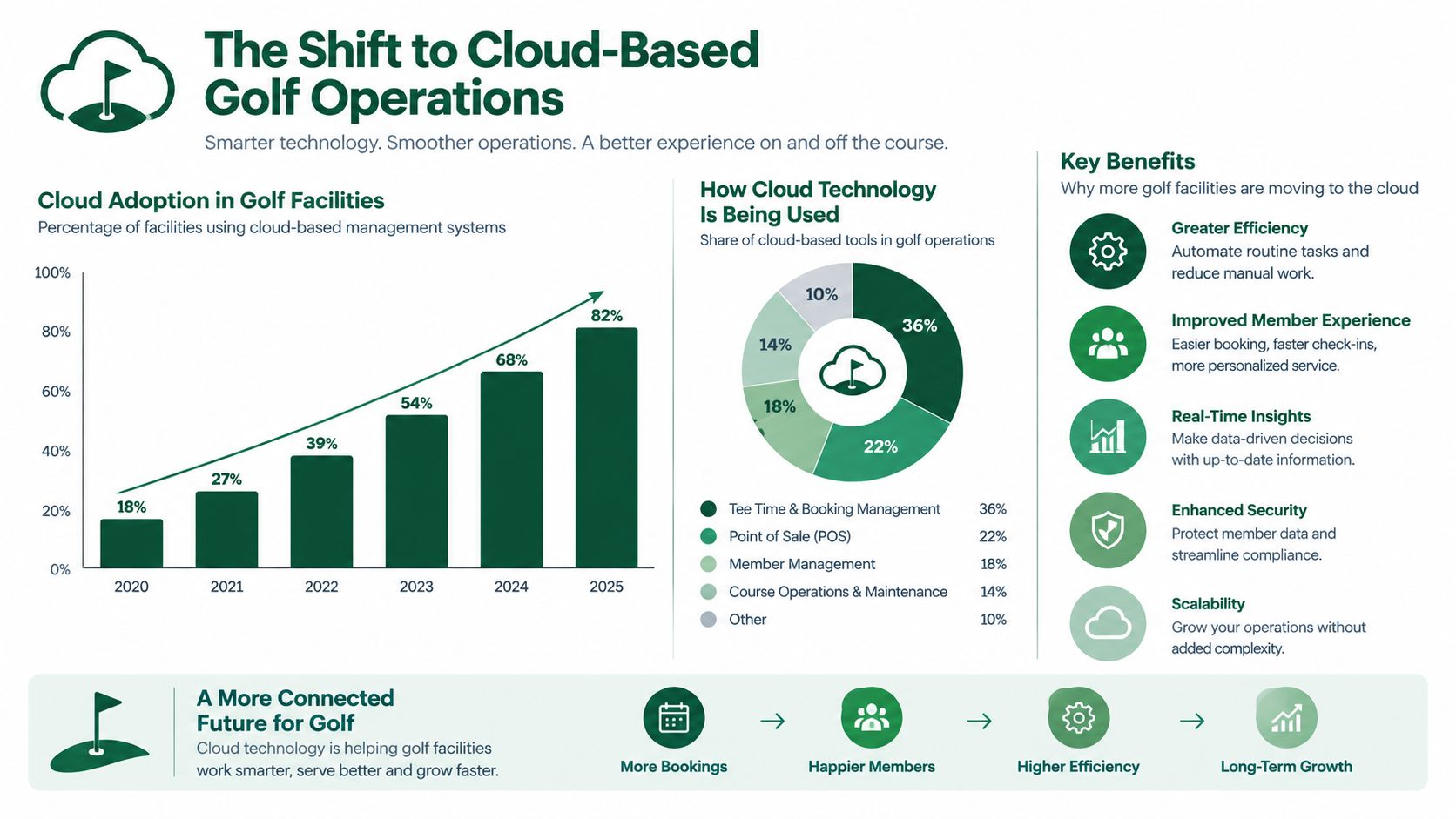
The industry has moved toward cloud delivery because golf events are mobile operations. Staff work at the registration desk, on the first tee, in the scoring area, and sometimes from a cart. A cloud platform lets authorized users reach the same event data from different devices, which reduces the risk of one person becoming the only source of truth.
A separate industry estimate valued the global golf software market at USD 1.64 billion in 2025 and projects it to reach USD 3.12 billion by 2032, implying a 9.6% CAGR. Its deployment breakdown estimated cloud-based golf software at 71.48% of global share in 2025, or about USD 1,174.1 million, compared with 28.52% for on-premise systems. The global golf software market estimate points to cloud access as the dominant deployment model, not a niche option.
Why device access changes the work
Cloud access isn't valuable because it sounds modern. It changes specific tasks:
A tournament director can review registration while away from the office.
A pro shop employee can correct a player record without waiting for the administrator who created the event.
Staff can publish a pairing change once instead of updating several local files.
Players can receive current information rather than relying on a printed sheet that became outdated after the first withdrawal.
The trade-off is that cloud software depends on reliable connectivity, sensible permissions, and a vendor that takes security and support seriously. A browser-based interface won't solve a weak venue connection, and remote access creates confusion if every employee can alter every setting. Ask how the system handles user roles, backups, support requests, and data export before you assume cloud means effortless.
The broader lesson is simple. Device-agnostic access is now a baseline expectation for event administration, but portability only helps when the workflow remains understandable on a laptop, tablet, and phone. A platform that technically works on every screen but forces staff to pinch, zoom, or hunt through dense menus still behaves like a desktop application.
Evaluating Tournament Management Platforms
Feature lists make software comparisons look easier than they are. One vendor may advertise a long list of modules, while another emphasizes a smaller set of event tools. The useful comparison is not how many buttons exist. It's how many staff handoffs the system removes during a real tournament.
Independent benchmark-style comparisons commonly weight features at 40%, ease of use at 30%, and value at 30%. The tournament management software comparison framework reflects a sound buying principle: functionality matters, but a platform that staff can't learn or operate under pressure creates its own cost.
Evaluation dimension | Legacy enterprise systems | Modern cloud platforms |
|---|---|---|
Setup | Broad configuration, often requiring specialist knowledge | Focused workflows designed for faster event creation |
Roster editing | Changes may need to be repeated across modules | A central roster can feed downstream event functions |
Pairings | Powerful but sometimes dependent on complex settings | Pairing tools prioritize speed and visibility |
Scoring | May rely on dedicated software or structured device setups | Browser-based entry can reduce player and staff support |
Reporting | Detailed output, often requiring configuration or exports | Common reports are available as part of the event workflow |
Integrations | Strong potential, but setup can be demanding | Lighter deployment, with fewer dependencies in some products |
Support | Formal processes and scheduled training may be required | Often suited to teams that need direct, practical assistance |
Test continuity, not the brochure
Ask a vendor to demonstrate one complete scenario. Start with a registration record, change a player's partner, move the group into a different flight, publish the pairing, enter a score, and produce the result. Watch for moments where the presenter leaves the system, opens a spreadsheet, or performs a manual reconciliation.
Those interruptions are the cost of fragmented software. They create opportunities for mismatched names, outdated handicaps, incorrect tee assignments, and results that don't agree with the scorecard.
The event management software comparison is a useful starting point for reviewing those differences, but your own event calendar should decide the final test. A system built for a large association may have capabilities your weekly member league never uses. A lightweight tool may be perfect for outings but insufficient for complex club integrations.
Count the decisions staff must make
Ease of use isn't the same as having a pleasant color scheme. It means a new tournament coordinator can understand what to do next, identify an error, and recover without calling the vendor. During a busy event, the best interface is often the one that makes the correct action obvious.
Look for:
Clear event states: Staff should know whether registration is open, pairings are published, scoring is active, or results are final.
Safe editing: A late player change shouldn't force the team to rebuild the entire event.
Visible exceptions: Missing scores, duplicate players, and incomplete groups should be easy to find.
Useful exports: The system should produce reports staff can print, share, or archive.
A feature-heavy product can be the right choice for a large club with dedicated technical support. It can also be the wrong choice for a municipal course where the head pro handles registration between lessons. Buy for the people who will run the event, not for the most impressive demonstration.
Matching Software to Event Formats and Rules
A tournament platform should be tested against the formats on your calendar, not just a standard scramble. Different formats place different demands on the software's rules engine, player communication, pairing logic, and results screen.
Start with the event types you run repeatedly. List weekly leagues, member tournaments, charity outings, corporate days, match play brackets, and any multi-round competitions. For each one, record how players register, how groups are formed, what scores must be entered, and what staff must publish before and after play.
Match play needs hole-level logic
Match play isn't stroke play with a different leaderboard. The winner of each hole matters, and the match may finish before the final hole. The World Amateur Golf Tour explanation of tournament playoff formats describes match play as a hole-by-hole contest in which the player or team winning the most holes wins, with the match ending when one side leads by more holes than remain. It also notes that under USGA Rule 3, match play normally continues hole by hole until a winner is decided unless the competition terms allow a tie.
Your software should therefore support:
Match status by hole, not only total strokes.
Automatic recognition of a decisive lead.
Brackets that update as matches finish.
Clear handling of ties, concessions, playoffs, or competition-specific rules.
Player-facing results that explain who advances.
If staff must calculate dormies, remaining holes, or bracket advancement on paper, the platform isn't carrying enough of the operational burden.
Round robin formats test rotation
Round robin events also need more than a generic “everyone plays everyone” label. Wenham Country Club describes a round robin, sometimes called 6,6 and 6, as a foursome format where partner pairs change after every six holes, creating three six-hole matches. Its golf games guide makes the important point that the format has a defined structure.
That means the system needs to represent changing partners and match segments without confusing the player roster or final scoring. A basic event tool may be fine for a single pairing, but it can become awkward when the same group has different opponents and partners throughout the round.
Payments and deadlines are part of the format
Registration isn't complete if the course still has to chase deposits, player counts, and final balances through email. Some outing policies require strict commitments. Bowling Green, Kentucky, states that an outing request remains tentative until a non-refundable $100 deposit and completed contract are received, the final player count is due 10 days before the event and can't be reduced, and final payment is due on the outing day. Bowling Green's golf outing policy illustrates why registration rules need to be visible and enforceable.
Choose software that can collect the required information, show deadlines, and flag incomplete registrations. Golf event registration systems can also collect credit card payments at sign-up. Documentation for event and league registration with payment identifies charity or corporate outings, tours, and golf associations as common use cases.
Eliminating Friction with App-Free Live Scoring
The first tee is a poor place to provide technical support. Players are arriving with clubs, carts, rangefinders, and questions about the format. Asking them to download an app, create an account, confirm an email, and find the right event adds a queue before the round has properly started.
App-free live scoring removes a needless decision from the player experience. A mobile browser link can take players directly to the score-entry screen, where they enter scores and view the leaderboard without installing another application. That approach won't fix unclear scoring rules, but it removes installation as a prerequisite for participation.

Design for the player holding a phone
Players don't experience software the way administrators do. They aren't interested in the database structure or the number of available settings. They want to know whose score they're entering, which hole they're on, and whether the information saved successfully.
A practical scoring screen should make those actions obvious:
Identify the group: Players should see their names and tee information without searching.
Show the current hole: The interface should reduce accidental entries for the wrong hole.
Confirm the save: A clear status message prevents repeated taps and duplicate submissions.
Keep the leaderboard accessible: Players should be able to check progress without leaving the event entirely.
Handle poor conditions gracefully: Buttons and text need to remain usable in bright sunlight and with one hand.
The live scoring workflow guide offers a useful reference for assessing how browser-based score entry can fit into tournament operations. Use a practice event to test the experience with actual players, not only staff members who already understand the system.
Reduce questions before they reach the pro shop
App-free scoring also changes staff responsibilities. Instead of troubleshooting downloads, staff can focus on the exceptions that need human judgment, such as a withdrawn player, a disputed score, or a group that has fallen behind.
That doesn't mean you should remove all guidance. Put the scoring link in registration confirmations, pairing emails, cart signs, and the first-tee briefing. Give one person authority to correct scores, and tell players how to report an error. A short instruction at the right time is more useful than a long manual sent days earlier.
The strongest setup keeps the player interface simple while giving administrators control behind it. Players see only what they need for the round. Staff can inspect score status, identify missing entries, and publish results without asking every group to restart the process.
Choosing the Right Platform for Your Facility
The right platform depends on the facility's operating model. A private club with integrated membership, point-of-sale, accounting, and tee-sheet requirements may need a broad management suite. A municipal course running seasonal outings may get better results from a focused tournament system that staff can configure without specialist help.
The gap in technical support is significant. One market report says 22% of courses without dedicated IT staff have implemented cloud-based golf course software, compared with 81% of tech-supported facilities. The cloud-based golf course software market report suggests that onboarding, usability, and support can determine adoption just as much as the software's feature set.
Use staffing and event complexity as filters
A useful decision matrix starts with the work your team can realistically maintain:
Facility situation | Sensible starting point | Questions to ask |
|---|---|---|
Small or municipal course | Focused event platform | Can one employee create and edit an event without formal training? |
Busy public course | Cloud tournament system with registration and reporting | Can staff handle last-minute changes while serving daily golfers? |
Private club | Integrated suite or connected event platform | Does it work with membership, tee-sheet, and financial workflows? |
Charity and corporate organizer | Registration-led event tool | Can it collect payments, manage sponsors, and publish results clearly? |
Association or league | Format-rich tournament platform | Does it support recurring schedules, flights, brackets, and multi-round events? |
Event volume matters, but complexity matters more. A facility may run fewer events yet spend more administrative time on each one because the formats, payments, or reporting requirements are demanding. Conversely, a busy course with straightforward scrambles may benefit more from fast setup than from an extensive collection of advanced modules.
Separate necessary integration from expensive complexity
Ask which systems must share data and which tasks staff can manage separately. Membership synchronization may be essential for a private club. It may be unnecessary for a charity coordinator who receives a final roster from the organizer and only needs registration, payment, pairings, scoring, and reports.
Also examine support. A platform that promises powerful customization but leaves staff to configure every rule alone can create more work than it removes. Ask for onboarding steps, response expectations, training materials, and a clear explanation of what the team must maintain after launch.
For clubs where event inquiries arrive through scattered email threads, a resource on how to optimise enquiry handling at your club can help improve the process around the software, not just the software selection itself. The event platform should then capture the information in a structured record so staff aren't retyping it later.
Use this golf course management software guide to compare broader suites with specialized tournament tools, then run a real event simulation before signing. The best choice is the system your team can operate confidently on a busy day.
Implementation Questions and Operational Realities
Migration rarely fails because staff can't understand the idea of cloud software. It fails because the first event exposes small gaps that nobody tested. A player appears twice under slightly different names, a late cancellation changes a flight, or the person responsible for results discovers that the chosen report doesn't include the information the club needs.
Start with a controlled event rather than moving every historical record at once. Import a current roster, build a representative tournament, and test the full path from registration to final report. Keep the legacy system available during the transition, but make one platform the official source for that pilot event.
Clean the roster before importing it
Old databases often contain duplicate records, inconsistent spellings, outdated email addresses, and incomplete handicap information. Importing everything without review transfers the mess into a newer interface.
Assign one person to approve the source roster. Decide how the system should identify returning players, what information is mandatory, and who can edit a record. A clean starting file makes later pairing changes much easier to diagnose.
Rehearse the awkward moments
The smooth demo doesn't tell the whole story. Practice the situations that interrupt tournament day:
Late registration: Add a player after pairings have been drafted and check what changes.
Withdrawal: Remove a player without losing the group's scores or creating a false result.
Pairing correction: Move a player between groups and confirm that published information updates properly.
Missing score: Find an incomplete card and determine who can correct it.
Format exception: Test a tie, playoff, concession, or unfinished match according to the event rules.
Final reporting: Produce the scorecards, results, tee information, or cart materials staff use.
Automated messages deserve the same attention. Send test registration confirmations, pairing notices, reminders, and result emails to internal addresses. Check the wording, timing, links, and mobile layout before players receive them.
Day-of-event test: If a staff member can't explain the recovery process for a late change, the implementation isn't finished.
Finally, write a short operating sheet for the pro shop team. Include who opens the event, who handles player edits, who monitors scoring, who approves results, and what happens if a player can't use a phone. Technology should reduce the number of urgent decisions at the first tee, not hide those decisions until the busiest moment.
Live Tourney offers web-based tournament, league, and outing management with registration, payments, roster and pairing tools, real-time scoring, leaderboards, and event reports that work on any device without app downloads. Visit Live Tourney to see how a focused platform can replace fragmented event administration with a clearer workflow for your course or organization.